
Apache HTTPD Proxy: Configuration Guide for 2026
Apache HTTP Server, commonly known as Apache httpd, remains one of the most powerful and flexible web servers available in 2026. While many know it for serving static and dynamic content, its proxy capabilities transform it into a robust intermediary that can handle complex routing, load balancing, and security tasks. Organizations leveraging proxy infrastructure alongside their web services benefit from enhanced control, improved performance, and additional security layers. Understanding how to configure and optimize an apache httpd proxy setup is essential for developers, system administrators, and businesses that rely on high-performance web infrastructure.
Understanding Apache HTTPD Proxy Architecture
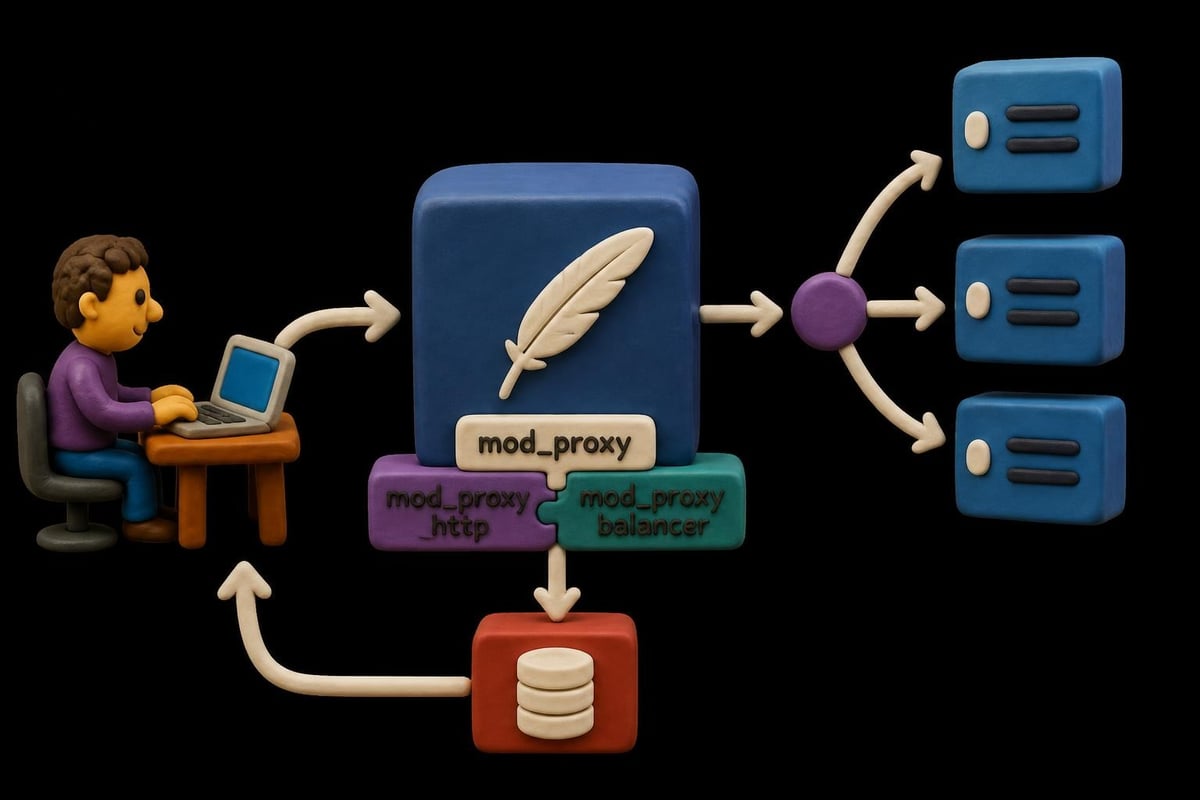
The apache httpd proxy functionality operates through a collection of modules that extend the server's core capabilities. At the heart of this system lies mod_proxy, which provides the fundamental proxy infrastructure. This module works in conjunction with protocol-specific modules like mod_proxy_http for HTTP/HTTPS requests, mod_proxy_ajp for Apache JServ Protocol, and mod_proxy_balancer for load distribution.
When configured as a proxy, Apache httpd sits between clients and backend servers, intercepting requests and forwarding them based on your configuration rules. This positioning enables several powerful capabilities:
- Request routing based on URLs, headers, or other criteria
- Load balancing across multiple backend servers
- SSL termination to offload encryption from application servers
- Content caching to reduce backend load and improve response times
- Security filtering to protect backend infrastructure
The proxy architecture supports both forward and reverse proxy configurations. Forward proxies serve client requests to arbitrary destinations, while reverse proxies appear as the origin server to clients while distributing requests to backend servers. Most modern implementations focus on reverse proxy scenarios for web applications.
Essential Modules for Proxy Functionality
Building a functional apache httpd proxy requires enabling specific modules during compilation or through your package manager. The core modules include mod_proxy as the foundation, alongside protocol-specific handlers. The official Apache documentation on mod_proxy provides detailed information about each directive and configuration option.
| Module | Purpose | Use Case |
|---|---|---|
| mod_proxy | Core proxy infrastructure | Required for all proxy configurations |
| mod_proxy_http | HTTP/HTTPS proxying | Web application proxying |
| mod_proxy_balancer | Load balancing | Distributing traffic across backends |
| mod_proxy_ajp | AJP protocol support | Connecting to Tomcat servers |
| mod_cache | Response caching | Improving performance |
Modern apache httpd proxy deployments often integrate with containerized applications, microservices architectures, and cloud infrastructure. This flexibility makes it valuable for businesses requiring sophisticated routing logic, especially those managing web scraping operations or complex API gateways.
Configuring Basic Reverse Proxy Setup
Setting up a basic reverse proxy with apache httpd proxy involves several configuration steps in your httpd.conf or a dedicated virtual host file. First, ensure the required modules are loaded. In most distributions, you can use the a2enmod command on Debian-based systems or manually uncomment LoadModule directives.
The simplest reverse proxy configuration forwards requests from Apache to a backend server running on a different port or machine:
LoadModule proxy_module modules/mod_proxy.so
LoadModule proxy_http_module modules/mod_proxy_http.so

ProxyPass /app http://backend-server:8080/
ProxyPassReverse /app http://backend-server:8080/
The ProxyPass directive establishes the mapping from the client-facing URL to the backend server. ProxyPassReverse modifies HTTP headers in responses to ensure redirects and other location-based responses work correctly from the client's perspective. This pairing is essential for maintaining proper application functionality.
Advanced Routing Techniques
Beyond basic forwarding, apache httpd proxy supports sophisticated routing based on various request attributes. You can route different URL patterns to different backends, implement host-based routing, or use conditional rules with mod_rewrite.
Pattern-based routing allows you to segment your application:
- Route
/api/*to your API server cluster - Direct
/static/*to a CDN or static file server - Send
/admin/*to secure administrative backends - Forward everything else to your main application server
Header-based routing enables advanced scenarios like A/B testing or gradual rollouts. By examining custom headers, cookies, or user agents, you can direct specific traffic segments to different backend versions. This approach proves valuable for ad verification workflows where request characteristics determine routing behavior.
The ProxyPassMatch directive uses regular expressions for more flexible URL matching:
ProxyPassMatch ^/images/(.*)$ http://image-server:8080/$1
ProxyPassMatch ^/videos/(.*)$ http://video-server:8080/$1
These patterns capture URL segments and reconstruct backend URLs dynamically, providing greater control than simple prefix matching.
Load Balancing with Apache HTTPD Proxy
Load balancing distributes incoming requests across multiple backend servers, improving availability and performance. The mod_proxy_balancer module extends apache httpd proxy with sophisticated distribution algorithms and health checking capabilities.
A basic load balancer configuration defines a balancer cluster:
<Proxy balancer://mycluster>
    BalancerMember http://backend1:8080
    BalancerMember http://backend2:8080
    BalancerMember http://backend3:8080
    ProxySet lbmethod=byrequests
</Proxy>

ProxyPass / balancer://mycluster/
ProxyPassReverse / balancer://mycluster/
The lbmethod parameter determines the distribution algorithm. Available methods include:
- byrequests - Distributes based on request count (default)
- bytraffic - Balances by total traffic volume
- bybusyness - Routes to the least busy backend
- heartbeat - Uses external health monitoring
Advanced configurations implement sticky sessions for applications requiring session affinity. The stickysession parameter ensures requests from the same client return to the same backend server, critical for stateful applications that don't share session data.
Health Monitoring and Failover
Production apache httpd proxy deployments require robust health checking to detect and route around failed backends. The mod_proxy_hcheck module provides active health monitoring that periodically checks backend availability.

Setting retry parameters prevents traffic from being sent to failed backends:
BalancerMember http://backend1:8080 retry=30
BalancerMember http://backend2:8080 retry=30
The retry value (in seconds) determines how long Apache waits before attempting to use a failed backend again. Combining health checks with appropriate retry intervals ensures your proxy maintains high availability even when individual backends experience issues.
Security Considerations for Proxy Configurations
Securing your apache httpd proxy is critical, as misconfigured proxies can become vectors for attacks or unauthorized access. The Apache Wiki on proxy abuse documents common security pitfalls and mitigation strategies.
Preventing open proxy abuse tops the security priority list. An open proxy allows anyone to use your server to access arbitrary websites, potentially facilitating malicious activity. Always restrict proxy access:
<Proxy *>
    Order Deny,Allow
    Deny from all
    Allow from 192.168.1.0/24
</Proxy>
This configuration denies all proxy requests except those originating from your trusted network range. For internet-facing reverse proxies, ensure you only proxy to specific, intended backend destinations using ProxyPass directives rather than allowing arbitrary forwarding.
SSL/TLS Configuration and Header Security
Modern apache httpd proxy deployments should enforce HTTPS for client connections and optionally for backend communication. SSL termination at the proxy level offloads encryption processing from application servers while maintaining security.
Key security headers should be added or modified:
- X-Forwarded-For - Preserves original client IP addresses
- X-Forwarded-Proto - Indicates the original protocol (HTTP/HTTPS)
- X-Forwarded-Host - Contains the original host header
- Strict-Transport-Security - Enforces HTTPS for clients
The RequestHeader directive manages these headers:
RequestHeader set X-Forwarded-Proto "https"
RequestHeader set X-Forwarded-Port "443"
Backend applications use these headers to construct correct URLs, enforce security policies, and maintain audit trails. For businesses running cybersecurity operations or handling sensitive data, proper header configuration ensures compliance and traceability.
| Security Measure | Configuration | Benefit |
|---|---|---|
| ProxyRequests Off | Disables forward proxy | Prevents abuse |
| IP Restrictions | Allow/Deny directives | Controls access |
| SSL Enforcement | SSLEngine on | Encrypts traffic |
| Header Filtering | RequestHeader unset | Removes sensitive data |
Performance Optimization Strategies
Optimizing apache httpd proxy performance involves tuning multiple parameters related to connections, buffering, and resource allocation. Default configurations often prioritize compatibility over performance, leaving significant optimization opportunities.
Connection pooling reduces backend connection overhead by maintaining persistent connections. The keepalive parameter on BalancerMember directives enables this:
BalancerMember http://backend1:8080 keepalive=On ttl=600
The time-to-live (ttl) parameter controls how long idle connections remain open. Tuning this value balances resource consumption against connection establishment costs.
Buffer sizing affects memory usage and throughput. The ProxyIOBufferSize directive controls the internal buffer size for proxy operations:
ProxyIOBufferSize 65536
Larger buffers improve performance for high-bandwidth transfers but consume more memory. Monitor your specific workload to find optimal values. Organizations handling travel aggregation or e-commerce traffic may benefit from larger buffers due to substantial data volumes.
Caching Configuration
Implementing caching at the proxy layer dramatically reduces backend load and improves response times. The mod_cache module, combined with either mod_cache_disk or mod_cache_socache, provides flexible caching options.
Basic cache configuration:
CacheEnable disk /
CacheRoot /var/cache/apache2/proxy
CacheDefaultExpire 3600
CacheMaxExpire 86400
This setup caches responses to disk with default expiration policies. Fine-tune caching based on content type and URL patterns using CacheEnable and CacheDisable directives for specific paths.
Cache invalidation strategies ensure clients receive fresh content when needed:
- Set appropriate Cache-Control headers from backends
- Use CacheIgnoreHeaders to control what prevents caching
- Implement custom invalidation mechanisms for dynamic content
For use cases like SERP monitoring, careful cache tuning balances freshness requirements against performance gains.
Integrating with Application Servers
The apache httpd proxy excels at fronting various application server types, from traditional Java servers to modern Node.js and Python applications. Each integration scenario benefits from specific configuration approaches.
Connecting to Tomcat Servers
Apache Tomcat integration represents one of the most common apache httpd proxy use cases. The Apache Wiki guide on Tomcat reverse proxy provides comprehensive setup instructions.
Using the AJP protocol offers better performance than HTTP for Tomcat:
LoadModule proxy_ajp_module modules/mod_proxy_ajp.so

ProxyPass /myapp ajp://localhost:8009/myapp
ProxyPassReverse /myapp ajp://localhost:8009/myapp
AJP reduces overhead compared to HTTP proxying by using a binary protocol optimized for communication between web servers and application containers. This efficiency matters for high-traffic applications requiring maximum throughput.
Session affinity becomes critical when running multiple Tomcat instances. Configure sticky sessions using the route parameter and jvmRoute in Tomcat's server.xml:
<Proxy balancer://tomcatcluster>
    BalancerMember ajp://tomcat1:8009 route=node1
    BalancerMember ajp://tomcat2:8009 route=node2
    ProxySet stickysession=JSESSIONID
</Proxy>
This configuration ensures sessions remain bound to the same backend server, preventing session loss and maintaining application state.
Modern Application Frameworks
Contemporary applications built with Node.js, Python Flask/Django, or Ruby on Rails typically communicate via HTTP. The apache httpd proxy provides a stable, feature-rich front end for these applications:
<VirtualHost *:80>
    ServerName api.example.com

    ProxyPass / http://localhost:3000/
    ProxyPassReverse / http://localhost:3000/

    ProxyPreserveHost On
</VirtualHost>
The ProxyPreserveHost directive passes the original Host header to the backend, ensuring the application generates correct URLs and behaves properly behind the proxy.

WebSocket and Modern Protocol Support
Modern web applications increasingly rely on WebSocket connections for real-time features. Configuring apache httpd proxy to support WebSocket requires specific module loading and upgrade handling.
Enable WebSocket proxying:
LoadModule proxy_wstunnel_module modules/mod_proxy_wstunnel.so

ProxyPass /ws ws://backend:8080/ws
ProxyPassReverse /ws ws://backend:8080/ws
The ws:// and wss:// URL schemes indicate WebSocket connections. Apache automatically handles the HTTP to WebSocket upgrade process when mod_proxy_wstunnel is loaded.
For applications using both HTTP and WebSocket traffic, combine configurations:
ProxyPass /ws ws://backend:8080/ws
ProxyPass / http://backend:8080/
Order matters here. More specific paths must appear before general catch-all rules to ensure correct routing.
HTTP/2 support in apache httpd proxy requires Apache 2.4.17 or later with mod_http2 and mod_proxy_http2:
LoadModule http2_module modules/mod_http2.so
LoadModule proxy_http2_module modules/mod_proxy_http2.so

Protocols h2 h2c http/1.1
ProxyPass / h2://backend:8080/
This configuration enables HTTP/2 between clients and the proxy, and optionally between the proxy and backends, reducing latency through multiplexing and header compression.
Monitoring and Troubleshooting
Effective monitoring of your apache httpd proxy ensures early problem detection and optimal performance. Apache provides several built-in tools and log mechanisms for visibility into proxy operations.
Server status module offers real-time metrics:
LoadModule status_module modules/mod_status.so

<Location /server-status>
    SetHandler server-status
    Require ip 192.168.1.0/24
</Location>
Accessing /server-status displays current connections, request statistics, and worker status. The extended status (ExtendedStatus On) provides additional detail about individual requests and performance metrics.
Logging configuration captures proxy-specific information:
- CustomLog with %{BALANCER_WORKER_ROUTE}e for tracking backend selection
- LogLevel proxy:trace2 for detailed proxy debugging
- Separate log files for proxy errors versus general server errors
Common troubleshooting scenarios:
- 502 Bad Gateway - Backend server unavailable or refusing connections
- 504 Gateway Timeout - Backend response exceeds ProxyTimeout setting
- Connection pooling issues - Adjust maxConnections or keepalive settings
- Performance degradation - Review buffer sizes and timeout configurations
For businesses managing brand protection or threat intelligence operations, reliable proxy performance directly impacts monitoring capabilities and response times.
Advanced Configuration Patterns
Sophisticated apache httpd proxy deployments leverage advanced patterns for complex routing, authentication, and content manipulation.
Path rewriting modifies URLs before proxying:
RewriteEngine On
RewriteRule ^/old-api/(.*)$ /new-api/$1 [P]
ProxyPassReverse / http://backend:8080/
The [P] flag in RewriteRule triggers proxying, enabling complex URL transformations before backend forwarding.
Authentication at the proxy layer protects backend services:
<Location /api>
    AuthType Basic
    AuthName "Protected API"
    AuthUserFile /etc/apache2/.htpasswd
    Require valid-user

    ProxyPass http://backend:8080/api
    ProxyPassReverse http://backend:8080/api
</Location>
This pattern centralizes authentication, preventing unauthenticated requests from reaching backend servers. Combined with IP restrictions, it creates defense in depth.
Content transformation using mod_substitute modifies response content:
<Location /api>
    AddOutputFilterByType SUBSTITUTE application/json
    Substitute "s|http://internal.example.com|https://api.example.com|i"

    ProxyPass http://backend:8080/api
    ProxyPassReverse http://backend:8080/api
</Location>
This substitution rewrites internal URLs in API responses to public-facing URLs, useful when backends don't have awareness of their external addresses.
Best Practices and Recommendations
Implementing apache httpd proxy successfully requires following established best practices that ensure security, performance, and maintainability.
Security hardening checklist:
- Disable forward proxy (ProxyRequests Off)
- Implement IP-based access control
- Use SSL/TLS for client connections
- Filter sensitive headers
- Regular security updates and patches
- Monitor for unusual traffic patterns
Performance tuning guidelines:
- Enable connection pooling for backend connections
- Implement caching where appropriate
- Set reasonable timeout values
- Monitor and adjust buffer sizes
- Use compression for text-based content
- Consider HTTP/2 for reduced latency
Operational excellence:
- Maintain separate virtual hosts for different services
- Use include files for modular configuration
- Implement comprehensive logging and monitoring
- Document your routing rules and load balancing logic
- Test failover scenarios regularly
- Keep configurations in version control
Organizations leveraging rotating proxies for their operations can combine apache httpd proxy for internal routing with external proxy services for outbound requests, creating layered architectures that optimize for both performance and flexibility.
The comprehensive guide on reverse proxy setup from Apache provides additional configuration examples and best practices for various deployment scenarios. For teams managing complex proxy requirements, understanding both internal apache httpd proxy configuration and integration with external proxy pools through services with IPv4 and IPv6 support creates robust, scalable infrastructure.
Mastering apache httpd proxy configuration empowers organizations to build sophisticated, secure, and high-performance web infrastructure that scales with business needs. Whether you're routing traffic to application servers, implementing load balancing, or securing backend services, Apache's flexible proxy capabilities provide the foundation for enterprise-grade deployments. For organizations requiring additional proxy capabilities beyond their internal infrastructure, PinguProxy delivers high-speed datacenter, residential, and mobile proxies with unlimited access, 10Gbps bandwidth, and complete IPv4/IPv6 support to complement your Apache proxy setup with external routing capabilities.