
Docker Reverse Proxy: Setup Guide & Best Practices
Modern containerized applications require efficient traffic management solutions that can handle multiple services, SSL termination, and load balancing. A docker reverse proxy serves as an intermediary between clients and backend containers, routing requests based on domain names, paths, or other criteria. This architecture enables developers and system administrators to run multiple applications on a single server while maintaining clean separation and enhanced security. Whether you're managing web scraping infrastructure, API endpoints, or customer-facing applications, implementing a docker reverse proxy provides scalability and flexibility that traditional configurations cannot match.
Understanding Docker Reverse Proxy Architecture
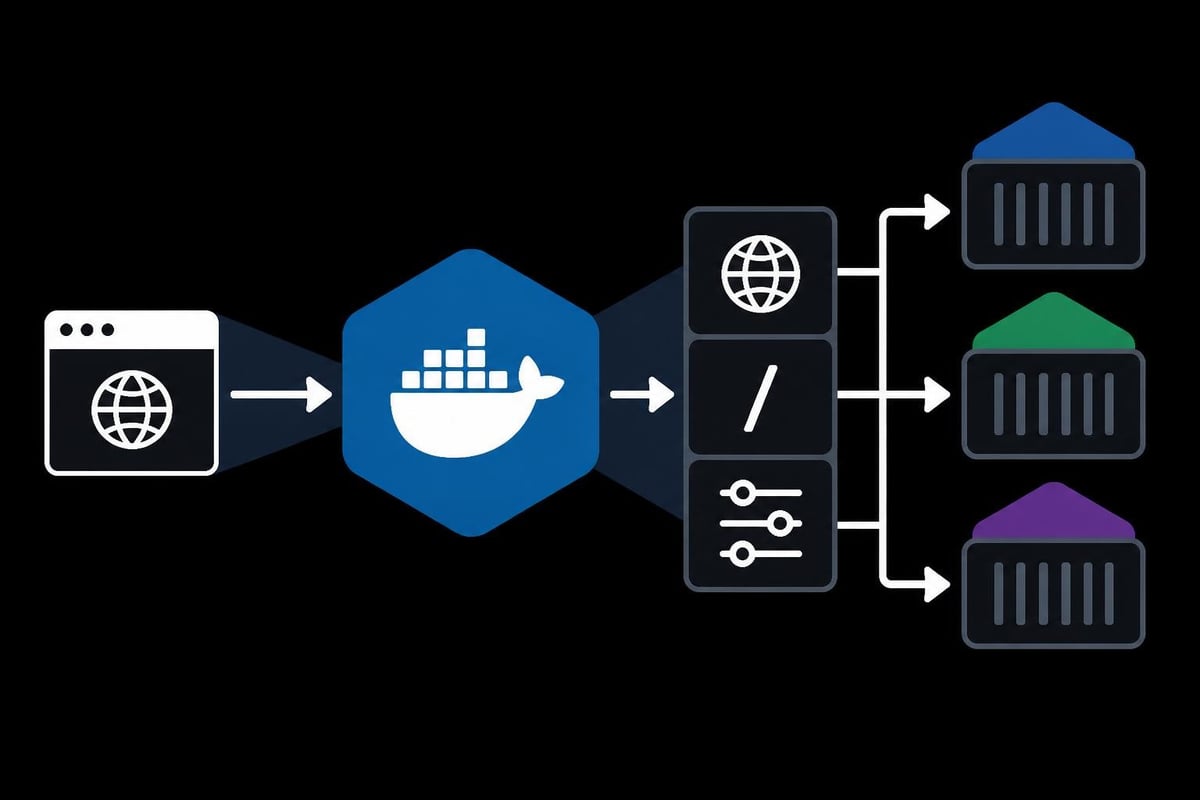
A docker reverse proxy functions as a gateway that accepts incoming client requests and forwards them to appropriate backend containers based on predefined rules. This setup differs fundamentally from forward proxies, which handle outbound traffic from clients to external servers.
The architecture creates a single entry point for all external traffic, simplifying network configuration and security management. When a client sends a request, the reverse proxy examines headers, paths, and domains to determine which container should handle the request. This intelligent routing enables multiple applications to share standard ports like 80 and 443 without conflicts.
Key benefits of this architecture include:
- Centralized SSL certificate management across all services
- Load balancing capabilities for high-traffic applications
- Security layer protecting backend containers from direct exposure
- Simplified DNS configuration with single server IP
- Enhanced logging and monitoring capabilities
Common Use Cases for Docker Reverse Proxies
Organizations deploy docker reverse proxy solutions across various scenarios requiring sophisticated traffic management. Development teams use reverse proxies to run multiple projects simultaneously on local machines, each accessible through unique domain names or paths. Production environments leverage reverse proxies for web scraping operations, routing requests through different proxy services based on target requirements.
E-commerce platforms implement reverse proxies to handle microservices architectures where different containers manage inventory, payments, and user authentication. The reverse proxy routes requests to appropriate services while maintaining session persistence and handling SSL termination. This configuration reduces complexity for individual services that no longer need to manage certificates or routing logic.
Choosing Between NGINX and Traefik
Two primary options dominate the docker reverse proxy landscape: NGINX and Traefik. Each offers distinct advantages depending on infrastructure requirements and operational preferences.
| Feature | NGINX | Traefik |
|---|---|---|
| Configuration | Manual file editing | Automatic service discovery |
| Learning Curve | Steeper initial setup | Beginner-friendly |
| Performance | Excellent for static content | Optimized for containers |
| SSL Management | Manual certificate handling | Automatic Let's Encrypt integration |
| Docker Integration | Requires explicit configuration | Native Docker label support |
NGINX provides unmatched performance and flexibility for organizations with complex routing requirements. The official NGINX Docker image offers extensive configuration options for custom caching policies, rate limiting, and security headers. However, adding new services requires manual configuration updates and container restarts.
Traefik automatically discovers new containers and updates routing configurations without manual intervention. This dynamic approach suits development environments and growing infrastructures where services frequently change. Traefik reads Docker labels to determine routing rules, making it ideal for teams preferring infrastructure-as-code approaches.
Performance Considerations
Performance requirements heavily influence reverse proxy selection. NGINX excels at serving static content and handling thousands of concurrent connections with minimal resource consumption. Its event-driven architecture processes requests efficiently, making it suitable for high-traffic e-commerce applications and content delivery networks.
Traefik's strength lies in dynamic environments where containers scale up and down frequently. While slightly more resource-intensive than NGINX, Traefik eliminates operational overhead through automatic configuration management. The performance difference becomes negligible in most scenarios, with routing decisions completing in microseconds regardless of choice.
Setting Up NGINX as a Docker Reverse Proxy
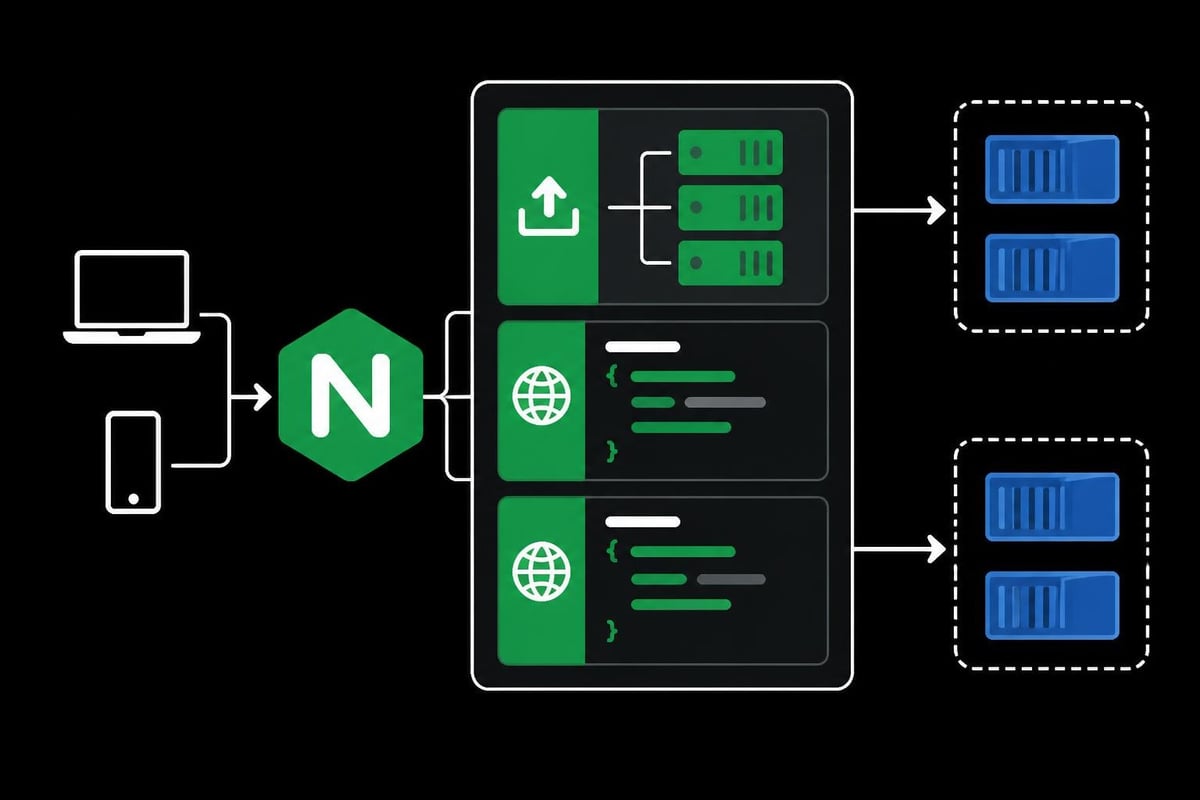
Implementing an NGINX reverse proxy requires creating a custom configuration file and Docker Compose setup. This approach provides complete control over routing behavior and security settings.
Start by creating a project directory structure:
- Create a main project folder containing all configuration files
- Generate an
nginx.conffile defining reverse proxy rules - Set up a
docker-compose.ymlorchestrating the proxy and backend services - Configure SSL certificates for HTTPS support
- Test routing rules before deploying to production
The NGINX configuration file defines upstream servers and server blocks that handle incoming requests. Each upstream block represents a backend container, while server blocks contain routing logic based on domain names or paths. This separation enables clean configuration management as infrastructure grows.
Essential NGINX directives for reverse proxying:
proxy_passspecifies the backend container addressproxy_set_headerforwards client information to backend servicesproxy_bufferingcontrols response buffering behaviorproxy_cacheenables response caching for improved performance
Docker Compose Configuration
The Docker Compose file ties together the NGINX container and backend services into a cohesive network. NGINX must access backend containers through Docker's internal networking, requiring all services to share a common network.
version: '3.8'

networks:
  proxy_network:
    driver: bridge

services:
  nginx:
    image: nginx:latest
    ports:
      - "80:80"
      - "443:443"
    volumes:
      - ./nginx.conf:/etc/nginx/nginx.conf:ro
      - ./ssl:/etc/nginx/ssl:ro
    networks:
      - proxy_network
    restart: unless-stopped
Backend services join the same network, making them accessible to NGINX through their service names. For example, a service named webapp becomes reachable at http://webapp:8080 within the Docker network. This internal DNS resolution simplifies configuration and maintains clean separation from external networking.
The phoenixNAP guide on Docker NGINX reverse proxy provides comprehensive examples of production-ready configurations including health checks and logging setups.
Implementing Traefik for Dynamic Routing
Traefik offers a docker reverse proxy solution that automatically configures itself based on container labels. This approach eliminates manual configuration files while maintaining powerful routing capabilities.
The official Docker guide on Traefik demonstrates basic setup procedures that work across development and production environments. Traefik monitors the Docker socket for container lifecycle events, updating routing tables when services start or stop.
Label-Based Configuration
Docker labels serve as Traefik's configuration mechanism, allowing each container to declare its routing requirements. This declarative approach keeps routing logic close to service definitions, improving maintainability and reducing configuration drift.
Example labels for a web application:
traefik.enable=trueactivates Traefik routing for the containertraefik.http.routers.webapp.rule=Host(example.com)defines routing rulestraefik.http.services.webapp.loadbalancer.server.port=8080specifies backend porttraefik.http.routers.webapp.tls.certresolver=letsencryptenables automatic SSL
These labels transform each service into a self-documenting component that clearly communicates its network requirements. Teams can understand routing logic by examining service definitions rather than searching through separate configuration files.
The DigitalOcean tutorial collection on Traefik covers advanced scenarios including middleware configuration for authentication and rate limiting.
Automatic SSL Certificate Management
Traefik integrates with Let's Encrypt to provide automatic SSL certificate provisioning and renewal. This feature eliminates manual certificate management, a common source of errors and security vulnerabilities in traditional setups.
The ACME (Automatic Certificate Management Environment) resolver handles certificate requests through DNS or HTTP challenges. Traefik stores certificates persistently, ensuring renewals happen automatically before expiration. This automation particularly benefits organizations managing multiple domains or frequently adding new services.
| SSL Management Task | Manual NGINX | Traefik Automation |
|---|---|---|
| Initial certificate request | 15-30 minutes | Automatic on startup |
| Certificate renewal | Manual scheduling required | Automatic 30 days before expiry |
| Multi-domain certificates | Complex configuration | Label-based definition |
| Certificate storage | Manual backup setup | Built-in persistence |
Advanced Routing and Load Balancing
Beyond basic routing, docker reverse proxy implementations support sophisticated traffic management strategies essential for production environments. Path-based routing directs requests to different services based on URL structure, enabling microservices architectures where /api, /admin, and /public routes map to separate containers.
Header-based routing examines custom HTTP headers to determine destination services. This capability supports A/B testing scenarios where experimental features route to specialized containers while production traffic continues to stable services. Organizations conducting localization testing use header routing to serve region-specific content from geographically distributed containers.
Load Balancing Strategies
Distributing traffic across multiple container instances requires load balancing algorithms that match application characteristics. Round-robin distribution works well for stateless services where any instance can handle any request. Session-based routing (sticky sessions) maintains client affinity to specific containers, essential for applications managing in-memory state.
Common load balancing algorithms:
- Round Robin - Sequential distribution across all healthy backends
- Least Connections - Routes to container with fewest active connections
- IP Hash - Consistent container assignment based on client IP
- Weighted Distribution - Assigns more traffic to higher-capacity containers
The KX guide on Traefik for Docker services demonstrates production configurations including health checks and graceful shutdowns that prevent routing to failing containers.
Health checks ensure reverse proxies only route to functioning backend services. Both NGINX and Traefik support active and passive health monitoring. Active checks periodically request specific endpoints to verify service availability. Passive monitoring observes response codes and timeouts, marking backends unhealthy after consecutive failures.
Security Hardening and Best Practices
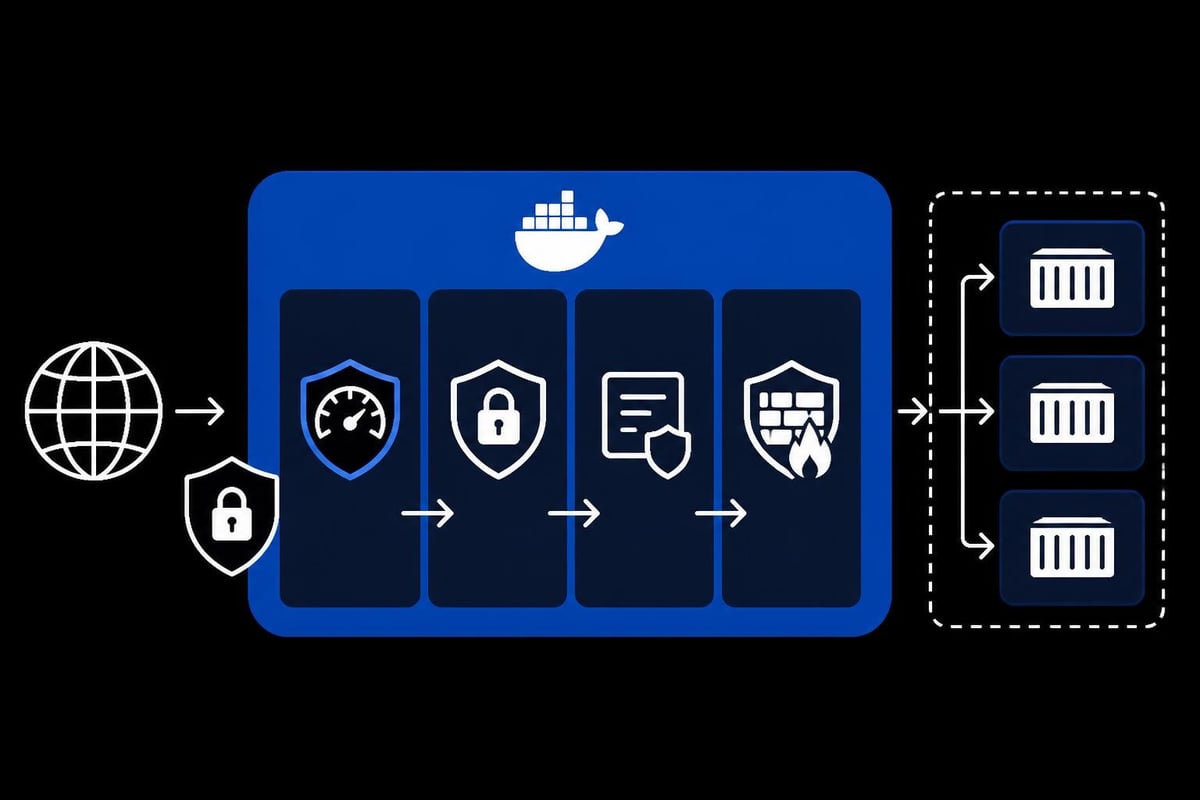
A docker reverse proxy serves as the first line of defense against malicious traffic, requiring careful security configuration. Limiting exposed ports reduces attack surface by ensuring only the reverse proxy container accepts external connections. Backend containers operate on internal networks without direct internet exposure.
Rate limiting prevents abuse by restricting request frequency from individual IP addresses. This protection proves essential for web scraping infrastructure and public APIs vulnerable to aggressive clients. Configure rate limits based on application capacity and expected usage patterns, with stricter limits for unauthenticated requests.
Security Headers and WAF Integration
Modern web applications require security headers that prevent common vulnerabilities. The reverse proxy adds these headers before forwarding responses to clients:
X-Frame-Optionsprevents clickjacking attacksX-Content-Type-Optionsstops MIME type sniffingStrict-Transport-Securityenforces HTTPS connectionsContent-Security-Policyrestricts resource loading sources
Web Application Firewall (WAF) integration provides additional protection against SQL injection, cross-site scripting, and other OWASP Top 10 vulnerabilities. ModSecurity runs as an NGINX module, examining request payloads against predefined rulesets. Traefik supports middleware chains that process requests through security layers before reaching backend services.
The Sonatype guide on Docker repository strategies discusses security considerations for private registries and artifact repositories, applicable to general reverse proxy deployments.
Monitoring and Logging Configuration
Effective monitoring requires visibility into reverse proxy operations and backend service health. Structured logging captures request metadata including timestamps, client IPs, response codes, and processing times. This data enables troubleshooting, performance analysis, and security auditing.
NGINX logs support custom formats that include proxy-specific information like upstream response times and cache hit status. Forward these logs to centralized systems like ELK Stack or Grafana Loki for aggregation and analysis. Traefik provides built-in metrics in Prometheus format, integrating seamlessly with modern observability platforms.
Performance Metrics and Alerting
Track key performance indicators to identify bottlenecks and capacity issues before they impact users:
- Request rate - Requests per second handled by the proxy
- Response time - P50, P95, and P99 latency percentiles
- Error rate - Percentage of requests returning 4xx or 5xx codes
- Backend health - Number of healthy versus unhealthy upstream containers
- SSL handshake time - Certificate verification performance
Configure alerts for threshold violations, such as error rates exceeding 1% or response times surpassing acceptable limits. Proactive monitoring prevents cascading failures and enables rapid incident response. Similar principles apply to rotating proxy services where connection success rates indicate upstream health.
Troubleshooting Common Issues
Docker reverse proxy deployments encounter predictable issues that respond to systematic troubleshooting approaches. Connection refused errors typically indicate backend containers haven't started or aren't reachable on specified ports. Verify service health through docker ps and check network connectivity using docker exec to run network tests from the proxy container.
Diagnostic commands for docker reverse proxy problems:
- Check container logs with
docker logs <container_name> - Verify network connectivity using
docker network inspect - Test DNS resolution within containers via
docker exec - Monitor real-time traffic with request logging enabled
- Validate configuration syntax before applying changes
502 Bad Gateway responses occur when backend services return errors or close connections unexpectedly. Enable debug logging to capture detailed information about upstream interactions. Increase timeout values if backends legitimately require extended processing time for complex operations.
The CTO2B tutorial on NGINX reverse proxy includes comprehensive troubleshooting sections covering certificate errors and routing misconfigurations.
SSL Certificate Issues
Certificate validation failures prevent secure connections between clients and the reverse proxy. Verify certificate chains include all intermediate certificates, not just the domain certificate. Use online SSL testing tools to identify missing intermediates or certificate mismatches.
Traefik's automatic certificate generation fails if DNS records don't point to the server or firewall rules block ACME challenge traffic. Check Let's Encrypt rate limits if certificate requests repeatedly fail. Production deployments should use staging certificates during testing to avoid hitting production rate limits.
Scaling and High Availability
Production docker reverse proxy deployments require redundancy to eliminate single points of failure. Deploy multiple reverse proxy instances behind DNS-based load balancing or hardware load balancers. This configuration maintains service availability even when individual proxy containers restart or fail.
Shared state management becomes critical in multi-instance deployments. Traefik supports distributed certificate storage through external key-value stores like Consul or etcd. NGINX configurations synchronize through configuration management tools or shared volumes, ensuring consistent behavior across instances.
Container orchestration platforms like Kubernetes provide native load balancing and service discovery that complement reverse proxy functionality. The reverse proxy handles SSL termination and external routing while Kubernetes manages internal service mesh communication. This layered approach separates concerns and improves overall system resilience, similar to how proxy pool architectures distribute traffic across multiple upstream providers.
Implementing a docker reverse proxy streamlines container networking while providing enterprise-grade traffic management capabilities. Whether you choose NGINX for maximum performance control or Traefik for automatic configuration, the architectural benefits remain consistent across deployment scenarios. Organizations requiring robust proxy infrastructure for web scraping, API management, or microservices architectures will find these solutions essential for production operations. PinguProxy complements your docker reverse proxy setup with high-speed datacenter and mobile proxies that integrate seamlessly into containerized environments, offering 10Gbps bandwidth and 1ms rotation for applications demanding both performance and anonymity.