
SSH SOCKS5 Proxy: Complete Guide for Secure Browsing
Secure tunneling has become essential for protecting sensitive data and maintaining privacy in today's digital landscape. An ssh socks5 proxy combines the robust security of SSH (Secure Shell) with the versatile routing capabilities of SOCKS5 protocol, creating a powerful solution for anonymizing network traffic and bypassing restrictions. This technique establishes an encrypted tunnel through which your applications can route their internet connections, providing both privacy and access to geo-restricted content. Whether you're a developer testing applications, a security professional conducting research, or a business protecting sensitive communications, understanding how to leverage SSH SOCKS5 proxies can significantly enhance your operational security.
Understanding SSH SOCKS5 Proxy Architecture
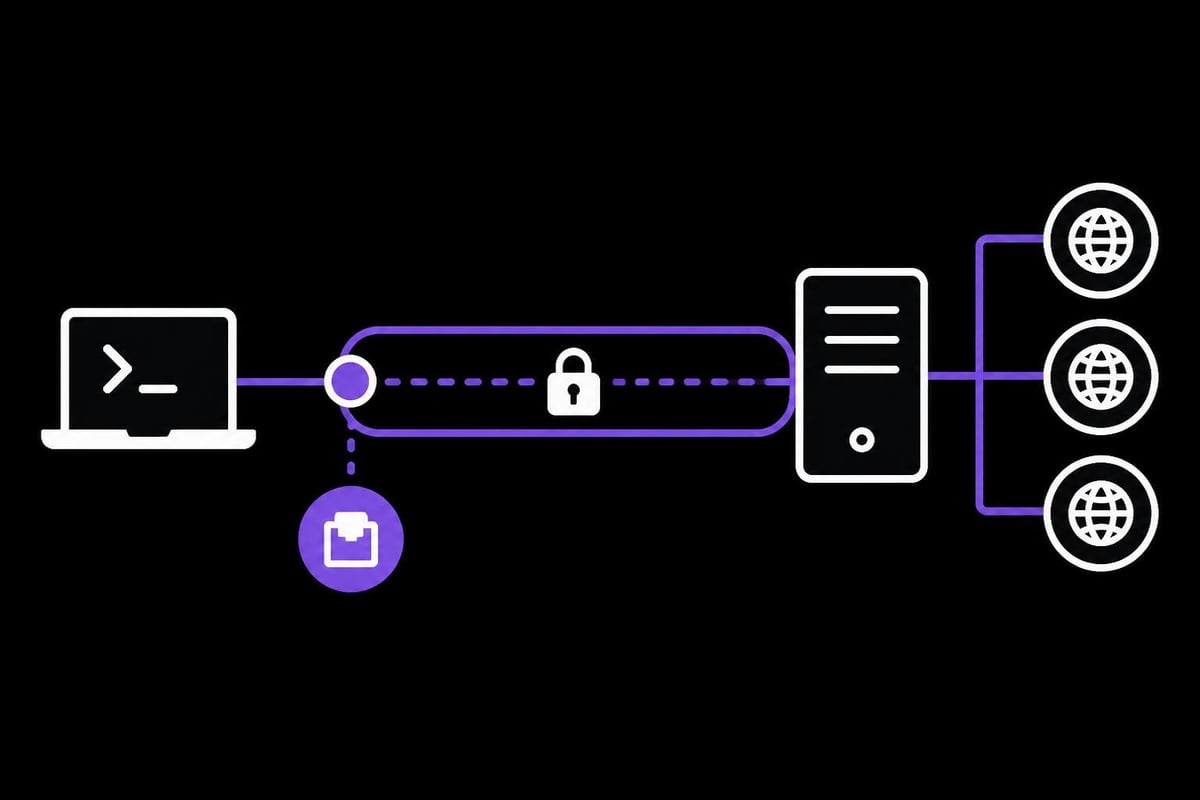
The ssh socks5 proxy works by creating a secure tunnel between your local machine and a remote SSH server. Unlike traditional HTTP proxies that only handle web traffic, SOCKS5 operates at a lower network level, making it protocol-agnostic and capable of handling any type of traffic including email, file transfers, and peer-to-peer connections.
When you establish an ssh socks5 proxy connection, SSH creates a local listening port on your machine. Applications configured to use this proxy send their traffic to this local port, where SSH encrypts the data and forwards it through the secure tunnel to the remote server. The remote server then makes the actual connection to the destination on your behalf, effectively masking your real IP address and location.
Key Components and How They Work Together
The architecture involves several critical components working in harmony:
- SSH Client: Initiates the connection and manages the local SOCKS5 proxy server
- SSH Server: Receives encrypted traffic and forwards it to destination servers
- SOCKS5 Protocol: Provides the framework for routing various types of network traffic
- Local Listening Port: Acts as the gateway where applications connect to access the proxy
- Encryption Layer: Protects data in transit between client and server
This combination provides significant advantages over using public proxy services, particularly regarding security and reliability.
Setting Up Your SSH SOCKS5 Proxy
Establishing an ssh socks5 proxy requires access to a remote server with SSH enabled. Most cloud providers and VPS services include SSH access by default, making setup straightforward for those with basic command-line knowledge.
The fundamental command structure is simple yet powerful. On Linux and macOS systems, you can create an ssh socks5 proxy using a single terminal command. The basic syntax involves specifying the dynamic port forwarding flag, choosing a local port number, and providing your SSH server credentials.
Platform-Specific Configuration Steps
For macOS and Linux users, the process begins by opening a terminal window. The command follows this pattern:
- Open your terminal application
- Execute the SSH command with the -D flag for dynamic port forwarding
- Specify your chosen local port (commonly 1080, 8080, or 9090)
- Provide your SSH server username and hostname
- Enter your password or use key-based authentication when prompted
Windows users have multiple approaches available. The native Windows 10 and 11 OpenSSH client works identically to Linux, accessible through PowerShell or Command Prompt. Alternatively, PuTTY provides a graphical interface for those preferring visual configuration. This comprehensive guide covers setup across all major operating systems in detail.
Command Parameters and Options
| Parameter | Purpose | Example Value |
|---|---|---|
| -D | Dynamic port forwarding | 1080 |
| -N | No remote command execution | N/A |
| -C | Enable compression | N/A |
| -q | Quiet mode (suppress warnings) | N/A |
| -f | Background process | N/A |
The -N flag is particularly useful for dedicated proxy connections because it prevents executing commands on the remote server, reducing overhead and potential security risks. Adding -C enables compression, which can improve performance on slower connections, especially beneficial for web scraping operations that transfer large amounts of data.
Configuring Applications to Use Your Proxy
After establishing the ssh socks5 proxy tunnel, you need to configure applications to route traffic through it. Most modern software includes native SOCKS proxy support, though the configuration location varies by application.
Web browsers provide the most straightforward configuration options. Firefox includes built-in proxy settings accessible through preferences, while Chrome and Edge rely on system-wide proxy settings on most platforms. When configuring browser proxy settings, you'll specify "localhost" or "127.0.0.1" as the SOCKS host and your chosen port number (typically 1080).
Browser Configuration Examples
Firefox offers granular control:
- Navigate to Settings > General > Network Settings
- Select "Manual proxy configuration"
- Enter 127.0.0.1 in the SOCKS Host field
- Enter your port number (1080) in the Port field
- Select "SOCKS v5" as the protocol
- Check "Proxy DNS when using SOCKS v5"
Chrome/Edge on different platforms:
- Windows and macOS: Use system proxy settings
- Linux: Launch with command-line flags specifying the proxy
- All platforms: Use extensions like SwitchyOmega for easier management
Command-Line Tools and Terminal Applications
Command-line tools often support environment variables or specific flags for proxy configuration. The proxychains tool on Linux systems can force almost any application to use your ssh socks5 proxy without requiring application-specific configuration. This proves invaluable for tools lacking native proxy support.
For development work, tools like curl and wget accept SOCKS proxy parameters directly in their commands, enabling quick testing without persistent configuration changes. Understanding how to set up SOCKS5 proxy servers helps when working with various development tools.
Security Considerations and Best Practices
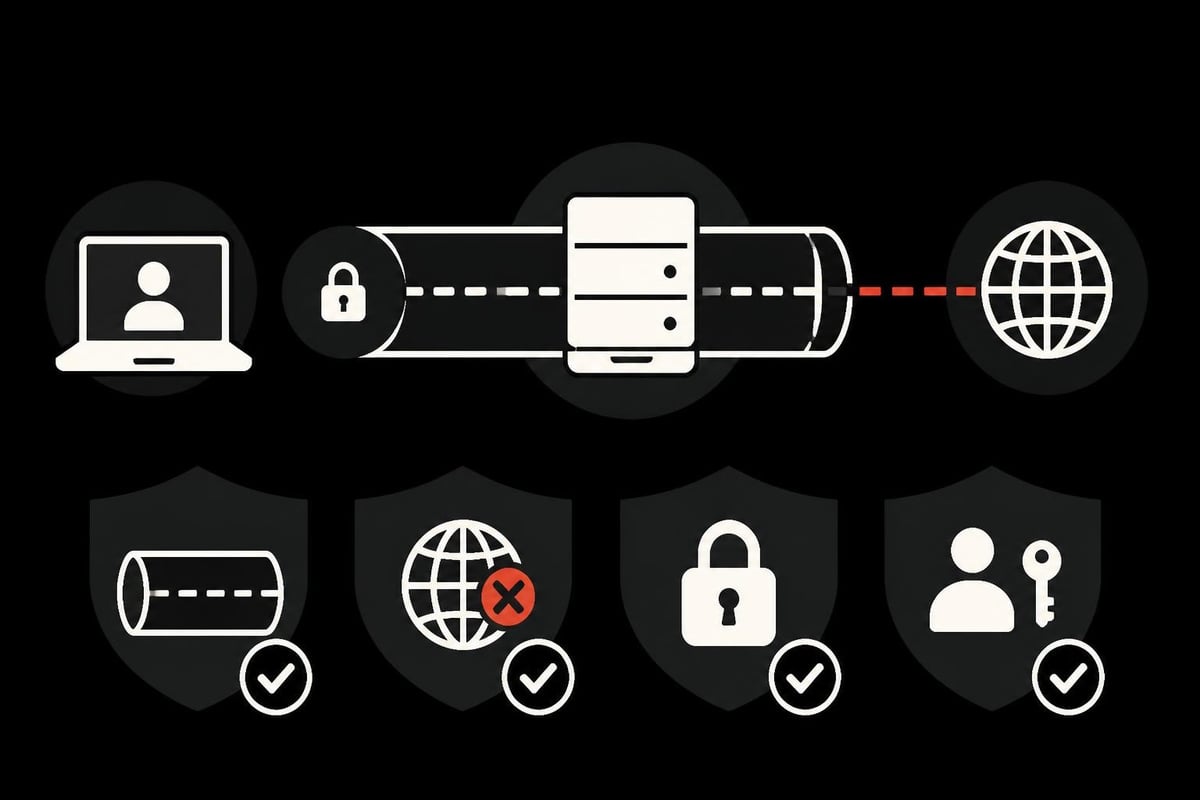
While an ssh socks5 proxy provides significant security benefits, understanding its limitations ensures you don't develop a false sense of invulnerability. The encryption only protects traffic between your machine and the SSH server. Once traffic exits the remote server to its final destination, it travels without SSH encryption unless the application uses its own encryption layer (like HTTPS).
DNS leaks represent one of the most common security pitfalls. When applications resolve domain names using your local DNS servers rather than through the proxy tunnel, your ISP can see which websites you're accessing even if the actual traffic goes through the proxy. Configuring applications to perform DNS resolution through the proxy prevents this information leakage.
Authentication and Access Control
Key-based authentication significantly enhances security compared to password authentication:
- Generate strong SSH key pairs using modern algorithms (Ed25519 or RSA 4096-bit)
- Disable password authentication on the SSH server
- Protect private keys with passphrases
- Use ssh-agent to manage keys securely
- Rotate keys periodically following security best practices
The security considerations for SOCKS5 proxies extend beyond basic setup, encompassing ongoing maintenance and monitoring.
Monitoring and Logging
Implementing appropriate monitoring helps detect unusual activity:
- Enable SSH server logging to track connection attempts
- Monitor bandwidth usage for anomalies
- Review connection logs regularly for unauthorized access
- Implement fail2ban or similar tools to prevent brute-force attacks
- Set up alerts for suspicious connection patterns
For businesses handling sensitive data, combining ssh socks5 proxy tunnels with professional proxy services like those offered for cybersecurity applications provides layered protection.
Advanced Techniques and Use Cases
Beyond basic browsing privacy, ssh socks5 proxy configurations enable sophisticated networking scenarios. Port forwarding variations allow selective routing, where only specific applications or traffic types use the proxy while others connect directly.
Multiple Tunnel Management
Managing multiple simultaneous tunnels to different servers enables complex routing scenarios:
- Create separate tunnels on different local ports
- Configure applications to use specific ports based on requirements
- Route traffic through different geographic locations as needed
- Implement failover by maintaining backup connections
- Balance load across multiple servers for high-volume operations
This approach proves particularly valuable for e-commerce businesses monitoring competitor prices across different regions or developers testing applications from various geographic perspectives.
Integration with Automation Scripts
Programmatically managing ssh socks5 proxy connections enables automation workflows. Shell scripts can establish connections before running automated tasks, then tear them down afterward. Python libraries like sshtunnel provide elegant ways to manage SSH tunnels programmatically, ideal for scheduled data collection tasks or automated testing pipelines.
For operations requiring persistent, high-performance connections, dedicated proxy services often prove more reliable than self-managed SSH tunnels. Services specializing in rotating proxy capabilities handle connection management automatically, freeing you from infrastructure concerns.
Performance Optimization Strategies
An ssh socks5 proxy connection's performance depends on multiple factors including network latency, server resources, and encryption overhead. Understanding these factors helps optimize configurations for specific use cases.
Latency and Throughput Considerations
| Factor | Impact | Optimization Strategy |
|---|---|---|
| Geographic distance | Increases latency | Choose servers closer to target destinations |
| Encryption overhead | Reduces throughput | Use compression (-C flag) when appropriate |
| Server resources | Affects concurrent connections | Allocate adequate CPU and bandwidth |
| Network congestion | Variable performance | Implement multiple tunnels for redundancy |
| SSH configuration | Overall performance | Tune KeepAlive and timeout settings |
Compression can significantly improve performance when transferring text-heavy data but may reduce throughput for already-compressed content like images or videos. Testing with and without the -C flag helps identify the optimal configuration for your specific use case.
Connection Persistence and Recovery
Maintaining stable connections requires addressing network interruptions gracefully. The autossh utility automatically restarts SSH connections when they drop, ensuring your ssh socks5 proxy remains available even through temporary network issues. Configure keepalive packets to detect dead connections promptly and trigger reconnection attempts.
For production environments requiring guaranteed uptime, professional services offering unlimited access and robust infrastructure eliminate many reliability concerns associated with self-managed solutions.
Troubleshooting Common Issues
Even properly configured ssh socks5 proxy setups occasionally encounter problems. Systematic troubleshooting quickly identifies and resolves most issues.
Connection and Authentication Problems
When connections fail to establish:
- Verify SSH server accessibility using standard SSH connection attempts
- Confirm firewall rules allow traffic on the specified port
- Check SSH server configuration permits port forwarding
- Validate credentials and key permissions
- Review SSH server logs for specific error messages
Authentication failures often result from incorrect file permissions on private keys. SSH requires private keys to have restricted permissions (600 or 400) and rejects keys readable by other users. The verbose mode (-v, -vv, or -vvv flags) provides detailed connection information useful for diagnosing authentication and connection issues.
Application Configuration Issues
When applications fail to route traffic through the proxy:
- Confirm the ssh socks5 proxy tunnel is active and listening
- Verify application proxy settings specify correct host and port
- Test connectivity using curl or wget with explicit SOCKS proxy parameters
- Check for conflicting proxy environment variables
- Ensure firewall rules permit local proxy connections
Tools like netstat or lsof help verify the proxy is listening on the expected port. Establishing a proxy using SSH tunnel requires attention to both server and client configuration details.
Comparing SSH SOCKS5 to Commercial Proxy Services
While ssh socks5 proxy setups offer excellent security and control, they differ significantly from commercial proxy services in capabilities and use cases. Understanding these differences helps choose the appropriate solution for specific requirements.
Self-managed SSH proxies excel when:
- You already maintain servers in desired locations
- Complete control over infrastructure is paramount
- Traffic volumes remain modest
- Technical expertise is available for maintenance
- Budget constraints limit commercial options
Commercial proxy services like PinguProxy provide advantages including:
- Geographic diversity with global server locations
- High-speed infrastructure with 10Gbps bandwidth
- Automatic IP rotation for enhanced anonymity
- Zero configuration required for immediate use
- Professional support and guaranteed uptime
- Specialized features for web scraping and data collection
For occasional personal use or learning purposes, an ssh socks5 proxy using existing infrastructure makes perfect sense. For business-critical applications requiring reliability, geographic diversity, or high-volume capacity, professional services prove more cost-effective when accounting for setup time, maintenance effort, and infrastructure costs.
Cost-Benefit Analysis
| Aspect | SSH SOCKS5 Proxy | Commercial Proxy Service |
|---|---|---|
| Initial setup | Technical knowledge required | Immediate activation |
| Monthly cost | Server hosting fees | Subscription fee |
| Maintenance | Self-managed | Provider-managed |
| IP diversity | Limited to your servers | Extensive IP pools |
| Bandwidth | Server-dependent | High-speed guaranteed |
| Support | Self-service | Professional 24/7 support |
Organizations requiring proxies for ad verification or brand protection particularly benefit from commercial services offering diverse IP addresses and geographic coverage impossible to replicate economically with self-managed infrastructure.
Legal and Compliance Considerations
Using an ssh socks5 proxy carries legal implications that vary by jurisdiction and use case. Understanding these considerations helps ensure compliant operations.
Legitimate uses include:
- Protecting sensitive business communications
- Testing applications from different geographic perspectives
- Conducting authorized security research
- Accessing content while traveling internationally
- Enhancing privacy for personal browsing
Prohibited or restricted activities often include:
- Circumventing geographic restrictions on copyrighted content
- Evading network policies on corporate or educational networks
- Concealing malicious activities or unauthorized access attempts
- Violating terms of service for online platforms
- Bypassing government censorship in certain jurisdictions
Always review and comply with applicable laws, regulations, and terms of service. When conducting business activities like travel aggregation or competitive intelligence gathering, ensure your methods align with legal requirements and industry standards.
Corporate Policy Compliance
Organizations implementing ssh socks5 proxy solutions should:
- Document approved use cases and acceptable practices
- Implement logging and monitoring for accountability
- Train users on proper configuration and security practices
- Regularly audit proxy usage for policy compliance
- Establish incident response procedures for security events
Professional services typically include compliance documentation and support, simplifying regulatory requirements for businesses in regulated industries.
SSH SOCKS5 proxy technology provides powerful capabilities for securing connections and maintaining privacy when properly implemented and used responsibly. While self-managed SSH tunnels offer excellent learning opportunities and serve specific use cases effectively, businesses requiring reliable, high-performance proxy infrastructure with global coverage often find greater value in professional services. PinguProxy delivers enterprise-grade proxy solutions with high-speed bandwidth, automatic IP rotation, and comprehensive support, eliminating the complexity of infrastructure management while providing superior performance for web scraping, data collection, and other business-critical applications. Whether you're scaling operations or seeking reliable proxy infrastructure, explore how PinguProxy's zero-log policy and unlimited access model can enhance your workflows.