A residential proxy for Instagram routes your requests through IP addresses assigned to real household connections, which makes automated traffic look like ordinary user traffic and lowers the odds of blocks. To set one up, you choose a proxy type and rotation mode, enter the gateway credentials in your client, verify the exit IP, and then tune request pacing so your pipeline stays inside Instagram's limits.
This guide is written for data engineers and developers who collect public web data at scale for scraping and AI training. It covers the configuration in Python and a browser-based client, how to pick session behavior, and how to monitor results. It also covers the point where proxies stop helping and API limits take over.
What You Need Before You Start
Gather these items first so the setup takes minutes rather than hours:
- A residential proxy account with gateway host, port, username and password. PinguProxy monthly plans start with a 1-day trial for €1, then the regular plan price, so you can validate the setup before committing. Keep the credentials in environment variables or a secrets manager rather than hardcoding them into scripts that end up in version control.
- A target list of public Instagram data you are permitted to collect, along with a review of Instagram's terms and applicable law. Write the list down as concrete URL patterns, such as public profile pages or public post pages, so you can scope request volume per pattern. Only route legal traffic through your proxies.
- A client that supports proxies: Python with
requestsorhttpx, Playwright or Puppeteer, or a headless browser setup. Confirm it supports authenticated proxies and lets you set timeouts, since a missing timeout can stall a worker indefinitely on a dead exit node. - A logging layer that records status codes, response times and the exit IP for each request. Structured logs, such as one JSON line per request, make later filtering by country or status code straightforward.
- A realistic request budget based on your target volume per hour. Divide the total records you need by the hours available, then add headroom for retries so the plan still works when some requests fail.
Step 1: Choose the Right Proxy Type for the Job
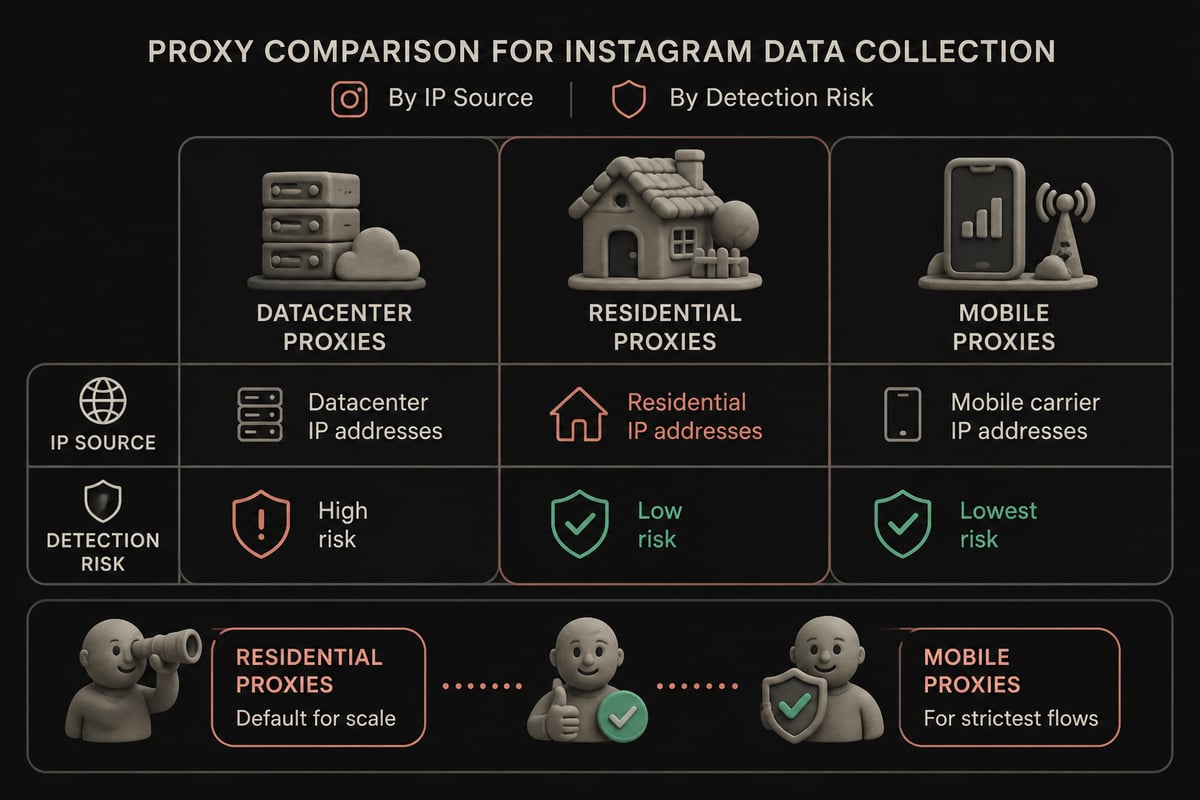
The right proxy type depends on how strictly the target flags traffic, and for Instagram that points to residential or mobile IPs over datacenter ones. Datacenter ranges are easier to identify than household or carrier IPs, so they tend to get flagged sooner on consumer social platforms.
| Proxy type | IP source | Typical use on Instagram | Detection risk |
|---|---|---|---|
| Datacenter | Hosting providers | Low-stakes testing, bulk checks of tolerant endpoints | High |
| Residential | Household ISPs | Public profile and post collection at scale | Lower |
| Mobile | Carrier networks | Strictest flows, app-like traffic | Lowest |
Residential IPs are a common choice for large-scale collection because pools are big and geographic targeting is granular. PinguProxy residential targeting reaches 221 countries, and the network holds over 500 million IP addresses, which helps when you need to spread requests thinly across many exit nodes. If your workload mimics app traffic, PinguProxy Mobile Proxies are worth testing alongside residential IPs, since carrier IPs are shared by many real users.
Step 2: Decide Between Rotating and Sticky Sessions
Use rotating sessions for stateless collection of public pages and sticky sessions for any flow that depends on staying on one IP for a period of time. Mixing them up is a common source of unexplained blocks.
Rotating sessions assign a new exit IP per request or at a set interval. They suit large crawls where each request is independent, such as fetching many public profile pages. PinguProxy offers a rotating IP interval of 1 ms on Pro and Enterprise plans, which allows very fine-grained rotation for high-concurrency jobs.
Sticky sessions hold one IP for a defined window. They suit flows where Instagram expects continuity, for example a headless browser that loads a page, scrolls and triggers follow-up requests. Changing IP mid-session produces a pattern that real users never generate.
A practical rule: if the target page issues several dependent requests, keep one IP for that page load. Rotate between page loads, not within them.
Step 3: Configure the Residential Proxy for Instagram in Your Client
Configuring the proxy means passing the gateway host, port and credentials to your HTTP client or browser so every request exits through the residential network. The exact values come from your provider dashboard.
Python with requests
Set the proxy dictionary once on a session object so connection reuse works in your favor:
import requests

proxy = "http://USERNAME:PASSWORD@GATEWAY_HOST:PORT"
session = requests.Session()
session.proxies = {"http": proxy, "https": proxy}
session.headers.update({"User-Agent": "Mozilla/5.0 (your realistic UA)"})

r = session.get("https://httpbin.org/ip", timeout=20)
print(r.json())
Playwright
Pass the proxy at browser launch so the whole context inherits it:
from playwright.sync_api import sync_playwright

with sync_playwright() as p:
    browser = p.chromium.launch(proxy={
        "server": "http://GATEWAY_HOST:PORT",
        "username": "USERNAME",
        "password": "PASSWORD",
    })
    page = browser.new_page()
    page.goto("https://httpbin.org/ip")
    print(page.inner_text("body"))
Manual browser or system settings
For a quick manual check, enter the same host and port in your operating system's network proxy settings or in a browser extension that supports authenticated proxies. Prefer client-level configuration for production, because system-wide settings send unrelated traffic through the pool and burn bandwidth.
PinguProxy supports both IPv4 and IPv6. Confirm which protocol your target and your client handle cleanly before switching a large job over, since mixed behavior is harder to debug than a single protocol.
Step 4: Verify the Exit IP Before Sending Real Traffic
Verification confirms that requests actually leave through the residential pool and that the exit IP matches your intended country. Do this before any Instagram request, because a misconfigured proxy that silently falls back to your server IP can get that IP flagged.
Run this checklist:
- Request an IP echo endpoint and confirm the returned address is not your own.
- Look up the IP's ASN. A residential result should resolve to a consumer ISP, not a hosting company.
- Confirm the country or region matches your targeting parameters.
- Repeat the request several times and confirm rotation behaves as configured (changing for rotating sessions, constant for sticky ones).
- Check for DNS leaks if you use a browser, so name resolution does not expose your real network.
Log the exit IP with every later request. When a block appears, you can then correlate it with a specific address, ASN or request pattern instead of guessing.

Step 5: Pace Requests Inside Instagram's Rate Limits
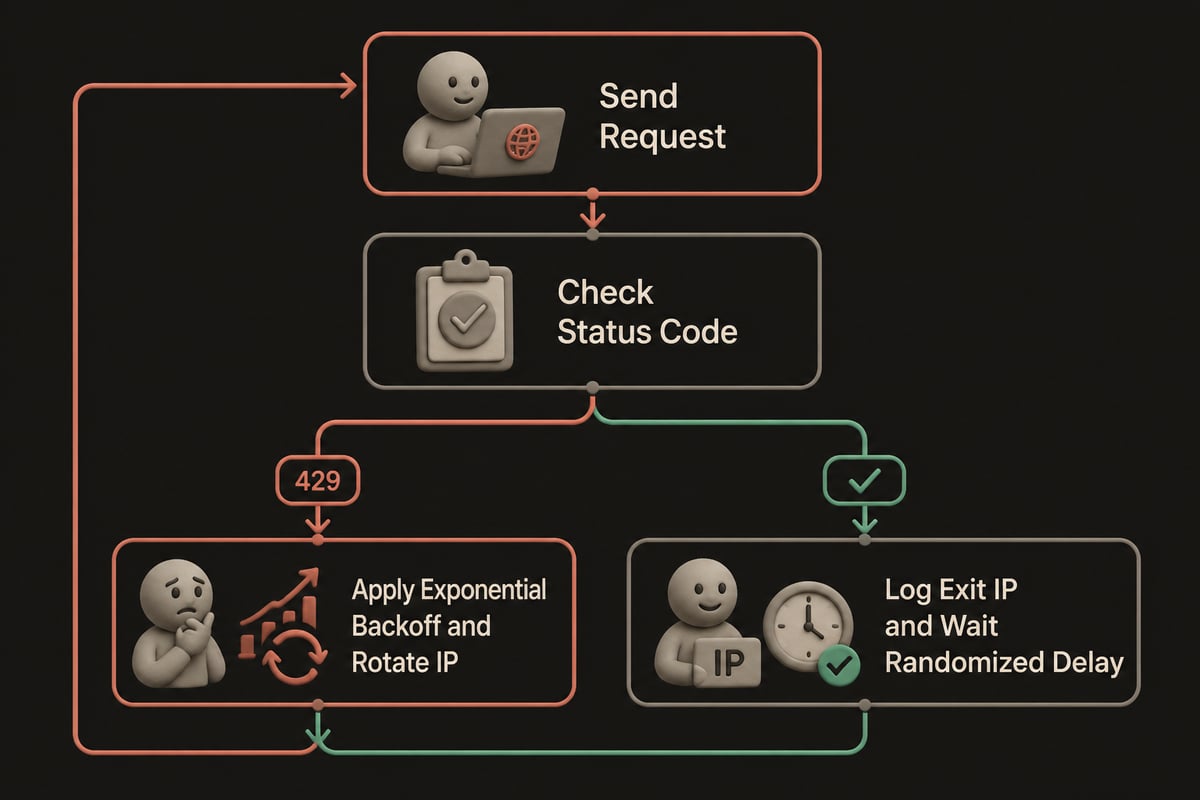
Pacing is the step that decides whether your setup holds up, because Instagram applies rate limits that no proxy can bypass. For API access, Meta documents that for most Instagram Platform endpoints the app's call count is calculated over a rolling 24-hour window as 4,800 multiplied by the number of impressions. Budget your calls against that formula rather than against the size of your proxy pool. Because the window is rolling, a burst early in the day does not reset at midnight; it keeps counting against you until those calls age out, so spread volume evenly instead of front-loading it.
Build these controls into your collector:
- Per-IP request caps so no single address carries an unnatural volume. A simple counter keyed by exit IP, reset on a timer, is enough to start.
- Randomized delays between requests instead of a fixed interval. A uniform random wait between, say, two bounds you choose avoids the metronome pattern that fixed sleeps create.
- Exponential backoff on 429 and 5xx responses, with a hard retry ceiling. Double the wait after each failure, add a little jitter, and give up on the item after the ceiling so one stubborn URL cannot block the queue.
- Concurrency limits per target host, scaled up gradually. Start with a handful of workers, watch the 429 rate, and raise the count only while it stays flat.
- Header and fingerprint consistency within a session, since a changing user agent on a constant IP is a strong bot signal.
Step 6: Use Webhooks and Official Endpoints Where They Apply
Where your use case allows it, official endpoints and webhooks reduce both proxy spend and block risk. Instagram recommends webhooks for notifications about media objects or messages, and using them can reduce the number of API calls and the risk of rate limiting.
For accounts and data you are authorized to access, a webhook-first design looks like this: subscribe to change notifications, fetch only the objects that changed, and keep polling as a fallback rather than the primary mechanism. In practice, your webhook receiver acknowledges each notification quickly, places the changed object's ID on a queue, and a separate worker fetches the details at a controlled pace. Decoupling receipt from fetching keeps bursts of notifications from turning into bursts of API calls. A low-frequency reconciliation job, run daily for example, can then catch anything a missed notification left behind. This cuts request volume sharply compared with periodic full re-crawls.
Proxies remain useful for public pages that have no API equivalent and for geographic verification of what users in a given country see. Checking how a public page renders from a specific country is a typical case. Treat the proxy as one tool in the pipeline, not the whole strategy.
Step 7: Monitor Performance and Tune the Pool
Monitoring turns a working setup into a reliable one by showing you which IPs, regions and request patterns degrade first. Track a small set of metrics and review them on a schedule:
- Success rate per country and per proxy type.
- Block signals: 403, 429, login redirects and challenge pages.
- Median and p95 latency, since slow exits often precede blocks.
- Cost per successful record, which is the number that matters for AI training datasets.
- Retry ratio, because a rising retry rate means wasted bandwidth.
When a region underperforms, shift traffic to another country or to mobile IPs rather than increasing retries on the same pool. PinguProxy states a 99.9% uptime target monitored 24/7, but your own metrics tell you how the network performs against your specific targets. Unlimited bandwidth on every plan removes bandwidth overage as a variable in your cost model, and unused pay-as-you-go GB never expire, which helps when job volume is uneven month to month.
Common Mistakes and Troubleshooting
Most failures trace back to a short list of causes. Check these first when requests start failing.
Using datacenter IPs for consumer endpoints. Hosting-provider ranges are flagged quickly. Switch to residential or mobile IPs.
Rotating inside a session. Changing IP between dependent requests of one page load looks unnatural. Use sticky sessions for multi-request flows.
Ignoring 429 responses. Retrying immediately makes things worse. Back off, slow down and spread load over more time.
Letting traffic fall back to your own IP. If the proxy fails and your client silently connects directly, your real address gets exposed. Fail closed: abort the request when the proxy is unreachable.
Inconsistent fingerprints. A fixed IP paired with a changing user agent, or a US IP paired with a non-US language header, invites challenges. Keep headers, locale and timezone coherent with the exit location.
Treating the proxy as a rate-limit bypass. API quotas apply to the app or account, not the IP. More IPs do not raise an API call budget.
Skipping the legal review. Collect only public data you are permitted to gather, respect terms and applicable regulations, and never route illegal traffic through any proxy network.
If a setup still fails after these checks, test the same request through a different country and proxy type to isolate whether the issue is the IP, the request pattern or the target's current defenses.
Your next step is to run the verification checklist from Step 4 against a small test pool and log the success rate before scaling any job. When you are ready to test at volume, PinguProxy offers residential, datacenter and mobile proxies with unlimited bandwidth and a zero-log policy on one account, and you can get started with a 1-day €1 trial on a monthly plan to confirm it fits your pipeline.