
PIA SOCKS5 Proxy: Complete Setup & Benefits Guide 2026
Private Internet Access has become a household name in the VPN industry, but many users overlook one of its most powerful features: the integrated SOCKS5 proxy service. This protocol offers a lightweight alternative to full VPN connections while still providing substantial privacy benefits and performance improvements. Understanding how to properly configure and leverage a pia socks5 proxy can dramatically enhance your online experience, whether you're focused on torrenting, web scraping, or simply maintaining anonymity during specific online activities.
Understanding SOCKS5 Proxy Technology
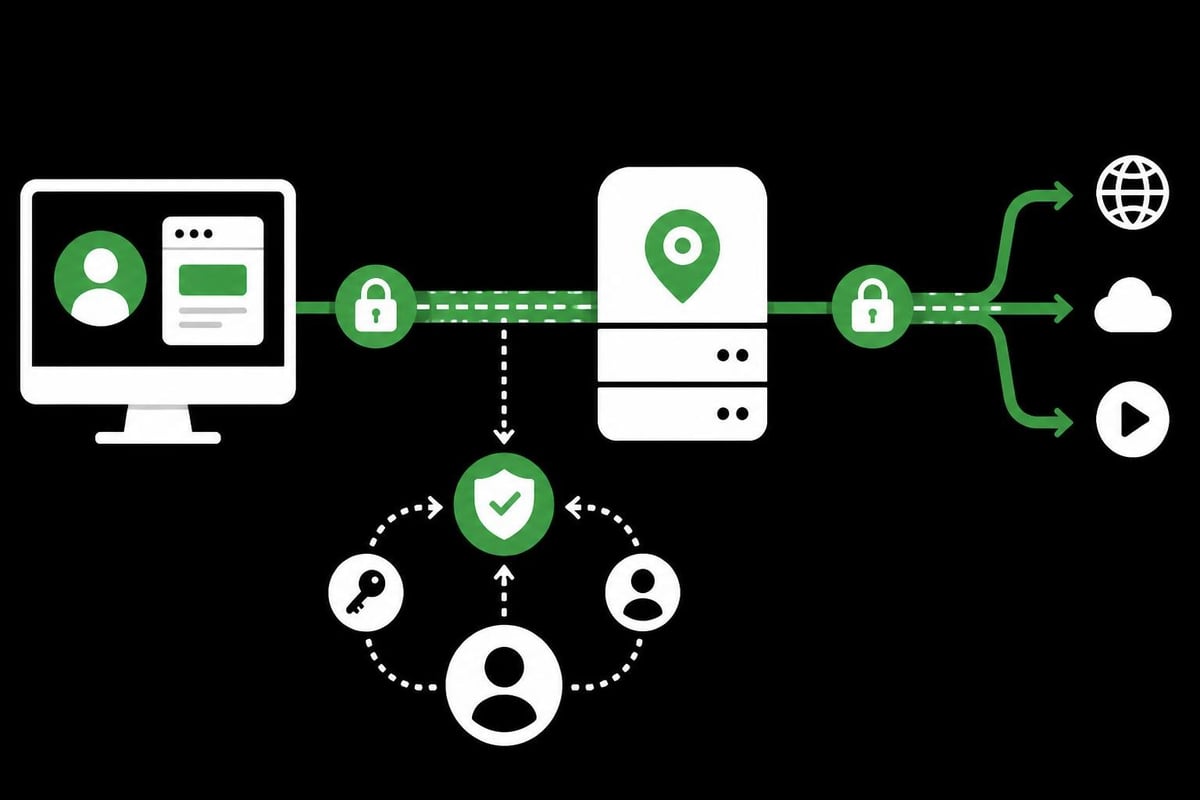
SOCKS5 represents the fifth iteration of the Socket Secure protocol, designed to route internet traffic through an intermediary server. Unlike HTTP proxies that only handle web traffic, SOCKS5 proxies support various protocols and traffic types, making them exceptionally versatile for modern internet usage.
The protocol operates at a lower level than HTTP proxies, working at Layer 5 of the OSI model. This positioning allows it to handle any type of traffic, from email to torrenting, without protocol-specific limitations. When you configure a pia socks5 proxy connection, your applications route requests through PIA's proxy servers instead of connecting directly to destination servers.
Key Technical Advantages
Authentication and Security Features:
- Username and password authentication prevents unauthorized access
- Support for UDP protocol enables real-time applications
- TCP connections for reliable data transfer
- No encryption overhead, resulting in faster speeds than VPN connections
The lack of built-in encryption might seem like a disadvantage, but it's actually a strategic design choice. Since many applications already use their own encryption (HTTPS, SSH, etc.), adding another encryption layer would create unnecessary overhead. This makes the pia socks5 proxy ideal for scenarios where speed matters more than adding redundant security layers.
Configuration Process for Different Platforms
Setting up a pia socks5 proxy varies depending on your operating system and intended use case. The fundamental configuration remains consistent: you need the proxy server address, port number, and your authentication credentials.
Windows Setup
- Open your application's network settings (torrent client, browser, etc.)
- Navigate to the proxy configuration section
- Select SOCKS5 as the proxy type
- Enter PIA's proxy server address:
proxy-nl.privateinternetaccess.com - Use port
1080for standard connections - Input your PIA username and password
- Enable proxy for hostname lookups (DNS requests)
- Test the connection before regular use
macOS Configuration Steps
Mac users follow a similar process, though the interface differs slightly. Most applications on macOS allow individual proxy settings without affecting system-wide connections. This granular control proves valuable when you want certain applications to use the pia socks5 proxy while others maintain direct connections.
For torrent clients like qBittorrent or Deluge, access the connection preferences and input the proxy details. Always verify that the "Use proxy for peer connections" option is enabled to ensure all torrent traffic routes through the proxy server.
| Platform | Configuration Location | Port | Authentication Required |
|---|---|---|---|
| Windows | App Network Settings | 1080 | Yes |
| macOS | System/App Preferences | 1080 | Yes |
| Linux | Network Config/App | 1080 | Yes |
| Android | App Proxy Settings | 1080 | Yes |
| iOS | Network Settings | 1080 | Yes |
Performance Optimization Strategies
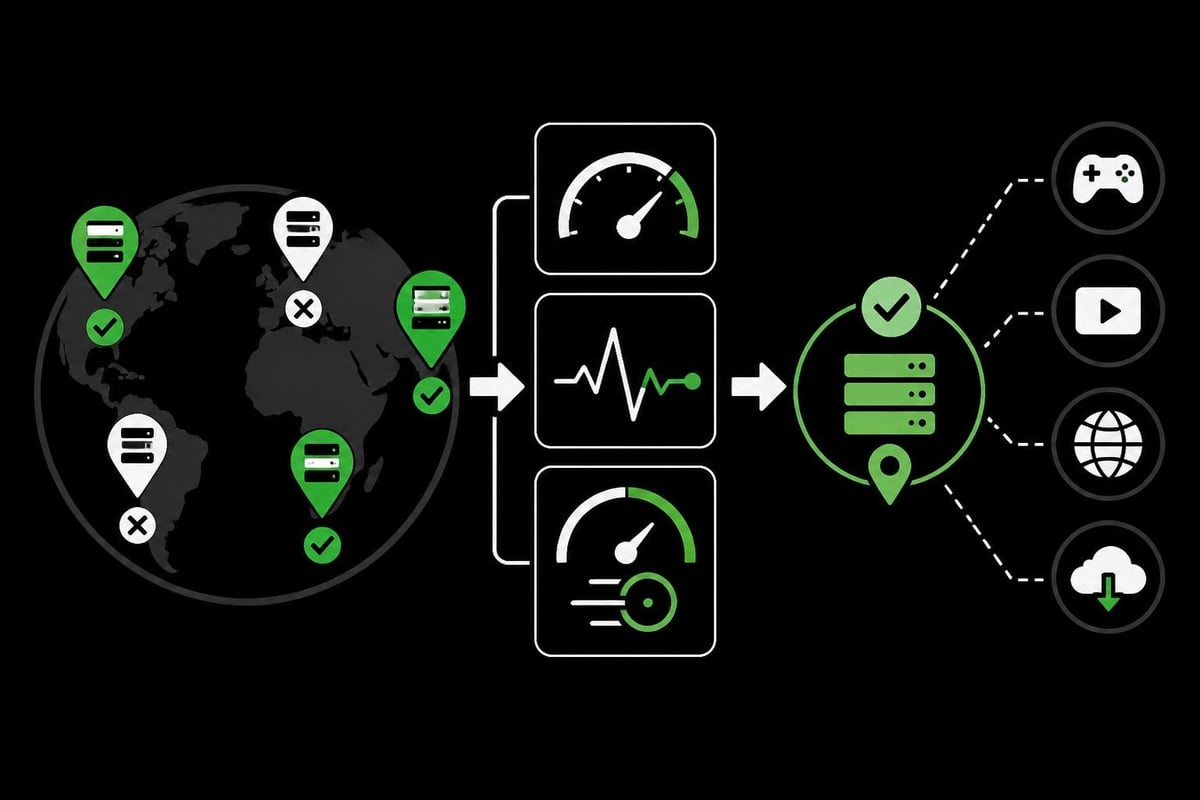
Speed represents one of the primary reasons users choose a pia socks5 proxy over full VPN connections. Without encryption overhead, proxy connections typically deliver speeds much closer to your baseline internet connection. However, several factors influence actual performance.
Geographic server selection matters tremendously. Choosing a proxy server geographically closer to your physical location reduces latency. PIA operates servers in numerous countries, allowing you to balance between speed and desired IP location. For web scraping use cases, selecting the appropriate region becomes critical for accessing geo-restricted content.
Bandwidth Considerations
While the pia socks5 proxy doesn't impose artificial bandwidth limits, your actual speeds depend on:
- Your base internet connection speed
- Server load at your chosen proxy location
- Physical distance to the proxy server
- Time of day and network congestion
- Application-specific limitations
Testing different server locations helps identify the optimal configuration for your specific needs. Many users report speeds exceeding 100 Mbps when using nearby proxy servers, making the service suitable even for bandwidth-intensive activities like 4K streaming or large file transfers.
Security and Privacy Implications
The pia socks5 proxy provides a different security profile compared to full VPN connections. Understanding these distinctions helps you make informed decisions about when to use each service. Unlike VPNs that encrypt all device traffic, SOCKS5 proxies only route traffic from configured applications.
Your IP address gets masked when using the proxy, preventing destination servers from seeing your real location. This proves particularly valuable for maintaining anonymity during web scraping or accessing region-locked content. However, your ISP can still see that you're connecting to PIA's proxy servers, even if they cannot inspect the actual traffic content.
DNS Leak Prevention
Critical security steps:
- Enable "Proxy hostnames" or "Use proxy for DNS queries"
- Configure applications to resolve DNS through the proxy
- Test for DNS leaks using online verification tools
- Verify your apparent IP address matches the proxy location
- Monitor for IPv6 leaks if using dual-stack connections
Research has shown that vulnerabilities in free proxy services can compromise user privacy significantly. Using a reputable paid service like PIA's SOCKS5 offering minimizes these risks through proper infrastructure and authentication mechanisms.
Application-Specific Use Cases
Different applications benefit from pia socks5 proxy configuration in unique ways. Understanding these use cases helps maximize the value you extract from the service.
Torrent Traffic Management
Torrent clients represent the most common pia socks5 proxy use case. The protocol handles P2P connections efficiently while masking your IP address from other peers in the swarm. Configure your torrent client to route all traffic through the proxy, including peer connections and tracker communications.
Modern torrent clients like qBittorrent offer built-in proxy testing features. After configuration, use these tools to verify that your torrent traffic actually routes through PIA's servers. Failed proxy connections should halt torrent activity, preventing accidental exposure of your real IP address.
Browser and Application Integration
While browsers don't natively support SOCKS5 proxies without extensions, many applications include built-in proxy support:
- Gaming clients: Reduce ping times to specific regions
- Development tools: Test geo-targeted applications
- Messaging apps: Bypass regional restrictions
- Streaming applications: Access content from different countries
- Research tools: Gather data from various geographic perspectives
Similar to how services like PinguProxy enable rotating proxies, the pia socks5 proxy can be switched between different server locations to simulate requests from various regions. This flexibility supports comprehensive testing and development workflows.
Comparing SOCKS5 to Alternative Solutions
Understanding where pia socks5 proxy fits within the broader proxy ecosystem helps you select the right tool for each situation. Different proxy types serve different purposes, and knowing these distinctions prevents using the wrong technology for your needs.
| Feature | SOCKS5 Proxy | HTTP Proxy | Full VPN | Datacenter Proxy |
|---|---|---|---|---|
| Speed | Very Fast | Fast | Moderate | Very Fast |
| Protocol Support | All | HTTP/HTTPS only | All | All |
| Encryption | None | Optional | Always | None |
| Application Control | Per-app | Per-app | System-wide | Per-app |
| Authentication | Required | Optional | Required | Varies |
| Use Case | Torrenting, specific apps | Web browsing | Complete privacy | Business operations |
For professional use cases like SERP monitoring or e-commerce price tracking, dedicated proxy services often provide more control and flexibility than consumer-grade SOCKS5 offerings. However, the pia socks5 proxy excels for personal privacy and selective application routing.
<image_prompt alt="Proxy type comparison">Decision matrix showing when to use SOCKS5 proxy versus HTTP proxy, VPN, or datacenter proxy based on speed requirements, security needs, and application compatibility</image_request>
Troubleshooting Common Configuration Issues
Even straightforward pia socks5 proxy setups occasionally encounter problems. Systematic troubleshooting resolves most issues quickly, restoring functionality without extensive technical knowledge.
Connection Failures
Authentication errors typically indicate incorrect credentials. Verify you're using your PIA account credentials, not your VPN-specific credentials if they differ. Some applications require the full username format including any suffixes PIA provides.
Server unreachable messages might stem from:
- Incorrect server address entry
- Port number typos (should be 1080)
- Firewall blocking outbound connections
- ISP interference with proxy traffic
- PIA server maintenance or outages
Testing with different server locations helps isolate whether the problem affects all PIA proxy servers or just specific regions. The comprehensive guide to SOCKS5 proxy provides additional troubleshooting frameworks applicable to most configurations.
Performance Degradation
Slow speeds through the pia socks5 proxy warrant investigation. Start by testing your base internet speed without any proxy connection. If baseline speeds are normal but proxy speeds are slow, consider:
- Server congestion: Switch to less popular server locations
- Routing inefficiency: Choose geographically closer servers
- Application limitations: Some apps throttle proxy traffic
- Network interference: Try different times of day
- Configuration errors: Verify all settings match PIA's documentation
Comparing performance against free SOCKS5 proxy alternatives often highlights the value of paid services. Free proxies typically suffer from overcrowding and poor infrastructure, while PIA maintains dedicated servers for proxy connections.
Advanced Configuration Techniques
Power users can extract additional value from pia socks5 proxy through advanced configuration options. These techniques require more technical knowledge but deliver enhanced functionality and control.
Chain Proxy Configurations
Some scenarios benefit from routing traffic through multiple proxy servers sequentially. While the pia socks5 proxy doesn't natively support proxy chaining, you can achieve similar results by:
- Running a local proxy server that forwards to PIA's SOCKS5
- Using applications that support multiple proxy layers
- Implementing custom routing rules based on destination
- Combining SOCKS5 proxy with VPN for specific applications
This approach proves particularly valuable for cybersecurity research where multiple layers of anonymity provide additional protection. Research into VPN-backed proxy sharing demonstrates how these technologies can be combined for specialized use cases.
Automated Failover Systems
Building resilience into your proxy configuration:
- Configure backup proxy servers in your applications
- Implement health checks that detect proxy failures
- Script automatic rotation between available servers
- Monitor connection quality and switch proactively
- Log proxy performance for pattern analysis
Professional environments often require guaranteed uptime. While pia socks5 proxy offers excellent reliability, implementing failover mechanisms ensures continuity even during rare service disruptions. This becomes especially important for automated systems performing travel aggregation or continuous data collection.
Privacy-Focused Application Workflows
Maximizing privacy through pia socks5 proxy requires understanding how different applications handle network connections. Not all software respects proxy settings uniformly, and some actively bypass configured proxies.
Verifying Proxy Effectiveness
After configuring the pia socks5 proxy, verification confirms your traffic actually routes through PIA's infrastructure. Multiple testing approaches provide comprehensive assurance:
- IP address checks: Visit IP lookup websites from configured applications
- DNS leak tests: Verify DNS queries don't bypass the proxy
- WebRTC leak detection: Ensure real IP doesn't leak through browser features
- Application-specific tests: Use built-in proxy verification tools
- Traffic monitoring: Observe network connections at the system level
Professional users performing ad verification or localization testing require absolute certainty about their apparent location. Regular verification prevents costly mistakes from proxy configuration failures.
Application Isolation Strategies
Different tasks warrant different privacy levels. Creating isolated environments for various activities prevents cross-contamination of browsing profiles and cookies:
- Separate browser profiles for different proxy configurations
- Virtual machines for complete isolation between tasks
- Container technology for application-level separation
- User accounts on operating systems with distinct proxy settings
- Dedicated devices for highest-risk activities
This compartmentalization approach extends beyond basic pia socks5 proxy usage, creating comprehensive privacy frameworks. When combined with proper operational security practices, these strategies significantly enhance anonymity and reduce tracking risks.
Integration with Modern Development Workflows
Developers increasingly rely on proxy services for testing, debugging, and accessing resources. The pia socks5 proxy integrates smoothly into common development environments and tools.
API Testing and Development
When building applications that interact with geo-restricted APIs or services, the pia socks5 proxy enables testing from various apparent locations. Configure your HTTP client libraries to route requests through the proxy:
Python example considerations:
- Configure requests library with proxy parameters
- Handle proxy authentication in request headers
- Implement retry logic for proxy connection failures
- Monitor response times to detect proxy issues
- Switch between proxy locations for comprehensive testing
Node.js integration approaches:
- Set environment variables for proxy configuration
- Use proxy-aware HTTP clients
- Implement connection pooling for efficiency
- Handle proxy errors gracefully
- Log proxy-related metrics for monitoring
Similar to how PinguProxy supports unlimited bandwidth for demanding development workflows, understanding your proxy service's limitations helps prevent unexpected bottlenecks during critical testing phases.
Continuous Integration Environments
Automated testing pipelines sometimes require specific geographic contexts or IP addresses. Integrating pia socks5 proxy into CI/CD workflows enables:
- Location-specific testing: Verify application behavior across regions
- Rate limit management: Distribute requests across IP addresses
- Access to restricted resources: Bypass network limitations in cloud environments
- Realistic environment simulation: Test under conditions matching production
- Security compliance: Meet requirements for data source locations
Documentation and configuration management become critical when multiple team members work with shared proxy resources. Maintaining clear proxy configuration documentation prevents confusion and troubleshooting delays.
Understanding and properly implementing a pia socks5 proxy delivers significant privacy and performance benefits for both personal and professional use cases. Whether you're protecting your torrenting activity, testing applications from different geographic perspectives, or simply seeking faster speeds than full VPN connections provide, SOCKS5 proxy technology offers a powerful solution. For businesses and power users requiring advanced proxy capabilities like rapid rotation, massive bandwidth, and comprehensive protocol support, PinguProxy provides enterprise-grade infrastructure with 10Gbps speeds, zero-log privacy, and 24/7 support tailored for demanding use cases from web scraping to cybersecurity research.