To get a proxy from USA, choose a provider with US-located IPs, pick the proxy type that matches your workload (datacenter, residential or mobile), copy the host, port and credentials from your dashboard, and enter them in your browser, operating system or scraper. Once you know which type fits your target sites and how your tooling expects the connection details, setup is quick.
This guide covers how to select the right US proxy, how to configure it on Windows, in browsers and in code, and how to test that traffic actually exits from an American IP. It is written for data engineers collecting web data at scale and for marketing, SEO and ad verification teams checking results across regions.
What a US proxy does and who needs one
A US proxy is an intermediary server with an American IP address that forwards your requests to a destination, so the target site sees the proxy's location instead of yours.
For teams working at scale, that matters for three practical reasons:
- Localized results. Search engine results pages, pricing, inventory and ads differ by country and often by state or city. A US exit point lets you see what an American user sees.
- Data collection. Scrapers feeding analytics pipelines or AI training sets need stable access to US-hosted or US-targeted content without hitting rate limits from a single IP.
- Ad and campaign verification. Verifying that a creative renders correctly, that geo-targeting works and that landing pages load properly requires a US vantage point.
A proxy does not encrypt your traffic the way a VPN does, and it works per application or per request rather than for the whole device. That is usually an advantage for data work, because you can route only the scraper or the test browser through it while everything else uses your normal connection.
Choosing the right type of proxy from USA
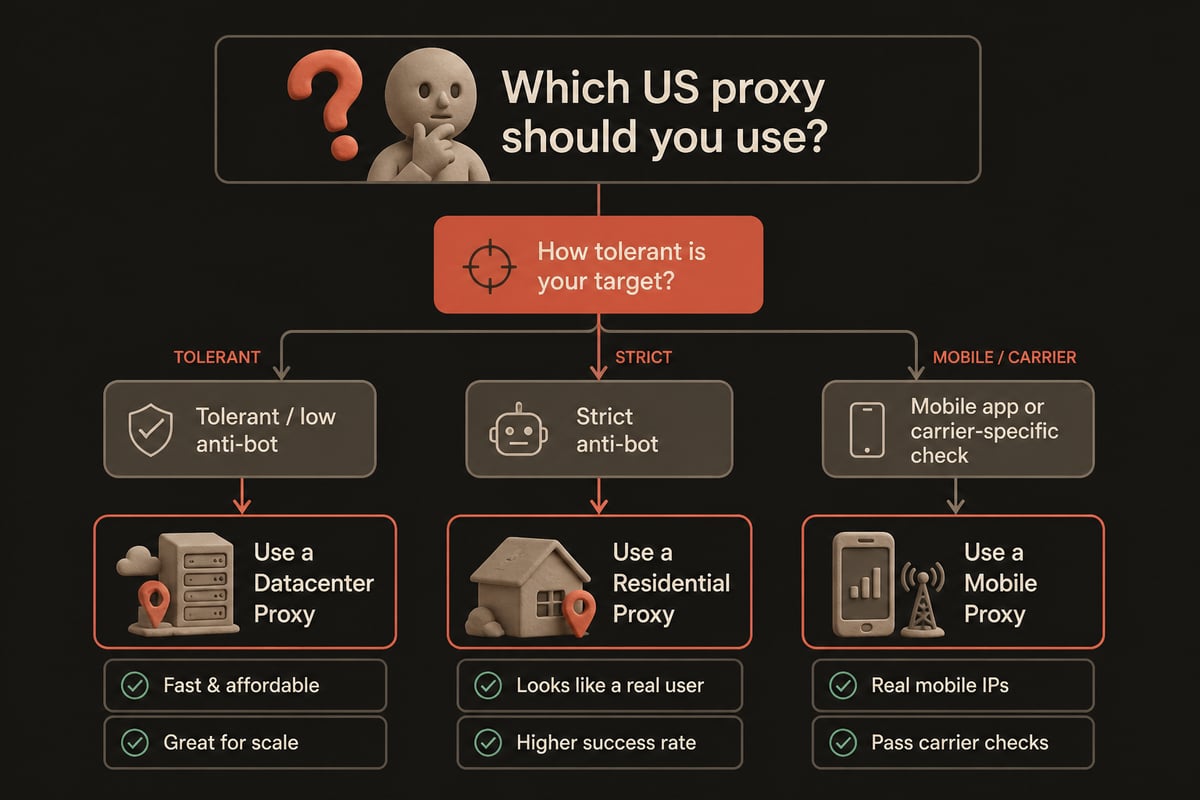
The right type depends on how closely the target site scrutinizes visitors and how much throughput you need. Datacenter proxies are fastest and cheapest per request, residential proxies look like ordinary household connections, and mobile proxies share carrier IPs that sites rarely block.
| Proxy type | Typical speed | Detection risk | Best fit |
|---|---|---|---|
| Datacenter | Highest | Higher on strict sites | Bulk collection from tolerant sources, uptime checks, API calls |
| Residential | Moderate | Low | SERP monitoring, retail price tracking, ad verification |
| Mobile | Moderate | Lowest | Mobile app testing, social platforms, carrier-specific ad checks |
A sensible approach is to start with datacenter IPs for the bulk of your workload and escalate to residential or mobile only for targets that block them. Escalating selectively keeps costs predictable.
PinguProxy runs datacenter, mobile, residential and TOR proxies on one account, so you can switch type per target without opening a new vendor relationship. The network spans over 500 million IP addresses across 190+ countries and regions, which means US coverage sits alongside every other market you may need to compare against.
Rotating versus static IPs
Use a static IP when you need a consistent identity, such as a logged-in session, and a rotating IP when you want each request or batch to come from a different address.
Rotation spreads requests across many IPs, which reduces the chance that any single address trips a rate limit. Static addresses are better for workflows where the site expects the same client to return, like account dashboards or multi-step checkouts.
Two settings are worth understanding before you buy:
- Rotation interval. Faster rotation means less reuse of any one address. PinguProxy offers a fast rotating IP interval, which suits high-volume collection where each request should look independent.
- Sticky sessions. Some workflows need the same IP for several minutes, then a change. Check that your provider supports session control rather than only per-request rotation.
If rotation is central to your project, the rotating proxy feature page explains how it works, and the proxy pool feature describes how large pools reduce address reuse. For a deeper walk through US-specific rotation, see this write-up on a USA rotating proxy.
Why free lists are the wrong starting point
Free public proxy lists are unreliable for production data work, and they carry security risks that are hard to justify when your pipeline or campaign data matters.
Public addresses are shared by thousands of anonymous users, get banned quickly, drop connections without warning and can log or alter the traffic passing through them. For a one-off curiosity check they may work. For recurring collection, ad verification or anything tied to a business deadline, the failure rate and lack of accountability become expensive. PinguProxy is built for professional workloads and is not a fit if you are looking for free proxy lists. If you want the full reasoning, the post on free proxy options for the USA covers the trade-offs in detail.
How to set up a proxy from USA in six steps
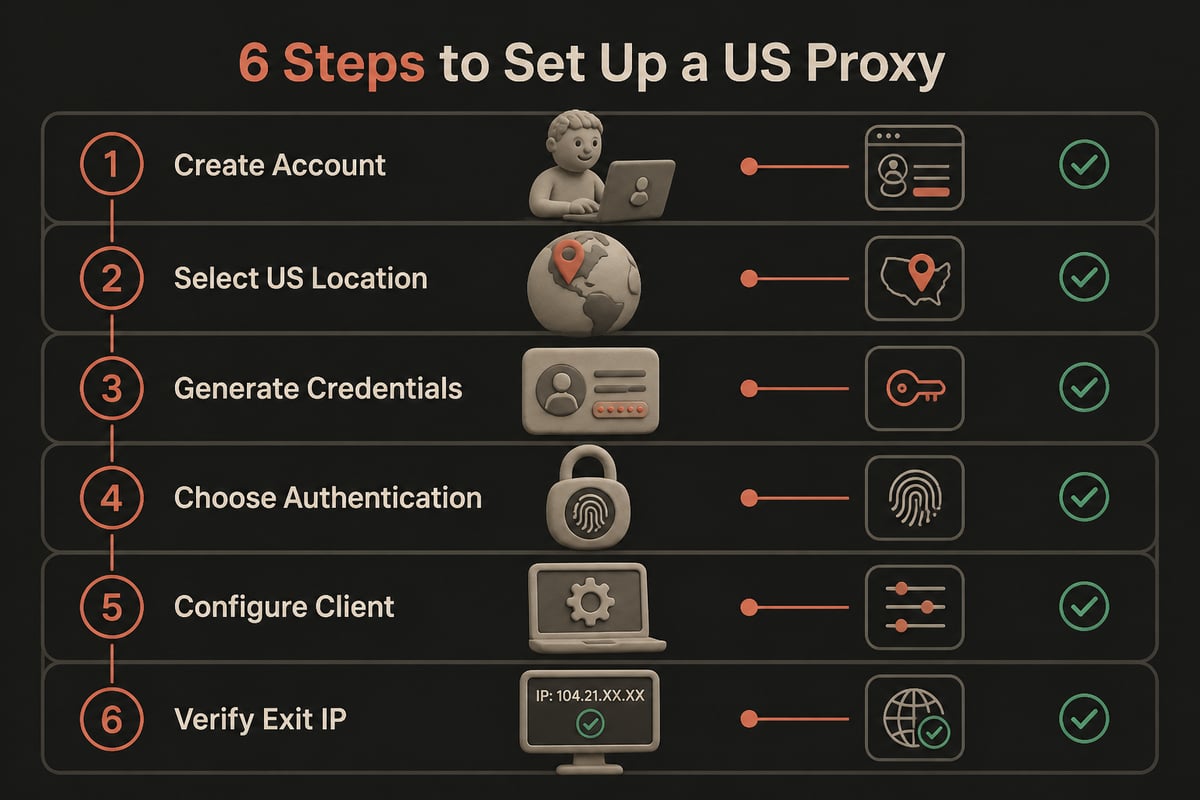
Setup follows the same sequence regardless of provider: create the account, pick a plan, generate credentials, choose an authentication method, configure the client and verify the exit IP.
- Create an account and pick a plan. Match bandwidth and IP type to your workload. Unlimited bandwidth removes the need to meter each crawl, and PinguProxy includes it on every plan. Pay-as-you-go buyers can also rely on unused GB never expiring, so a quiet month costs nothing extra.
- Select the US location. In the dashboard, filter by country, and by state or city where the plan allows it.
- Generate credentials. You will receive a host, a port, a username and a password, or an IP whitelist option.
- Choose authentication. Username and password works from anywhere. IP whitelisting is cleaner for servers with fixed addresses because no secret travels in the request.
- Configure your client. Browser, operating system, curl, Python or a headless browser, as covered below.
- Verify. Confirm the exit IP and its geolocation before launching a job.
Configuring a US proxy on Windows and in browsers
On Windows, you enter the proxy address and port under Settings, then Network & internet, then Proxy, and save the configuration, according to Microsoft Support. The same page notes that Windows also supports automatic proxy detection and setup scripts alongside manual configuration.
For a single machine used by one analyst, manual setup is enough:
- Open Settings and go to Network & internet, then Proxy.
- Under Manual proxy setup, switch on Use a proxy server.
- Enter the proxy host and port from your dashboard.
- Save, then visit an IP-checking page to confirm the change.
For teams, per-device manual entry does not scale. Microsoft recommends WPAD for configuring Windows to use an internet proxy, which can discover settings through DNS or DHCP without client-side configuration, as described on Microsoft Learn. That approach suits managed office environments, though it assumes your proxy endpoint is reachable by every client.
Browsers behave differently. Chrome and Edge reuse the operating system proxy by default, while Firefox has its own network settings panel. If you need only one browser profile on the US proxy, Firefox or a dedicated automation profile keeps the rest of your traffic untouched. Note that browser proxy fields rarely accept embedded credentials, so you may be prompted for the username and password on first use.
Routing only some traffic with a PAC file
A Proxy Auto-Configuration file lets you send specific domains through the proxy while everything else connects directly. It uses a JavaScript function named FindProxyForURL to decide whether each request goes direct or through a proxy, according to MDN Web Docs.
This is useful for verification teams who only need US routing for certain properties, such as an ad platform dashboard and a set of landing pages. MDN's PAC file reference details the available matching rules. Two practical details from MDN prevent common mistakes: the file should use the .pac extension, and the server should deliver it with the MIME type application/x-ns-proxy-autoconfig. A PAC file served as plain text is often ignored silently, which leads to confusing "the proxy is not working" reports.

Using a US proxy in code and scraping tools
In code, you pass the proxy URL to your HTTP client or browser automation library, and the library handles the tunnel. For HTTPS targets, the client typically sends an HTTP CONNECT request, which RFC 9931 defines as establishing a TCP connection to a specified host and port through the proxy.
Most libraries accept a URL in the form http://username:password@host:port. A few habits make scraping jobs more reliable:
- Set timeouts explicitly. Proxies add a hop, so default timeouts can be too tight or too loose.
- Retry on failure with a new IP. Treat connection errors and 403 or 429 responses as signals to rotate, with exponential backoff rather than instant retries.
- Keep headers consistent with the IP. A US residential IP paired with a non-US language header or an unusual time zone is an easy signal for anti-bot systems.
- Separate sessions from rotation. Use sticky sessions for multi-step flows and per-request rotation for independent page fetches.
- Log the exit IP. Recording which IP served which response makes debugging blocks far easier.
For AI training data collection, also record the source URL, fetch time and proxy region alongside each document. That metadata makes it possible to audit coverage later and to explain why a given sample reflects US content.
Testing that your traffic really exits in the United States
Confirm the exit IP, its country and its consistency before running any large job, because a misrouted or leaking connection silently ruins the dataset or the verification report.
A quick pre-flight check should include:
- IP and geolocation lookup. Request an IP-echo endpoint through the proxy and confirm the country and, if relevant, the state.
- Repeat calls. For rotating setups, confirm that the IP changes as expected. For static ones, confirm it does not.
- DNS behavior. Use a proxy mode that resolves DNS remotely where possible, so name lookups do not reveal your real location.
- Latency. Measure round-trip time to your key targets. US datacenter IPs close to target servers usually respond fastest.
- Target-specific test. Fetch one real page from each target and check that content, currency and language match a US visitor.
Providers monitor their own networks, and PinguProxy targets 99.9% uptime with 24/7 monitoring, but your own pre-flight test is still the only proof that your configuration works end to end.
Staying compliant and avoiding blocks
Sustainable data collection depends on respecting the sites you collect from and the law that applies to your use case. Review each target's terms of service, honor robots.txt where your policy requires it, keep request rates polite and never route illegal traffic through any proxy. PinguProxy is not intended for anyone routing illegal traffic, and its ethical proxy usage guidance outlines sensible boundaries.
A few operational habits reduce blocks without aggressive tactics:
- Spread requests across a wide pool instead of hammering one endpoint.
- Randomize timing within realistic human ranges for browser-based checks.
- Cache responses you have already fetched to avoid duplicate requests.
- Stop and investigate when error rates spike instead of pushing harder.
Bandwidth policy also affects how you plan. With unlimited bandwidth, large crawls and repeated ad checks do not require per-GB budgeting, which simplifies forecasting for recurring jobs.
Frequently asked questions
Is a proxy from USA the same as a VPN?
No. A proxy forwards traffic for a specific application or request and usually does not encrypt it, while a VPN routes and encrypts all device traffic. For scraping and verification, a proxy's per-application control is typically more practical.
Which proxy type works best for SERP and ad checks?
Residential proxies are the usual choice because they resemble ordinary user connections, and mobile proxies suit carrier-specific or mobile-app checks. Datacenter IPs work for sources that do not scrutinize visitors heavily.
Can I target a specific US state or city?
Many providers support state or city targeting on residential and mobile plans. Check your dashboard's location filters before assuming granularity, and verify the result with a geolocation lookup.
Do I need IPv6?
Only if your targets or infrastructure use it. PinguProxy supports both IPv4 and IPv6, so you can match whichever protocol your stack requires.
How do I choose between per-request rotation and sticky sessions?
Use per-request rotation for independent page fetches and sticky sessions for flows that depend on session state, such as logins or carts.
Start by running a small pilot: pick one target site, configure a single US endpoint, and confirm the exit IP, latency and response content before scaling up. When you are ready to move from test to production with unlimited bandwidth, zero logs and datacenter, residential and mobile IPs on one account, PinguProxy lets you get started in a few minutes and scale your US traffic as your collection or verification workload grows.