A private residential proxy is a proxy that routes your traffic through an IP address assigned by an internet service provider to a real household, and that is allocated to you alone rather than shared with other customers. Websites see a request from an ordinary home connection instead of a data center, which lowers the chance of blocks, CAPTCHAs and distorted results. For teams that collect web data at scale or verify campaigns across countries, a private residential proxy is often the difference between clean data and a stream of failed requests.
This article explains the mechanics, the types you can choose from, the use cases that justify the cost, and the legal and ethical points you should check before buying.
How a Private Residential Proxy Works
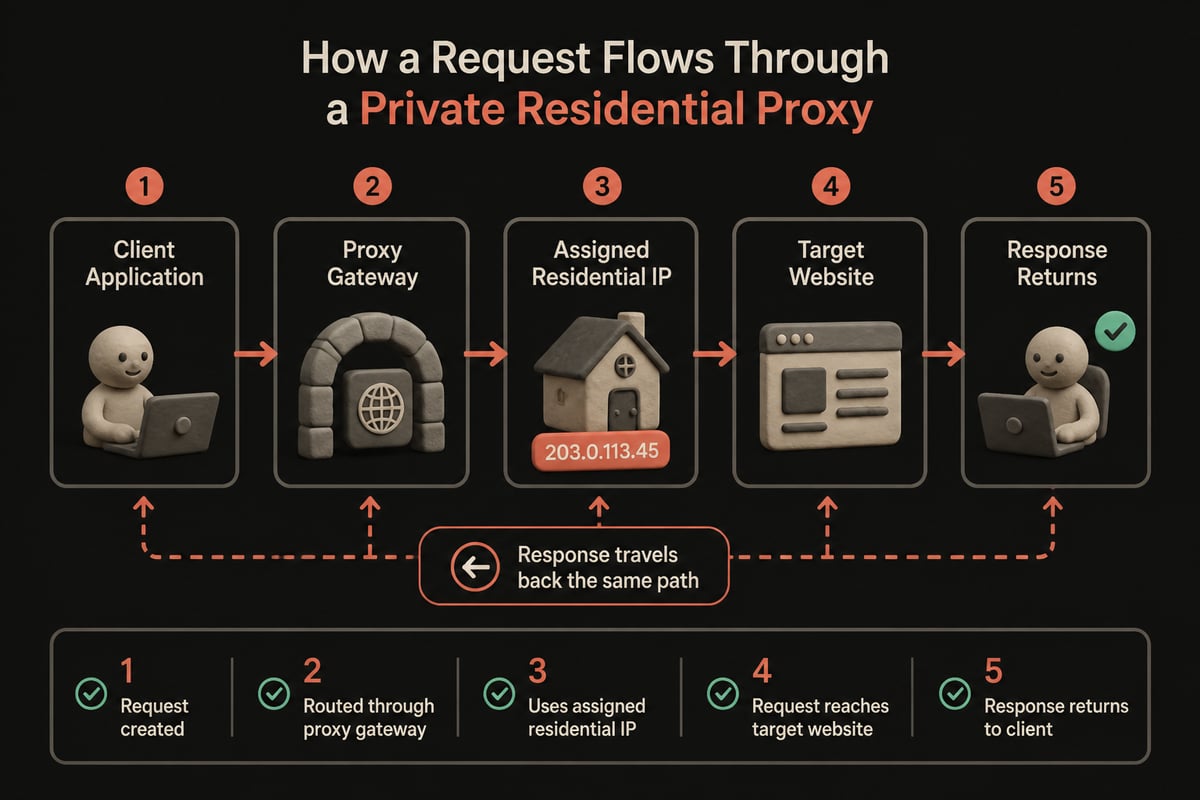
A residential proxy works as an intermediary: your request goes to a gateway, the gateway forwards it through a residential IP, and the target site responds to that IP instead of yours.
The sequence is short:
- Your scraper, browser or monitoring tool sends a request to the proxy gateway with your credentials.
- The gateway selects a residential IP that matches your targeting rules, such as country, city or ISP.
- The request exits through that IP and reaches the destination site.
- The response travels back along the same path to your application.
Because the exit IP belongs to a consumer ISP range, anti-bot systems treat it with more trust than a server address. That trust is the product you are paying for.
The word "private" matters here. In a shared pool, other customers may send aggressive traffic through the same IPs, and the reputation damage lands on you. With private or dedicated allocation, the IPs are assigned to your account, so your own request behavior determines how those addresses are treated.
Where the IPs Come From
Residential IPs originate from real devices and home connections. Providers source them through opt-in applications, partnerships and ISP arrangements. Kaspersky notes that residential proxyware can turn a user's computer, smartphone or home router into an intermediary that forwards other people's internet requests. That is why sourcing practices deserve scrutiny, a point covered in the ethics section below.
Residential vs. Datacenter Proxies
Residential proxies carry higher trust and cost more per gigabyte, while datacenter proxies are faster and cheaper but easier for websites to detect.
| Attribute | Residential | Datacenter |
|---|---|---|
| IP origin | ISP-assigned household addresses | Server farms and hosting providers |
| Detection risk | Low on most sites | Higher on protected sites |
| Speed | Variable, depends on the home connection | Consistently high |
| Typical billing | Per GB | Per IP or unlimited bandwidth |
| Best fit | Geo-targeted, protected targets | High-volume work on tolerant targets |
Most mature data pipelines use both. Datacenter IPs handle cooperative targets such as public APIs and lightly protected pages, and residential IPs are reserved for the sites that block server ranges. Routing traffic this way keeps your per-GB spend focused on the requests that actually need it.
Detection is the practical dividing line. Anti-bot systems can recognize hosting-provider address ranges and apply stricter rules to them, so a datacenter IP may draw CAPTCHAs or outright blocks on a retail or search site while passing without friction on a documentation portal. Residential addresses sit in consumer ISP ranges, which is why they hold up better on protected pages. Speed works the other way. A datacenter connection is stable and fast, while a household line varies with the home network behind it, so latency-sensitive jobs often favor server IPs. A common split is to start every new target on datacenter IPs, watch the block rate, and promote only the failing targets to residential.
Types of Residential Proxies
Residential proxies differ along three axes: how the IP changes, how it is allocated, and which protocol carries the traffic.
Rotating vs. Static Sessions
Rotating proxies assign a new IP per request or at a set interval. They suit broad crawling, SERP collection and price monitoring, where spreading requests across many addresses reduces rate-limit triggers. Sticky or static sessions hold one IP for a defined period, which you need for logged-in flows, checkout testing and any workflow where a changing IP would break the session.
Private vs. Shared Allocation
- Private (dedicated): IPs are assigned to you. Reputation depends on your behavior, and results are more predictable.
- Shared: IPs are used by many customers at once. Pricing is lower, but you inherit the traffic patterns of others.
HTTP(S) vs. SOCKS5
HTTP and HTTPS proxies handle web traffic and are supported by nearly every scraping library. SOCKS5 is protocol-agnostic and suits non-browser clients, custom TCP tooling and some automation stacks. Check that your provider supports both, along with IPv4 and IPv6 if your targets serve either.
Use Cases That Justify the Cost
Residential IPs earn their price when the target site treats server traffic differently from consumer traffic, or when results change by location.
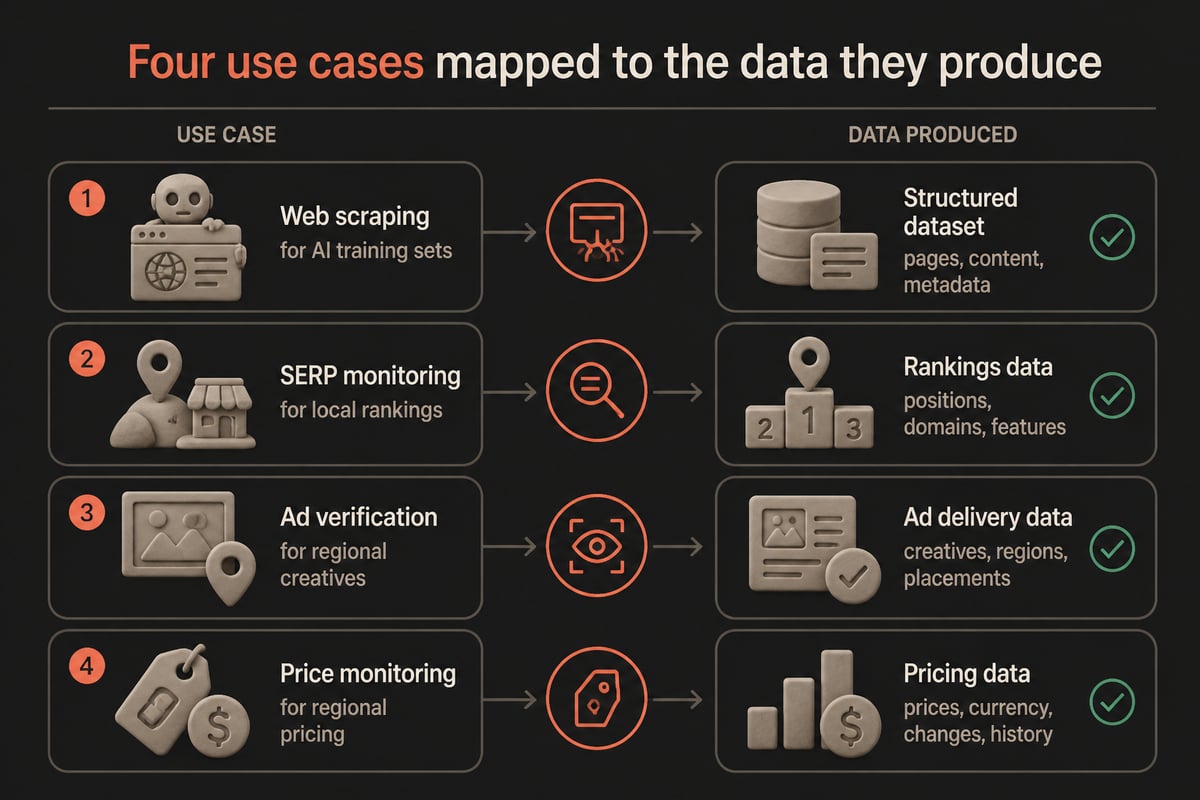
Web Scraping and AI Training Data
Engineers collecting large public datasets run into rate limits, fingerprinting and IP bans. A private residential proxy pool lets crawlers distribute requests across clean addresses, retry on a fresh IP after a block, and hold sessions where pagination requires continuity. Pair the proxy layer with sensible concurrency limits and robots.txt awareness, since the proxy does not change what you are permitted to collect.
SEO and SERP Monitoring
Search results vary by country, city and language. Residential IPs let SEO teams check rankings, featured snippets and local packs as a real user in that market would see them. Datacenter IPs are more likely to trigger CAPTCHAs on search engines, which interrupts rank tracking at scale.
Ad Verification
Ad teams need to confirm that creatives render correctly, that landing pages match the targeting, and that no fraudulent placements slip through. Because ad networks serve different content by geography and device context, residential IPs in the target region show what the intended audience actually sees.
Price and Availability Monitoring
Retailers and travel sites often display different prices by region. Collecting from residential IPs in each market gives a more accurate picture of regional pricing and stock, and it reduces the chance of being served decoy or degraded pages.
Localization and Geo-Testing
Product and QA teams use country-level exits to verify translated pages, currency formatting, consent banners and region-locked features before release.
Choosing a Private Residential Proxy Provider
Choose a provider by testing targeting accuracy, pricing structure, sourcing transparency and real-world success rates on your own targets.
Evaluate these factors before committing:
- Geographic coverage and granularity. Country-level targeting is the minimum. City or ISP targeting matters for local SEO and ad checks.
- Billing model. Per-GB billing rewards efficient requests and punishes heavy media downloads. Confirm whether unused traffic expires.
- Session control. You should be able to switch between rotation and sticky sessions without opening a ticket.
- Success rate on your targets. Run a trial against the exact sites you plan to collect from. Vendor averages rarely match your workload.
- Integration. Look for standard gateway authentication, API access and compatibility with common scraping frameworks.
- Support and uptime. Pipelines run around the clock, so monitoring and responsive support are practical requirements.
For teams that want residential IPs next to datacenter and mobile options on one account, PinguProxy's Residential Proxies are billed per GB, with geo-targeted IPs for scraping, SERP monitoring and localization testing. A zero-log policy keeps your traffic private, and the same account covers datacenter work when residential IPs are not needed.

Is a Private Residential Proxy Legal and Safe?
Using a residential proxy is legal in most jurisdictions, but legality depends on what you collect, how you collect it and how the provider sources its IPs.
Three areas deserve attention.
Data protection. The European Commission lists an IP address as an example of personal data when it relates to an identified or identifiable living person. If your pipeline touches personal data, GDPR-style obligations apply regardless of whether a proxy is involved. Collecting public, non-personal data such as prices, rankings and ad placements is the lower-risk path.
Provider sourcing. Because residential IPs come from real people's devices, consent matters. Ask whether the provider uses opt-in sources, how participants are informed and whether compensation or clear terms are involved. Kaspersky also lists credential stuffing, account abuse, fraud, DDoS attacks, spam and CAPTCHA bypass among reported abuses of residential proxies, which is a reason to choose providers with acceptable-use enforcement and abuse monitoring.
Traffic visibility. A proxy sits in the path of your requests. The Canadian Centre for Cyber Security notes that proxies can log TCP sessions and block specified URLs, IP addresses and domain names, and that depending on implementation they may create adversary-in-the-middle risks. In practice, use HTTPS end to end, avoid sending credentials through providers you have not vetted, and favor a stated zero-log policy.
Routing illegal traffic through any proxy remains illegal, and reputable providers will suspend accounts that do so.
Practical Tips for Running Residential Proxies at Scale
Good proxy hygiene lowers both your block rate and your bill.
- Budget by response size. Residential billing is per GB, so block images, fonts and video in headless browsers where you do not need them. A product page can weigh several times more with media than as bare HTML, and that gap multiplies across large request volumes.
- Match geography to intent. Use the exit country that matches the audience you are measuring, not simply the cheapest pool.
- Use sticky sessions for stateful flows. Rotate between sessions, not inside them. A login, cart and checkout sequence that changes IP midway looks like account takeover and often triggers a challenge.
- Respect rate limits. Spreading requests across IPs does not excuse abusive request rates. Slower, steadier crawling produces cleaner data and fewer bans.
- Rotate user agents and headers coherently. A residential IP paired with a mismatched browser fingerprint still looks suspicious. If the user agent claims a mobile browser, the language headers, viewport and TLS behavior should agree with it.
- Log failures by status code. A rising share of 403 or 429 responses is an early signal to adjust pacing, targeting or session length. Tracking cost per successful request, not per request sent, shows whether a change actually helped.
- Reserve residential for hard targets. Send tolerant sites through cheaper datacenter IPs.
Frequently Asked Questions
Is a private residential proxy faster than a shared one?
Not inherently. Speed depends on the underlying home connection and the provider's routing. Private allocation mainly improves consistency and IP reputation, since no other customer is sending traffic through your addresses.
How many IPs do I need?
It depends on target sensitivity and request volume rather than a fixed number. Start with a rotating pool, measure block rates on your real targets, and move to larger pools or tighter session control only if the data shows you need it.
Can I use residential proxies for SEO rank tracking?
Yes. Rank tracking is one of the most common uses, because residential IPs in the target country return results closer to what local users see and trigger fewer CAPTCHAs than server addresses.
What is the main risk of residential proxies?
The main risks are provider sourcing practices and traffic exposure. Choose a vendor with transparent consent practices, a zero-log policy and abuse controls, and keep sensitive traffic encrypted.
Your next step is to run a small pilot: pick two or three of your hardest target sites, send the same 1,000 requests through a residential pool in the right country, and compare success rate, latency and cost per GB against your current setup. PinguProxy gives you residential, datacenter and mobile proxies on one account, with per-GB Residential Proxies for geo-targeted work and a zero-log policy behind them. You can Get Started with PinguProxy today and test the pool against your own workload before scaling up.