
407 HTTP Error: Authentication, Proxies, and Solutions
When working with proxy servers, encountering the 407 http status code is a common experience that can disrupt your workflow. This authentication-related error specifically occurs when a proxy server requires credentials before allowing access to requested resources. Understanding how to identify, troubleshoot, and resolve 407 http errors is essential for anyone relying on proxy services for web scraping, data collection, or secure browsing. Whether you're a developer implementing proxy authentication or a business user managing proxy configurations, mastering this error code will save you valuable time and prevent connection failures.
What Is the 407 HTTP Status Code
The 407 http status code, officially named "Proxy Authentication Required," is a client error response indicating that the proxy server demands authentication before processing the request. Unlike the similar 401 Unauthorized error that involves direct server authentication, the 407 status code specifically addresses proxy-level authentication requirements.
How 407 Differs From Other Authentication Errors
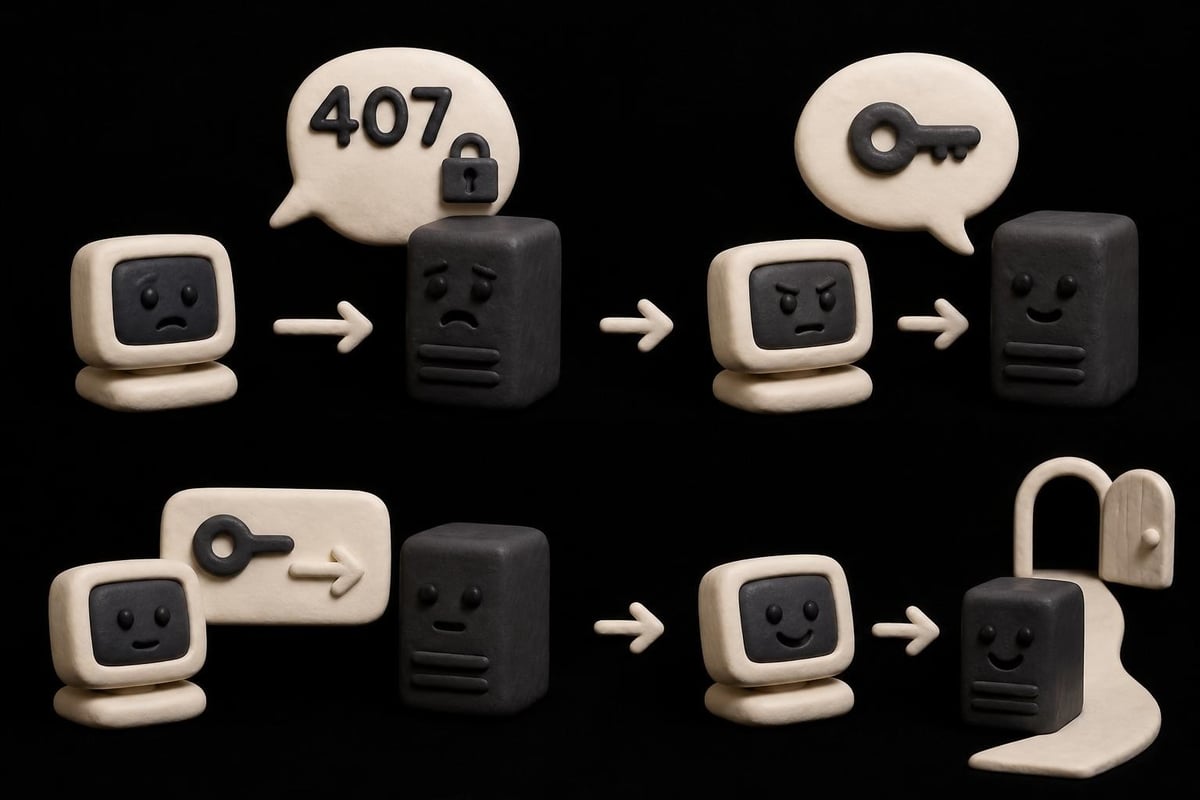
When a client attempts to access resources through a proxy without proper credentials, the proxy server responds with a 407 http code rather than allowing the request to proceed. This distinction matters significantly in network architecture:
- 401 Unauthorized: The destination server requires authentication
- 407 Proxy Authentication Required: The intermediate proxy requires authentication
- 403 Forbidden: Authentication won't help; access is denied regardless
- 408 Request Timeout: The server didn't receive a complete request in time
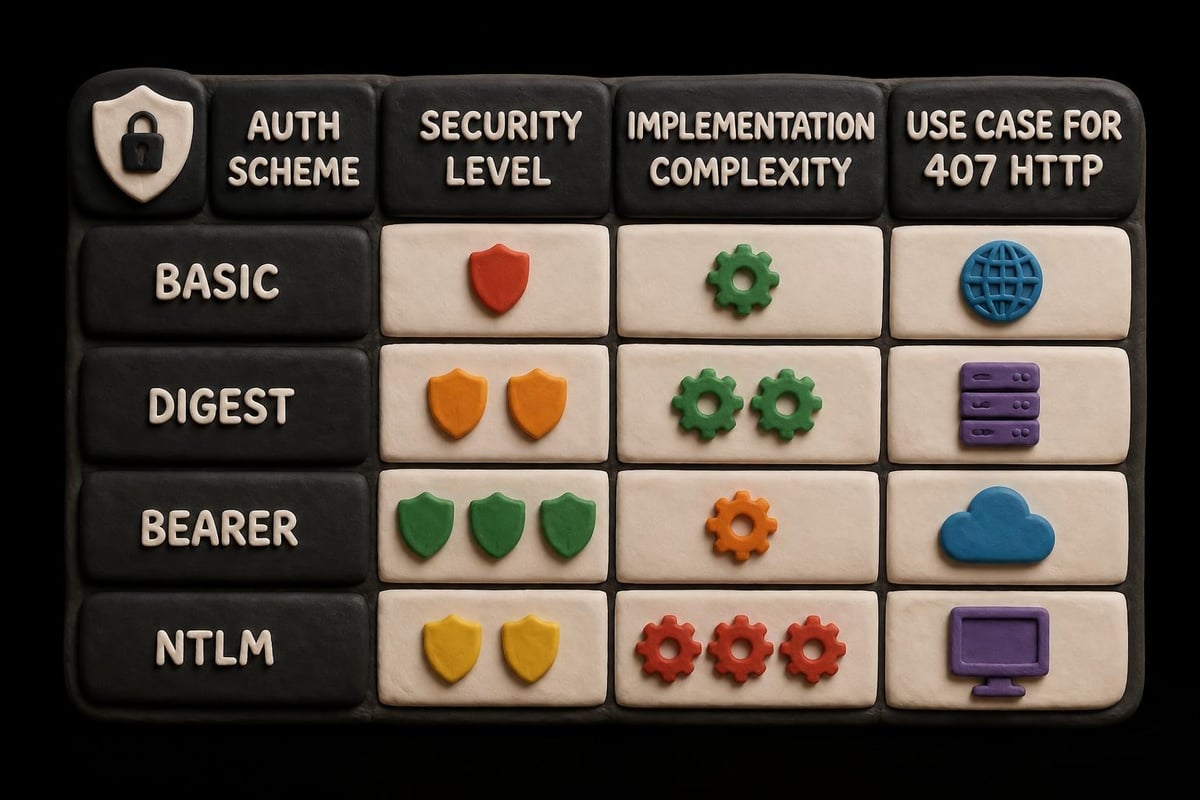
The proxy server includes a Proxy-Authenticate header in the 407 response, specifying the authentication method required. Common methods include Basic, Digest, NTLM, and Bearer authentication schemes.
Common Causes of 407 HTTP Errors
Understanding why 407 http errors occur helps prevent them in the first place. Several scenarios trigger this response code in real-world applications.
Missing or Invalid Credentials
The most straightforward cause involves attempting to use a proxy without providing authentication credentials. When configuring applications for web scraping operations, developers sometimes overlook the authentication step entirely.
Credential-related issues include:
- No credentials provided in the initial request
- Incorrect username or password combinations
- Expired authentication tokens
- Credentials formatted improperly for the authentication scheme
- Special characters in passwords not properly encoded
Configuration Mismatches
Modern applications often involve multiple layers of proxy configuration. A mismatch between your application settings and proxy requirements creates authentication failures that manifest as 407 http errors.
| Configuration Area | Common Issues | Impact |
|---|---|---|
| Application Code | Hardcoded credentials, missing auth headers | Immediate 407 errors |
| Environment Variables | Wrong proxy URLs, outdated passwords | Intermittent failures |
| Network Settings | System-wide proxy conflicts | Widespread connection issues |
| Firewall Rules | Blocked authentication ports | Silent failures |
Proxy services like those offered through PinguProxy's diverse proxy types require proper configuration to ensure seamless authentication across datacenter, residential, and mobile proxy options.
Authentication Scheme Incompatibility
Not all proxies support every authentication method. When your client attempts to authenticate using an unsupported scheme, the proxy returns a 407 http error. The Proxy-Authenticate header indicates acceptable methods, but if your application can't use any of them, manual intervention becomes necessary.
Modern proxies typically support Basic and Digest authentication at minimum. However, enterprise environments may require NTLM or Kerberos authentication, which many standard HTTP libraries don't handle automatically.
Technical Anatomy of 407 HTTP Responses
Examining the technical structure of 407 http responses reveals how proxy authentication actually works. This knowledge proves invaluable when debugging connection issues.
Response Headers and Their Meaning
When a proxy issues a 407 response, it includes specific headers that guide the authentication process. The Proxy-Authenticate header is mandatory and contains crucial information:
HTTP/1.1 407 Proxy Authentication Required
Proxy-Authenticate: Basic realm="Proxy Access"
Proxy-Connection: close
Content-Length: 0
Key headers in 407 responses:
- Proxy-Authenticate: Specifies authentication method and realm
- Proxy-Connection: Connection handling instructions
- Content-Type: Usually minimal or absent in 407 responses
- Date: Timestamp for debugging time-sensitive auth issues
The Authentication Challenge-Response Cycle
The 407 http status initiates a challenge-response authentication cycle. Understanding this sequence helps troubleshoot where authentication breaks down:
- Client sends initial request through proxy without credentials
- Proxy responds with 407 http and Proxy-Authenticate header
- Client resends request with Proxy-Authorization header containing credentials
- Proxy validates credentials and either forwards the request or returns another error
Modern HTTP clients often handle steps 2-3 automatically, making the authentication transparent to users. However, when implementing custom solutions or debugging issues, understanding each step becomes critical.
Resolving 407 HTTP Errors in Practice
Fixing 407 http errors requires systematic troubleshooting based on your specific environment. Whether you're working with rotating proxies or static connections, these solutions apply universally.
Implementing Proper Proxy Authentication
The most direct solution involves correctly implementing proxy authentication in your code or configuration. Different programming languages and tools handle this differently.
For command-line tools like curl:
Include credentials directly in the proxy URL or use dedicated authentication flags. The format http://username:password@proxy-server:port embeds credentials but may expose them in logs.
For Python requests library:
proxies = {
    'http': 'http://user:pass@proxy:port',
    'https': 'http://user:pass@proxy:port'
}
For browser-based scenarios:
Configure system proxy settings with authentication credentials, or use browser extensions that handle proxy authentication automatically.
When working with services that offer unlimited proxy access, ensure your authentication credentials match your account permissions to avoid unnecessary 407 http errors.
Troubleshooting Authentication Failures
When proper credentials still produce 407 http errors, deeper investigation becomes necessary. The comprehensive guide on proxy authentication errors offers additional troubleshooting perspectives.
| Troubleshooting Step | What to Check | Solution Approach |
|---|---|---|
| Verify Credentials | Test username/password separately | Reset credentials if validation fails |
| Check Encoding | Special characters in auth strings | URL-encode or escape properly |
| Review Proxy Type | Authentication method compatibility | Switch auth scheme or proxy type |
| Test Connectivity | Network path to proxy server | Verify firewall rules and routing |
| Examine Logs | Detailed error messages | Look for specific authentication failures |
Handling 407 Errors in Automated Systems
Automated systems like web scrapers and data collection tools require robust error handling for 407 http responses. Simply retrying failed requests wastes resources and time.
Effective strategies include:
- Detecting 407 responses and automatically injecting credentials
- Implementing exponential backoff for authentication failures
- Rotating between authenticated proxies when one fails
- Logging authentication attempts for security auditing
- Separating authentication errors from other connection issues
For operations requiring IP rotation capabilities, ensure authentication credentials persist across rotations to prevent repeated 407 http errors during proxy switches.
Advanced Authentication Scenarios
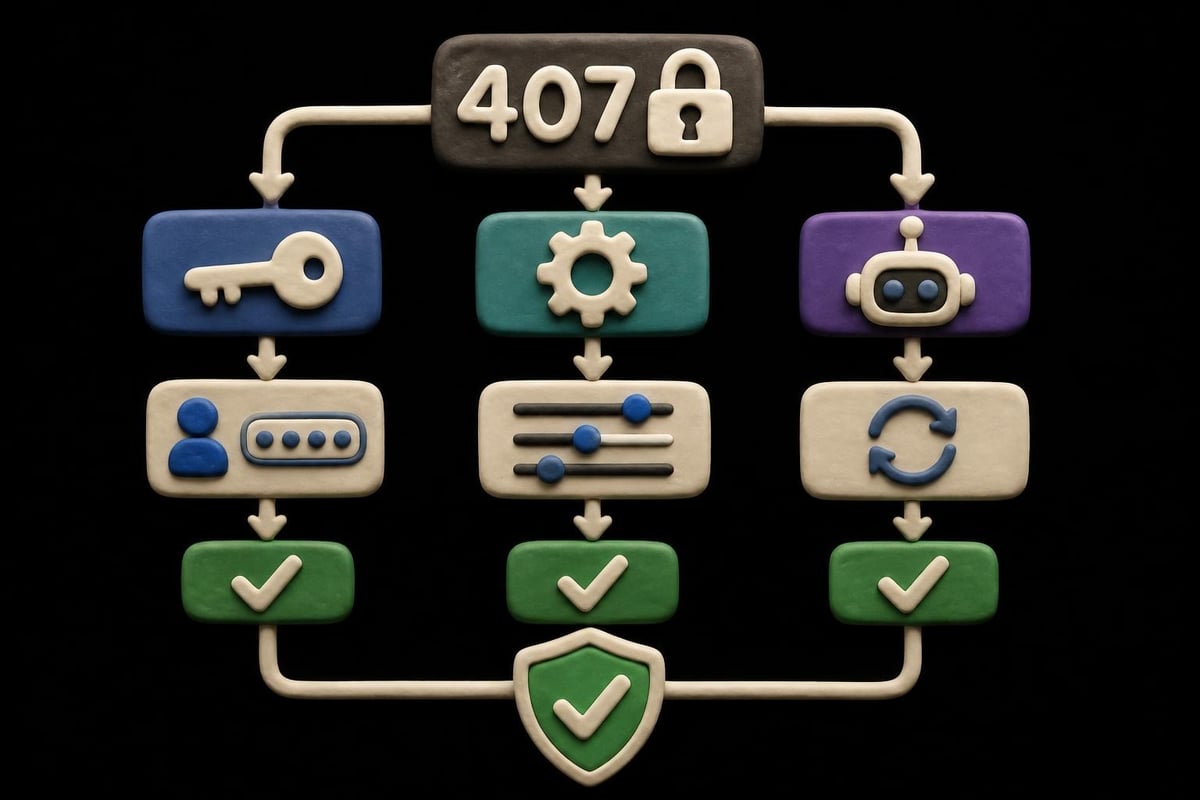
Beyond basic username-password authentication, modern proxy environments present complex authentication challenges that generate 407 http errors in unexpected ways.
Token-Based and OAuth Authentication
Some proxy services use bearer tokens or OAuth flows instead of traditional credentials. These modern authentication methods provide enhanced security but require different implementation approaches.
When using token authentication:
- Obtain the authentication token through the proxy provider's API
- Include the token in the Proxy-Authorization header with "Bearer" scheme
- Implement token refresh logic before expiration
- Handle token validation failures distinctly from credential errors
The shift toward token-based systems reflects broader security trends, and understanding how 407 http errors manifest in these contexts prevents confusion during troubleshooting.
Multi-Proxy Authentication Chains
Enterprise networks sometimes route traffic through multiple proxy layers, each requiring separate authentication. This creates scenarios where a 407 http error could originate from any proxy in the chain.
Debugging multi-proxy scenarios requires:
- Identifying which proxy in the chain returned the 407 response
- Verifying credentials for each authentication layer
- Understanding authentication pass-through policies
- Testing each proxy connection independently
When configuring proxy pools for high-volume operations, ensure authentication is properly configured for all proxies in your rotation to maintain consistent connectivity.
Security Implications of 407 HTTP Errors
While 407 http errors primarily indicate authentication issues, they also reveal important security considerations that affect both proxy users and providers.
Information Disclosure Risks
The Proxy-Authenticate header in 407 responses reveals information about the proxy's authentication requirements. While necessary for proper client configuration, this disclosure could assist attackers in reconnaissance.
Security-conscious implementations should:
- Use encrypted connections (HTTPS) for all proxy communication
- Implement rate limiting on authentication attempts
- Monitor for brute-force authentication patterns
- Employ strong password policies for proxy credentials
- Consider certificate-based authentication for sensitive environments
Credential Management Best Practices
Storing and transmitting proxy credentials securely prevents unauthorized access that could bypass intended access controls. The Cloudflare documentation on 407 errors emphasizes proper credential handling.
Essential credential security measures:
- Never hardcode credentials in source code repositories
- Use environment variables or secure credential stores
- Rotate proxy passwords regularly, especially after team changes
- Implement least-privilege access for proxy credentials
- Audit proxy authentication logs for suspicious patterns
For developers working with SOCKS proxy configurations, remember that authentication security applies equally to SOCKS5 authentication and HTTP proxy authentication.
Performance Impact of Authentication
The authentication process triggered by 407 http responses introduces latency that can affect application performance, especially in high-throughput scenarios.
Authentication Overhead Analysis
Each 407 http challenge-response cycle adds network round trips to your requests. While typically negligible for individual requests, this overhead compounds in bulk operations.
- Initial 407 response: ~50-100ms depending on proxy location
- Credential validation: ~20-50ms for basic schemes
- Connection establishment: Additional TLS handshake if using HTTPS
- Total overhead: 100-200ms per unauthenticated request
Modern HTTP clients implement authentication caching, sending credentials proactively on subsequent requests to the same proxy. This optimization eliminates most 407 http errors after the first request in a session.
Optimizing Authenticated Proxy Connections
Reducing authentication-related performance impacts requires strategic implementation choices:
Connection pooling maintains authenticated connections across multiple requests, amortizing the authentication overhead. Most HTTP libraries support this through keep-alive connections.
Preemptive authentication sends credentials with the first request, avoiding the 407 challenge entirely. While this works well with trusted proxies, it exposes credentials in every request.
Session persistence with high-speed datacenter proxies ensures that once authenticated, connections remain stable throughout your operation window, minimizing repeated authentication cycles.
Common Platforms and 407 HTTP Errors
Different platforms and tools handle 407 http errors in distinctive ways, requiring platform-specific knowledge for effective troubleshooting.
Browser-Based Applications
Modern web browsers automatically prompt users for proxy credentials when receiving 407 responses. However, this behavior varies across browsers:
| Browser | 407 Handling | User Experience |
|---|---|---|
| Chrome | Displays authentication dialog | May cache credentials per session |
| Firefox | Prompts with detailed error info | Allows saving credentials |
| Safari | System keychain integration | Seamless with stored credentials |
| Edge | Similar to Chrome | Syncs across devices |
For automation scenarios using headless browsers, proxy authentication must be configured programmatically to prevent 407 http errors from halting execution.
Mobile Applications and 407 Errors
Mobile platforms introduce unique challenges for proxy authentication. iOS and Android handle system-wide proxy settings differently, and not all apps respect these configurations.
Mobile-specific considerations:
- Many mobile apps ignore system proxy settings entirely
- VPN-based proxy solutions bypass traditional 407 authentication
- Mobile networks sometimes inject transparent proxies
- App sandboxing limits credential sharing between applications
When developing mobile applications that use proxies for app QA testing, implement explicit proxy configuration rather than relying on system settings to avoid unexpected 407 http errors.
Enterprise Software Solutions
Enterprise environments frequently employ authenticated proxy servers for security and monitoring. Corporate applications must handle 407 http errors gracefully while respecting company security policies.
Enterprise authentication patterns:
- Active Directory integration for proxy credentials
- Single sign-on (SSO) extensions for proxy authentication
- Centralized credential management systems
- Compliance-driven authentication logging
Understanding how protocol compatibility affects authentication helps prevent 407 http errors when deploying enterprise solutions across diverse network environments.
Monitoring and Logging 407 Errors
Proactive monitoring of 407 http errors reveals authentication issues before they impact production systems. Effective logging strategies balance security with diagnostic utility.
Implementing Effective Error Logging
When 407 errors occur, comprehensive logging helps identify patterns and root causes:
- Timestamp and request details: When and what triggered the error
- Proxy endpoint information: Which proxy returned the 407 response
- Authentication method attempted: What credentials or scheme failed
- User or system context: Who or what encountered the error
- Subsequent retry outcomes: Whether authentication eventually succeeded
Avoid logging actual credentials even when debugging authentication failures. Instead, log credential presence and format validation results.
Alerting Strategies for Authentication Failures
Setting up intelligent alerts for 407 http errors prevents minor issues from escalating:
- Threshold-based alerts: Trigger when 407 errors exceed normal rates
- Pattern recognition: Detect systematic authentication failures
- Service-specific monitoring: Track 407 rates per proxy or application
- Correlation with changes: Link authentication failures to recent configuration updates
For operations involving connection timeout troubleshooting, distinguish between timeouts and authentication errors, as they require different remediation approaches despite sometimes appearing similar.
Future Trends in Proxy Authentication
The landscape of proxy authentication continues evolving, influenced by security requirements and technological advances. Understanding these trends helps prepare for future 407 http error scenarios.
Zero-Trust Architecture Impact
Zero-trust security models increasingly influence proxy authentication mechanisms. Rather than trusting authenticated connections implicitly, modern systems continuously verify credentials and authorization.
Emerging authentication patterns include:
- Continuous authentication verification throughout sessions
- Contextual authentication based on request characteristics
- Time-limited authentication tokens with automatic rotation
- Integration with identity providers and SSO systems
Standardization Efforts
While HTTP proxy authentication has existed for decades, standardization efforts continue refining best practices. The HTTP status code documentation reflects current standards while acknowledging ongoing development.
New authentication protocols aim to reduce the frequency of 407 http errors through improved credential negotiation and more flexible authentication schemes that adapt to security requirements without interrupting legitimate traffic.
Understanding 407 http errors transforms proxy authentication from a frustrating obstacle into a manageable aspect of network configuration. By implementing proper credentials, monitoring authentication patterns, and choosing reliable proxy infrastructure, you can minimize disruptions and maintain smooth operations. PinguProxy eliminates common authentication headaches with straightforward credential management, high-speed connections across datacenter and residential networks, and 24/7 support to resolve any proxy issues quickly. Whether you're scaling web scraping operations or ensuring secure access to global resources, our unlimited bandwidth and zero-log policy provide the reliable foundation your projects demand.