
यह लेख वर्तमान में केवल अंग्रेज़ी में उपलब्ध है।
अंग्रेज़ी में पढ़ेंApache HTTP Server Reverse Proxy Setup Guide 2026
An apache http server reverse proxy acts as an intermediary that sits between client requests and backend servers, forwarding requests and responses while providing additional layers of security, load balancing, and performance optimization. Unlike a forward proxy that serves clients, a reverse proxy serves servers, making it an essential tool for modern web infrastructure. For businesses managing web scraping operations, gaming platforms, or distributed applications, understanding how to leverage Apache's reverse proxy capabilities can dramatically improve both security posture and operational efficiency.
Understanding Apache Reverse Proxy Architecture
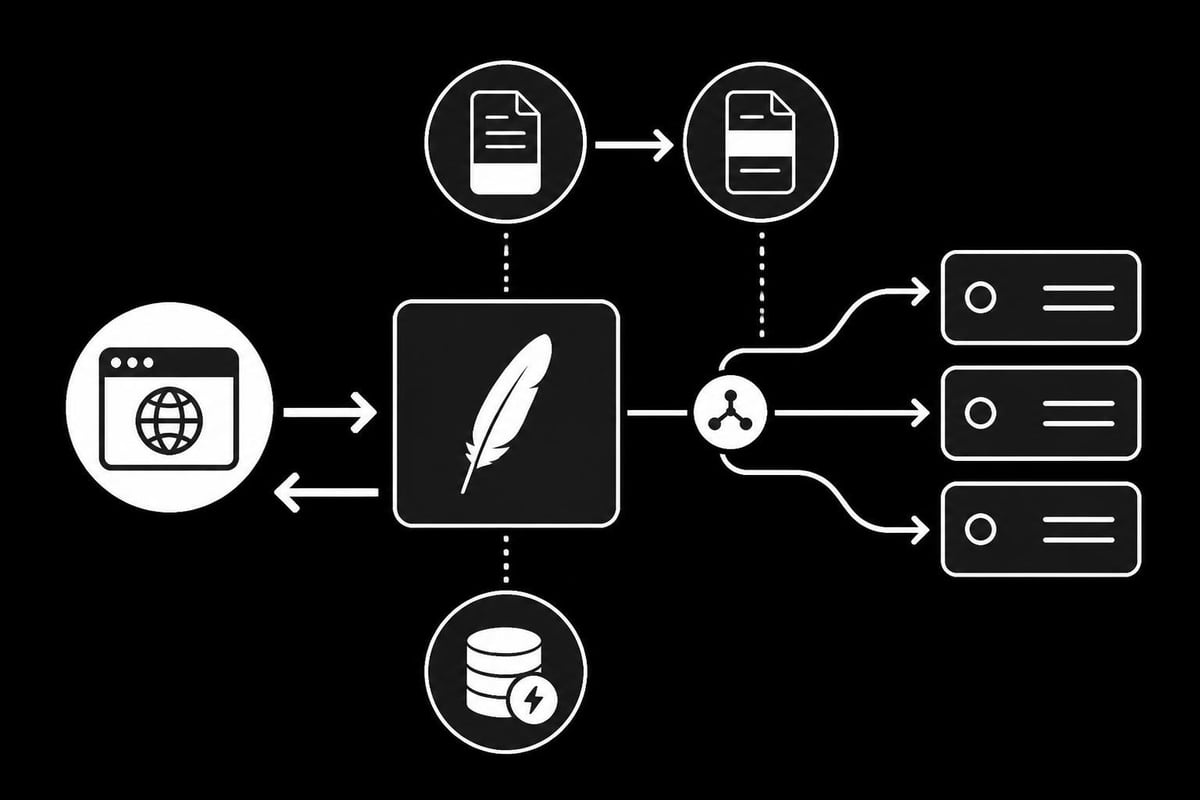
The apache http server reverse proxy functions as a gateway that accepts incoming HTTP requests and forwards them to one or more backend servers. This architecture creates a single point of entry for client traffic while distributing workload across multiple application servers behind the scenes.
Key architectural benefits include:
- Centralized SSL/TLS termination at the proxy layer
- Load distribution across multiple backend instances
- Protection of backend server IP addresses and infrastructure
- Simplified certificate management and security updates
- Content caching for improved response times
When a client sends a request to your domain, the apache http server reverse proxy intercepts it, processes any necessary transformations, and forwards it to the appropriate backend server. The response follows the reverse path, with the proxy potentially modifying headers or caching content before sending it back to the client. This bidirectional flow enables sophisticated traffic management strategies that would be difficult to implement at the application layer alone.
The proxy server can also handle multiple domains and subdomains through a single IP address, making it ideal for organizations managing diverse web properties. This consolidation reduces infrastructure complexity while maintaining clear separation between different applications and services.
Essential Apache Modules for Reverse Proxy
Setting up an apache http server reverse proxy requires several core modules that work together to handle request forwarding and response management. The primary module, mod_proxy, provides the foundation for all proxy operations, but it needs companion modules to handle specific protocols and features.
Required Module Configuration
| Module Name | Purpose | Critical For |
|---|---|---|
| mod_proxy | Core proxy functionality | All proxy operations |
| mod_proxy_http | HTTP/HTTPS protocol support | Web traffic handling |
| mod_proxy_balancer | Load balancing capabilities | Traffic distribution |
| mod_lbmethod_byrequests | Request-based load balancing | Even distribution |
| mod_headers | Header manipulation | Security and routing |
| mod_ssl | SSL/TLS termination | Encrypted connections |
To enable these modules on most Linux distributions, you'll execute commands in your terminal. On Ubuntu or Debian systems, use a2enmod followed by the module name. For example: sudo a2enmod proxy proxy_http proxy_balancer headers ssl. On CentOS or RHEL systems, the modules are typically compiled into Apache, but you may need to uncomment LoadModule directives in your httpd.conf file.
After enabling the necessary modules, restart Apache to load them into memory. The service restart ensures all dependencies are properly initialized and ready to handle proxy traffic. This step is critical because attempting to use proxy directives without the corresponding modules will result in configuration errors and failed service starts.
The official Apache documentation on reverse proxy configuration provides detailed information about each module's specific directives and use cases. Understanding these modules allows you to build more sophisticated proxy configurations tailored to your specific infrastructure needs.
Basic Apache HTTP Server Reverse Proxy Configuration
Creating a basic apache http server reverse proxy configuration involves defining how incoming requests map to backend servers. The two fundamental directives are ProxyPass and ProxyPassReverse, which handle request forwarding and response header rewriting respectively.
Here's a simple configuration example:
<VirtualHost *:80>
    ServerName example.com

    ProxyPreserveHost On
    ProxyPass / http://backend-server:8080/
    ProxyPassReverse / http://backend-server:8080/
</VirtualHost>
The ProxyPass directive tells Apache where to forward requests. When a client accesses example.com, Apache forwards the request to backend-server on port 8080. The ProxyPassReverse directive adjusts response headers, particularly Location and Content-Location headers, ensuring that redirects and URLs in responses point back to the proxy rather than directly to the backend server.
ProxyPreserveHost is crucial because it:
- Maintains the original Host header from the client request
- Allows backend applications to see the original domain name
- Enables proper virtual host routing on backend servers
- Prevents URL generation issues in web applications
For organizations running multiple services, you can configure path-based routing to direct different URLs to different backend servers. This approach allows you to consolidate multiple applications behind a single domain while maintaining logical separation.
Advanced Routing Patterns
Path-based routing enables sophisticated traffic distribution strategies. Consider an e-commerce platform where the main website, API, and admin panel run on separate servers:
ProxyPass /api/ http://api-server:3000/
ProxyPassReverse /api/ http://api-server:3000/

ProxyPass /admin/ http://admin-server:4000/
ProxyPassReverse /admin/ http://admin-server:4000/

ProxyPass / http://web-server:8080/
ProxyPassReverse / http://web-server:8080/
The order matters significantly in these configurations. Apache processes directives from top to bottom, so more specific paths must appear before general ones. Placing the root path (/) first would catch all requests, preventing subsequent rules from ever matching.
Similar to how reverse proxy SSL configurations handle secure connections, you can implement SSL termination at the Apache layer, offloading encryption overhead from backend servers while maintaining end-to-end security through internal network encryption.
Load Balancing with Apache Reverse Proxy
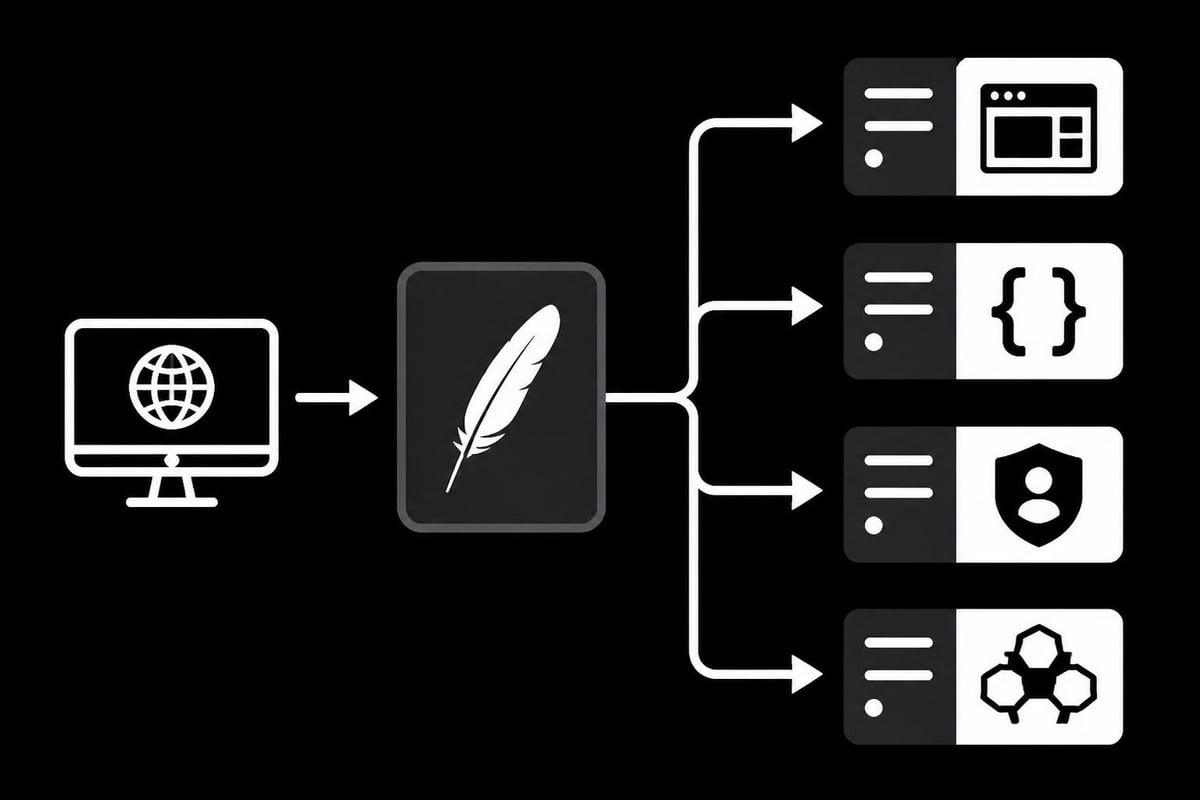
The apache http server reverse proxy excels at distributing traffic across multiple backend servers through its load balancing capabilities. The mod_proxy_balancer module creates a pool of backend servers called a balancer cluster, automatically distributing requests according to your chosen algorithm.
Configuring a Load Balancer Cluster
A balanced configuration requires defining the balancer group and specifying member servers:
<Proxy balancer://mycluster>
    BalancerMember http://backend1:8080
    BalancerMember http://backend2:8080
    BalancerMember http://backend3:8080
    ProxySet lbmethod=byrequests
</Proxy>

ProxyPass / balancer://mycluster/
ProxyPassReverse / balancer://mycluster/
This configuration creates a balancer named "mycluster" with three backend servers. The lbmethod=byrequests setting distributes requests evenly across all healthy members, ensuring no single server becomes overwhelmed while others sit idle.
Available load balancing methods:
- byrequests: Distributes requests evenly (default)
- bytraffic: Balances based on byte count transferred
- bybusyness: Sends requests to the server with fewest active connections
- heartbeat: Uses external heartbeat monitoring for health checks
Each method suits different scenarios. For web scraping operations where request complexity varies significantly, bybusyness often provides better real-world distribution than simple round-robin. Video streaming or file download services benefit from bytraffic, which accounts for bandwidth consumption rather than just request count.
Health checking ensures traffic only reaches operational servers. Apache can automatically detect failed backends and route around them, maintaining service availability even when individual servers experience issues. This resilience is essential for production environments where downtime directly impacts revenue and user experience.
Just as Docker reverse proxy setups benefit from container orchestration, Apache's load balancing integrates well with dynamic infrastructure where servers scale up and down based on demand.
Security Considerations for Reverse Proxy Deployments
An apache http server reverse proxy introduces both security benefits and potential vulnerabilities that require careful configuration. When properly implemented, the proxy acts as a security boundary, but misconfigurations can expose backend systems to attack.
Essential Security Headers
| Header | Purpose | Example Value |
|---|---|---|
| X-Forwarded-For | Preserve client IP | Client's real IP address |
| X-Forwarded-Proto | Indicate original protocol | https |
| X-Real-IP | Alternative client IP header | Client's IP address |
| Strict-Transport-Security | Enforce HTTPS | max-age=31536000 |
Configure these headers to maintain security context as requests traverse the proxy:
RequestHeader set X-Forwarded-Proto "https"
RequestHeader set X-Real-IP %{REMOTE_ADDR}s
Header always set Strict-Transport-Security "max-age=31536000; includeSubDomains"
The X-Forwarded-For header preserves the original client IP address, which backend applications need for logging, rate limiting, and geographic restrictions. Without this header, backends only see the proxy's IP address, losing critical information about request origins.
Additional security measures include:
- Restricting proxy access to specific backend hosts
- Implementing IP-based access controls
- Disabling unnecessary HTTP methods
- Validating and sanitizing incoming headers
- Enabling request size limits to prevent resource exhaustion
Research on HTTP request synchronization demonstrates how discrepancies between proxy and backend servers can create security vulnerabilities. Ensuring consistent request interpretation across your infrastructure prevents exploitation of parsing differences.
For proxy services handling sensitive data, consider implementing sanitization techniques for intrusion prevention, which add an additional layer of protection against SQL injection and other database-targeted attacks passing through the reverse proxy.
The proxy server should never expose detailed error messages to clients, as these can reveal information about backend infrastructure and software versions. Configure custom error pages that provide user-friendly information without leaking technical details attackers could exploit.
Performance Optimization Techniques
Optimizing an apache http server reverse proxy for maximum performance requires balancing resource usage, connection handling, and caching strategies. These optimizations become particularly important when handling high traffic volumes or supporting performance-sensitive applications like web scraping or real-time gaming platforms.
Enabling Content Caching
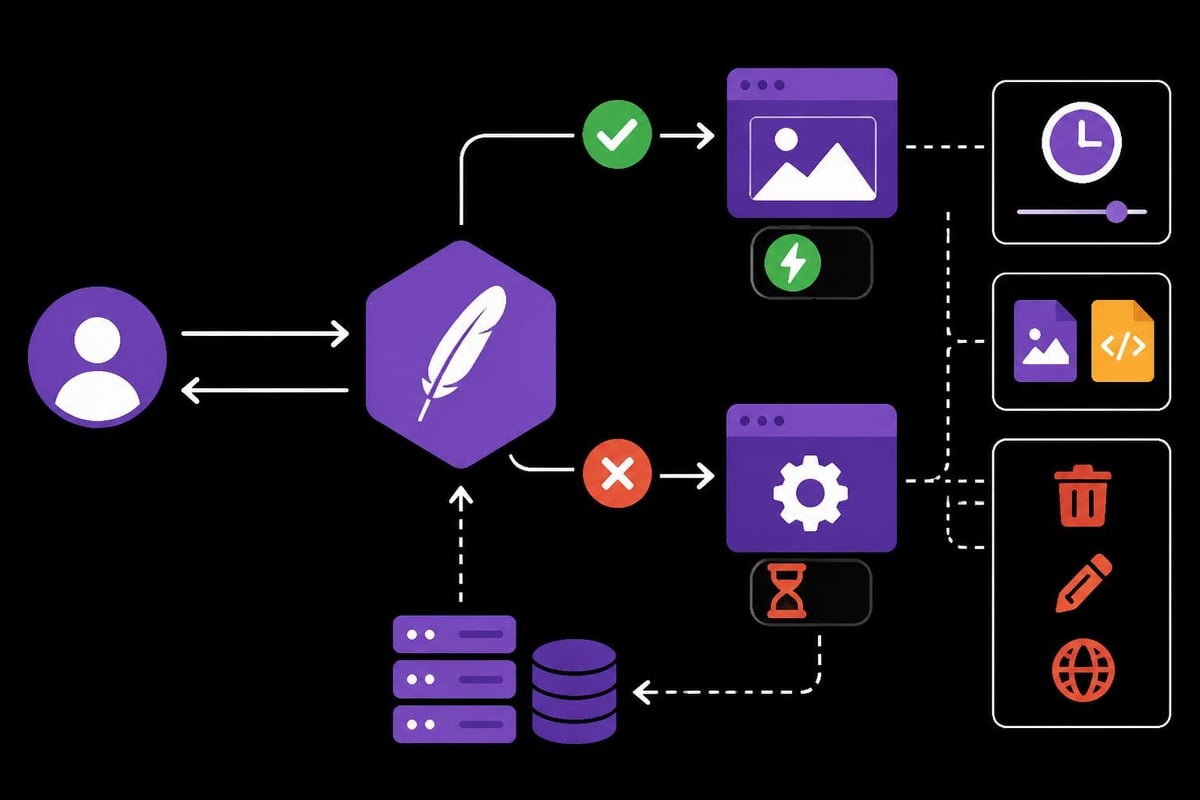
The mod_cache and mod_cache_disk modules allow Apache to cache responses from backend servers, dramatically reducing load and improving response times for frequently requested content:
CacheEnable disk /
CacheRoot /var/cache/apache2/proxy
CacheDefaultExpire 3600
CacheMaxExpire 86400
CacheIgnoreHeaders Set-Cookie
This configuration enables disk-based caching for all paths, storing cached content in the specified directory. The expiration settings control how long content remains cached, with a default of one hour and maximum of 24 hours for items without explicit cache headers.
Caching proves especially valuable for static assets like images, CSS, and JavaScript files that rarely change. However, be cautious with dynamic content and authenticated sessions, where caching can serve stale or incorrect data to users.
Connection Pooling and KeepAlive
Connection reuse between the proxy and backend servers eliminates the overhead of establishing new TCP connections for each request:
<Proxy http://backend-server:8080>
    ProxySet connectiontimeout=5 timeout=90 keepalive=On
</Proxy>
These settings maintain persistent connections to backend servers, reducing latency and TCP overhead. The connectiontimeout defines how long Apache waits to establish a connection, while timeout controls how long to wait for responses. Setting keepalive=On enables HTTP persistent connections to the backend.
Performance tuning checklist:
- Adjust
MaxRequestWorkersbased on expected concurrent traffic - Configure
ServerLimitappropriately for your hardware - Enable compression with
mod_deflateto reduce bandwidth - Implement rate limiting to protect backend resources
- Monitor and tune
TimeOutdirectives for your application behavior
For businesses utilizing cheap datacenter proxies for web scraping operations, optimizing the reverse proxy configuration ensures efficient request distribution and minimal overhead, maximizing the value of your proxy infrastructure.
Studies on fairness in adaptive video streaming over HTTP/2 server push demonstrate how advanced proxy configurations can optimize content delivery for bandwidth-intensive applications, principles that apply broadly to reverse proxy performance tuning.
Monitoring and Troubleshooting Apache Reverse Proxy
Maintaining a healthy apache http server reverse proxy requires continuous monitoring and the ability to quickly diagnose issues when they arise. Apache provides extensive logging capabilities and status modules that give visibility into proxy operations.
Configuring Comprehensive Logging
Enable detailed proxy logging to track request flow and identify problems:
LogLevel warn proxy:trace2
CustomLog ${APACHE_LOG_DIR}/proxy_access.log combined
ErrorLog ${APACHE_LOG_DIR}/proxy_error.log
The proxy:trace2 log level provides detailed information about proxy decisions, backend selection, and request forwarding without overwhelming your logs with excessive detail. This verbosity level strikes a balance between insight and log storage requirements.
Custom log formats can capture proxy-specific information:
LogFormat "%h %l %u %t \"%r\" %>s %b \"%{Referer}i\" \"%{User-Agent}i\" %D %{X-Forwarded-For}i" proxy_combined
CustomLog ${APACHE_LOG_DIR}/proxy.log proxy_combined
This format includes the %D directive showing request duration in microseconds, plus the X-Forwarded-For header showing the original client IP. These metrics are invaluable for identifying slow backends and troubleshooting routing issues.
Enabling the Balancer Manager
The mod_status and balancer manager provide web-based interfaces for monitoring load balancer health:
<Location /balancer-manager>
    SetHandler balancer-manager
    Require ip 192.168.1.0/24
</Location>
This configuration creates a /balancer-manager URL that displays real-time statistics about balancer members, including request counts, byte transfers, and health status. The Require ip directive restricts access to your internal network, preventing public exposure of infrastructure details.
Common troubleshooting scenarios:
- 502 Bad Gateway: Backend server unreachable or not responding
- 503 Service Unavailable: All backend servers marked as failed
- Slow response times: Check ProxyTimeout settings and backend performance
- Missing client IP: Verify X-Forwarded-For header configuration
- SSL certificate errors: Validate certificate chain and ProxyPassReverse URLs
For detailed troubleshooting guidance, the comprehensive video guide on Apache reverse proxy configuration walks through common issues and their solutions, including multiple server setups and domain name routing.
Regular monitoring of error logs helps identify patterns before they become critical issues. Set up automated alerts for error rate spikes, connection failures, or abnormal response times to maintain proactive oversight of your proxy infrastructure.
Integration with Modern Proxy Services
The apache http server reverse proxy integrates seamlessly with modern proxy services, creating layered architectures that combine Apache's routing capabilities with specialized proxy providers for enhanced functionality. This integration proves particularly valuable for web scraping, accessing geo-restricted content, and maintaining anonymity.
When using external proxy services like high-speed datacenter proxies, you can configure Apache to route traffic through these proxies while maintaining centralized control over request distribution and load balancing. This approach combines the benefits of Apache's robust reverse proxy features with the geographic diversity and IP rotation capabilities of specialized proxy providers.
Consider a scenario where your web scraping infrastructure needs to distribute requests across multiple data centers while rotating IP addresses to avoid rate limiting. Configure Apache to balance load across your scraper instances, then have those instances connect through rotating proxies. This two-tier architecture provides both application-level load balancing and IP-level diversity.
Chaining Proxy Configurations
Apache can forward requests to upstream proxies using the ProxyRemote directive:
ProxyRemote * http://upstream-proxy:8080
This configuration sends all proxied traffic through an additional proxy layer, useful when you need to route through SOCKS5 proxies or specialized proxy services. The layered approach provides flexibility in mixing different proxy types and providers within a single infrastructure.
Performance considerations become critical when chaining proxies, as each additional hop introduces latency. Balance the security and anonymity benefits against the performance costs, and monitor end-to-end response times to ensure they remain acceptable for your use case.
The combination of Apache's reverse proxy capabilities with specialized proxy services creates a powerful platform for applications requiring both load distribution and IP diversity, from large-scale web scraping operations to global content delivery networks.
Implementing an apache http server reverse proxy provides essential infrastructure capabilities for load balancing, security, and performance optimization across modern web applications. Whether you're managing web scraping operations, gaming platforms, or distributed services, Apache's flexible configuration options enable sophisticated traffic management tailored to your specific requirements. PinguProxy complements these reverse proxy setups with high-speed datacenter and mobile proxies supporting both IPv4 and IPv6, offering 10Gbps bandwidth and 1ms proxy rotation to maximize anonymity while your Apache infrastructure handles intelligent request distribution. With unlimited access and 24/7 support, PinguProxy ensures your proxy-based architecture operates at peak efficiency for any use case.