
Best Proxy for YouTube: Speed, Security & Access Guide
YouTube has become the second-largest search engine and the most popular video platform globally, but access isn't always guaranteed. Schools, workplaces, and entire countries impose restrictions that prevent users from watching their favorite content. Meanwhile, geo-blocking limits access to region-specific videos, live streams, and even entire channels. Finding the best proxy for YouTube means balancing speed, security, and reliability to ensure smooth playback without compromising your privacy or data.
Understanding Why You Need a Proxy for YouTube
YouTube restrictions fall into several categories, each requiring different technical approaches. Network administrators at schools and offices typically block YouTube by domain or IP address to preserve bandwidth and maintain productivity. National governments implement more sophisticated blocks, often using deep packet inspection to detect and restrict video streaming traffic. Content creators themselves may geo-restrict videos due to licensing agreements, making certain content unavailable in specific countries.
The challenge goes beyond simple access. Modern streaming requires consistent high bandwidth, low latency, and stable connections. YouTube automatically adjusts video quality based on connection speed, meaning a slow or unstable proxy results in constant buffering and reduced resolution. Recent research on video streaming behavior demonstrates how network characteristics directly impact playback quality, making proxy selection critical for viewer experience.
Security Risks of Free Proxies
Many users turn to free proxy services without understanding the significant security implications. A comprehensive security study analyzing free proxy vulnerabilities revealed that the majority log user activity, inject advertisements, or worse, intercept sensitive data. When you route YouTube traffic through an untrusted proxy, every search query, watched video, and comment becomes visible to the proxy operator.
Free proxies also suffer from severe performance limitations:
- Overcrowded servers shared by thousands of users simultaneously
- Bandwidth throttling that makes HD video playback impossible
- Frequent downtime requiring constant switching between proxy addresses
- Outdated encryption or no encryption at all, exposing your identity
The trade-off for "free" access often means compromised privacy and frustrating viewing experiences that defeat the purpose of using a proxy in the first place.

Types of Proxies and Their YouTube Performance
Choosing the best proxy for YouTube depends on understanding the three primary proxy types and how each performs for video streaming. Each approach offers distinct advantages and limitations that affect playback quality, privacy, and reliability.
Datacenter Proxies
Datacenter proxies originate from cloud hosting providers and data centers rather than residential internet connections. These proxies deliver exceptional speed thanks to enterprise-grade infrastructure and 10Gbps+ bandwidth capabilities. For YouTube streaming, datacenter proxies provide consistent high performance at the lowest cost per gigabyte.
| Feature | Performance Level | YouTube Suitability |
|---|---|---|
| Speed | Very High (10Gbps+) | Excellent for 4K streaming |
| Cost | Low to Medium | Best value for regular use |
| Detection Risk | Medium to High | May trigger verification |
| IP Pool Size | Medium | Adequate for most users |
The primary drawback involves detection. YouTube's systems can identify datacenter IP ranges and may occasionally prompt additional verification steps or temporarily restrict access. For most casual viewing, however, datacenter proxies provide the speed and affordability that make them a popular choice.
Residential Proxies
Residential proxies route traffic through real devices with legitimate ISP-assigned IP addresses. This makes them virtually indistinguishable from regular YouTube viewers, significantly reducing the risk of detection or blocking. When you need the best proxy for YouTube that mimics authentic user behavior, residential proxies deliver superior reliability.
The authentication challenge stems from the diverse, distributed nature of residential networks. Understanding rotating residential proxies helps clarify how these systems maintain both anonymity and performance across millions of legitimate IP addresses.
Key advantages for YouTube access:
- Genuine ISP IP addresses that YouTube trusts completely
- Geographic diversity spanning hundreds of countries and cities
- Lower block rates compared to datacenter alternatives
- Ability to access region-locked content reliably
Speed can vary depending on the source device's connection quality, but premium residential proxy services maintain quality standards that ensure smooth HD and 4K playback. The higher cost per gigabyte reflects the complexity of maintaining authentic residential IP pools.
Mobile Proxies
Mobile proxies utilize IP addresses assigned by cellular networks (4G, 5G) to mobile devices. These represent the most trusted IP addresses from YouTube's perspective since millions of legitimate users watch videos on smartphones and tablets. Mobile proxies offer the highest success rate for bypassing sophisticated detection systems.
The rotation capabilities of mobile proxies provide exceptional anonymity. Cellular carriers frequently reassign IP addresses, and premium services implement additional rotation to enhance privacy further. This makes mobile proxies ideal for accessing YouTube in highly restricted environments where other proxy types fail.
However, bandwidth costs and availability constraints make mobile proxies the most expensive option. They excel for critical use cases requiring absolute reliability but may not be cost-effective for casual daily YouTube viewing.
Technical Considerations for YouTube Streaming
Modern YouTube streaming relies on sophisticated protocols that affect proxy compatibility and performance. Understanding these technical factors helps identify the best proxy for YouTube in 2026.
Protocol Support and Compatibility
YouTube primarily uses HTTPS for video delivery, but the underlying transport protocols matter significantly. The platform has increasingly adopted QUIC (Quick UDP Internet Connections), which operates over UDP rather than traditional TCP. Recent advances in QUIC proxying demonstrate how proxy architecture affects streaming performance, particularly for latency-sensitive applications like video.
Your proxy must properly handle:
- HTTPS with SNI (Server Name Indication) for initial connection establishment
- QUIC/HTTP3 for optimized video chunk delivery
- WebSocket connections for live chat and interactive features
- Range requests that allow adaptive bitrate streaming
Proxies that don't correctly forward these protocols cause playback failures, buffering, or quality degradation even with sufficient bandwidth.
Bandwidth and Speed Requirements
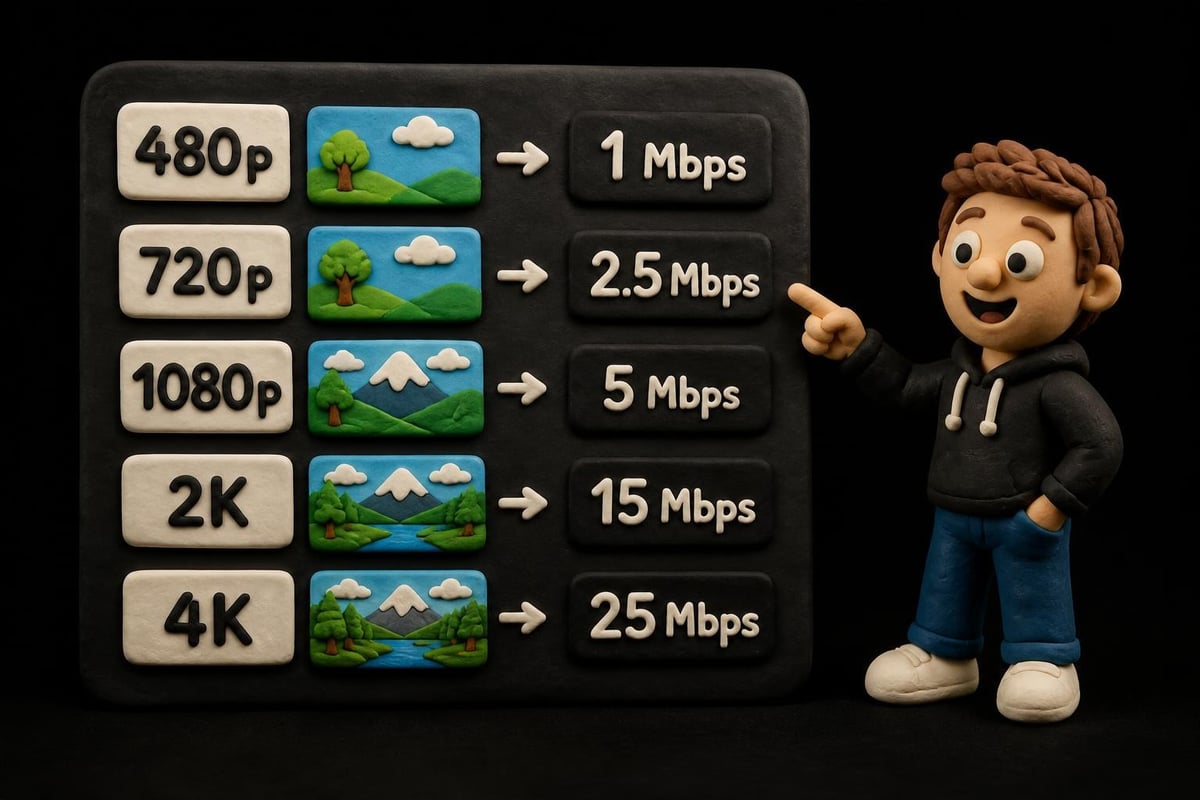
YouTube automatically adjusts video quality based on detected connection speed, creating specific bandwidth thresholds for different resolutions:
| Video Quality | Minimum Speed | Recommended Speed | Proxy Type Recommendation |
|---|---|---|---|
| 480p (SD) | 1.1 Mbps | 2.5 Mbps | Any type adequate |
| 720p (HD) | 2.5 Mbps | 5 Mbps | Datacenter or residential |
| 1080p (Full HD) | 5 Mbps | 10 Mbps | Premium datacenter/residential |
| 4K (Ultra HD) | 20 Mbps | 35+ Mbps | High-tier datacenter only |
The best proxy for YouTube provides consistent speeds above these thresholds, accounting for overhead from encryption and routing. Look for services advertising 10Gbps backbone connections and unlimited bandwidth to avoid throttling during extended viewing sessions.
Proxy vs VPN for YouTube Access
The debate between proxies and VPNs for YouTube access involves weighing convenience, security, and performance. Understanding the fundamental differences between these technologies helps determine which tool best serves your specific needs.
VPNs encrypt all device traffic and route everything through a secure tunnel, providing comprehensive privacy protection. This system-wide approach means every application benefits from the VPN connection, but it also introduces encryption overhead that can reduce speeds. For YouTube streaming, the encryption/decryption process adds latency that may impact playback quality, particularly on slower connections.
Proxies, by contrast, typically handle only browser traffic or specific applications. This selective routing means:
- Lower latency since only YouTube traffic routes through the proxy
- Higher speeds without system-wide encryption overhead
- Application flexibility allowing normal speeds for non-YouTube activities
- Simpler configuration without installing dedicated software
Comprehensive comparisons show that proxies generally deliver better raw performance for streaming, while VPNs offer stronger privacy protection. For users whose primary goal is accessing YouTube content rather than comprehensive device security, a quality proxy often provides the superior experience.
The privacy trade-off requires consideration. While VPNs encrypt traffic end-to-end, reputable proxy services with zero-log policies and modern security practices offer adequate privacy for YouTube viewing. Evaluating your specific privacy needs helps determine whether a proxy's performance advantages outweigh a VPN's encryption benefits.
Selecting the Best Proxy for YouTube in 2026
Finding the optimal proxy solution requires evaluating several critical factors beyond basic functionality. The best proxy for YouTube balances multiple considerations to deliver reliable, fast, and secure access.
Essential Features to Prioritize
Speed and infrastructure form the foundation of quality YouTube proxy service. Look for providers advertising 10Gbps bandwidth, enterprise-grade servers in major data centers, and proven uptime records. Services that allow unlimited concurrent connections ensure you can stream on multiple devices without degradation.
Geographic coverage determines your ability to access region-locked content. The best services maintain servers in dozens of countries, with multiple cities in major markets. This geographical diversity enables access to content restricted to specific regions while providing backup options when primary servers experience issues.
Privacy protections should include strict zero-log policies, modern encryption standards, and transparent operational practices. Verify that your provider doesn't monitor, record, or sell browsing data. Premium services implement automatic IP rotation (1ms switching capability adds anonymity) and support both IPv4 and IPv6 protocols for maximum compatibility.
Protocol Support and Compatibility
Modern proxy services must support multiple protocols to handle YouTube's evolving technical requirements:
- HTTP/HTTPS proxies for standard web browsing and most YouTube access
- SOCKS5 proxies for greater flexibility and better streaming performance
- IPv6 support for accessing content on YouTube's IPv6 infrastructure
- Residential and mobile options for bypassing sophisticated detection systems
Services offering rotating proxy options provide enhanced anonymity through automated IP address changes, making them ideal for sustained YouTube viewing in restricted environments.
Customer Support and Reliability
Technical issues inevitably arise, making 24/7 customer support essential for uninterrupted YouTube access. The best proxy for YouTube includes:
- Live chat support for immediate troubleshooting
- Comprehensive documentation covering setup across devices and platforms
- Status pages showing real-time server availability
- Quick replacement for non-functioning IP addresses
Services that guarantee specific uptime percentages (99.9%+) demonstrate confidence in their infrastructure reliability.
Practical Setup and Optimization Tips
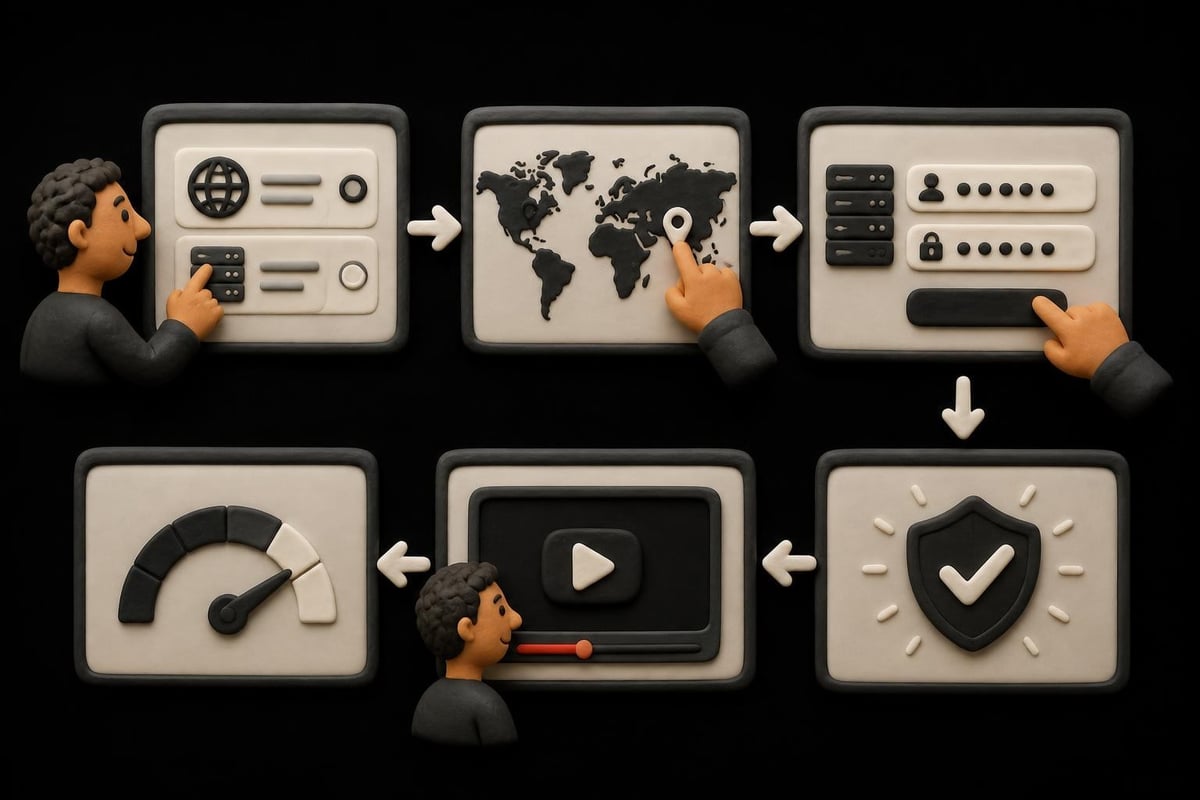
Implementing your chosen proxy correctly ensures optimal YouTube streaming performance. Configuration varies by device and proxy type, but several universal principles apply.
Browser Configuration
Most users access YouTube through web browsers, making browser-level proxy configuration the simplest approach. Modern browsers support proxy settings natively, allowing you to specify HTTP or SOCKS5 proxy addresses without additional software. Enter your proxy provider's server address, port, and authentication credentials in browser network settings.
Browser extensions offer convenient proxy switching for users who need to toggle between proxied and direct connections. However, verify extension trustworthiness before granting network access permissions, as malicious extensions can compromise security.
System-Wide Configuration
Operating system proxy settings route all internet traffic through your proxy, useful when watching YouTube through dedicated apps or media center software. Windows, macOS, and Linux each provide network configuration panels where you can specify proxy servers system-wide.
Configuration checklist:
- Verify proxy server address and port accuracy
- Enter authentication credentials if required
- Test connection before streaming YouTube
- Configure proxy bypass for local network resources
- Enable automatic proxy rotation if supported
Optimizing Streaming Performance
Once connected, several optimizations ensure the best YouTube viewing experience through your proxy:
- Clear browser cache before initial connection to prevent loading cached regional content
- Disable browser extensions that might interfere with proxy routing or video playback
- Choose nearby proxy servers to minimize latency when geographic restrictions aren't a concern
- Enable hardware acceleration in browser settings for smoother video rendering
- Monitor bandwidth usage to identify performance bottlenecks
Testing different proxy servers from your provider's pool helps identify the fastest options for your specific location and network conditions.
Advanced Use Cases and Considerations
Beyond basic access, sophisticated users leverage proxies for specialized YouTube activities that demand enhanced anonymity, performance, or geographic flexibility.
Content Creation and Research
YouTube creators and marketers use proxies to research regional content trends, verify how videos appear in different countries, and analyze competitor strategies across markets. Residential proxies prove particularly valuable for authentic geographic research since they present genuine regional IP addresses that accurately reflect local search results and recommendations.
Market research requires rotating through multiple locations to understand regional preferences, trending topics, and content availability. The best proxy for YouTube supports rapid location switching without connection interruptions or account flagging.
Accessing Geo-Restricted Content
Licensing agreements frequently restrict premium content, live sports, music videos, and educational material to specific countries. Proxies located in the target region allow access to this content by presenting a local IP address that satisfies geographic verification.
Practical guides on accessing blocked content emphasize the importance of choosing proxies in the specific countries where desired content is available, rather than simply selecting the fastest server.
Maintaining Multiple Accounts
Users managing multiple YouTube channels for business purposes need IP diversity to prevent platforms from linking accounts. Dedicated residential or mobile proxies assigned to specific channels create clear separation, reducing the risk of automated account association.
Account management best practices include:
- Assigning dedicated IP addresses to each channel
- Using consistent proxies for each account
- Avoiding rapid switching between accounts
- Implementing proper session management
Quality proxy services provide sticky sessions that maintain the same IP address for extended periods, essential for appearing as legitimate independent users.
Security and Privacy Best Practices
While proxies provide access and anonymity benefits, implementing proper security practices ensures your YouTube viewing remains private and your data stays protected.
Verifying Proxy Provider Trustworthiness
Before routing your YouTube traffic through any proxy service, verify the provider's credibility through independent reviews, security audits, and transparent privacy policies. Reputable providers clearly document their data handling practices, server locations, and technical infrastructure.
Warning signs of questionable proxy services include:
- Vague or missing privacy policies that don't specify data retention
- No information about infrastructure or server locations
- Unusually low prices that suggest the service monetizes through data selling
- Frequent connection failures indicating unreliable infrastructure
The best proxy for YouTube comes from established providers with proven track records, even if this means paying premium prices for quality and security.
Additional Privacy Layers
Combining proxies with other privacy tools creates defense-in-depth protection for sensitive viewing. Browser privacy extensions block trackers and fingerprinting attempts, while secure DNS services prevent DNS leaks that might reveal your real location despite proxy usage.
Consider implementing:
- WebRTC leak protection to prevent browser-based IP address exposure
- Cookie isolation to limit tracking across browsing sessions
- HTTPS Everywhere to ensure encrypted connections when possible
- Privacy-focused browsers designed to minimize data collection
These complementary measures enhance the privacy protection your proxy provides without significantly impacting streaming performance.
Choosing the best proxy for YouTube in 2026 requires balancing speed, security, geographic coverage, and protocol compatibility to ensure reliable access without compromising privacy or performance. Whether you need to bypass workplace restrictions, access geo-locked content, or maintain anonymity while streaming, understanding the technical differences between datacenter, residential, and mobile proxies helps identify the right solution for your specific needs. PinguProxy delivers high-speed datacenter, residential, and mobile proxies with 10Gbps bandwidth, zero-log privacy protection, and 1ms proxy rotation, ensuring smooth YouTube streaming with maximum anonymity and 24/7 expert support whenever you need assistance.