A mobile proxy routes your requests through IPs assigned by cellular carriers, while a residential proxy uses IPs assigned to home broadband connections. For data engineers, the practical difference in a mobile proxy vs residential proxy decision comes down to three variables: how often targets block you, how much each gigabyte costs, and how precisely you can target a location. Mobile IPs tend to survive aggressive anti-bot systems better and cost more. Residential IPs cover the majority of scraping and AI data collection workloads at a lower price per GB.
This comparison explains where each type earns its cost, so you can match the proxy to the target site rather than defaulting to the most expensive option.
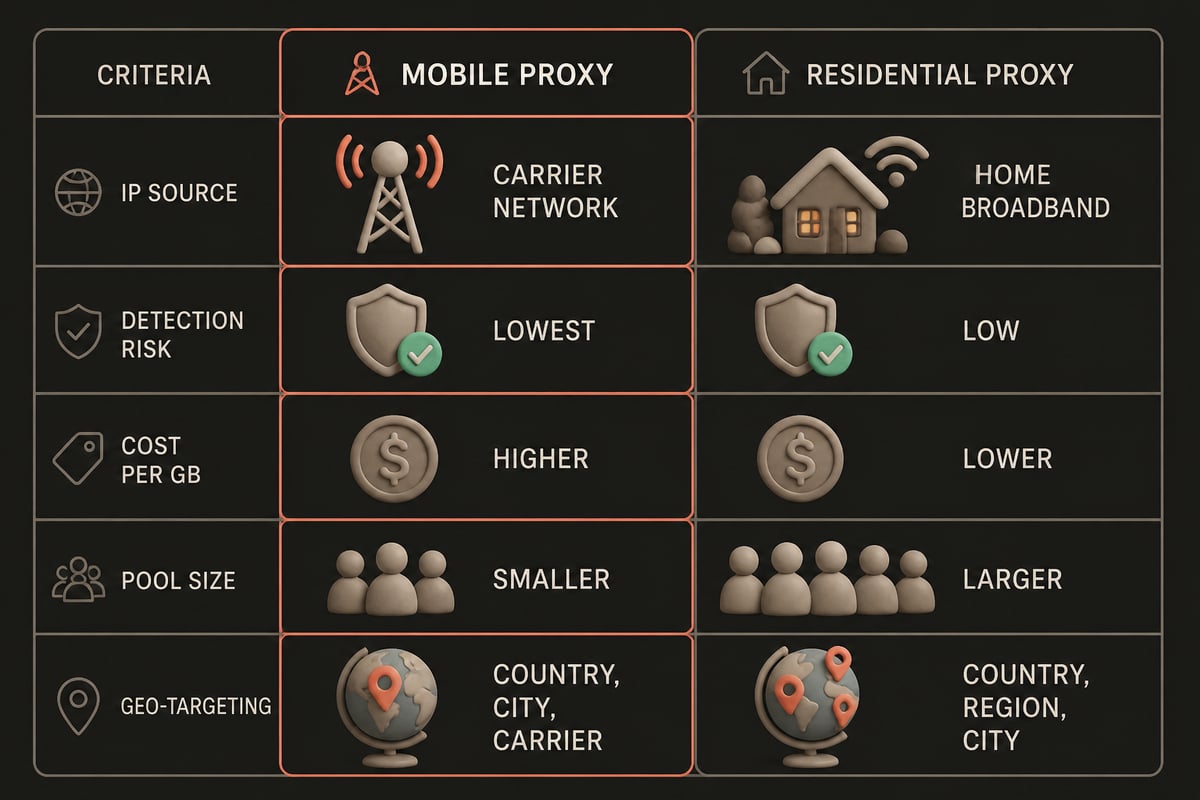
Mobile vs Residential Proxy at a Glance
The table below summarizes the attributes that matter most for large-scale collection. Price ranges are approximate and drawn from the cited comparisons; provider pricing varies.
| Attribute | Mobile proxy | Residential proxy |
|---|---|---|
| IP source | Cellular carrier networks (3G, 4G/LTE, 5G) | Home broadband connections from ISPs |
| Detection risk | Lowest of the common proxy types | Low |
| IP sharing | Many subscribers behind one public IP (carrier-grade NAT) | Typically one household per IP |
| Typical pricing model | Per GB at higher rates, or per port per 30 days | Per GB, with volume discounts |
| Reported median price | About $8/GB at 1 GB | About $4/GB at 5 GB |
| Geo-targeting | Country, city, and often carrier | Country, region, and city |
| Pool size | Smaller | Larger |
| Best fit | Heavily protected targets, app and mobile-first traffic | Broad scraping, SERP monitoring, localization checks |
The sections below take each criterion in turn.
What Is a Mobile Proxy and What Is a Residential Proxy?
A mobile proxy exits through a cellular carrier's network, and a residential proxy exits through an IP address that an internet service provider assigned to a home. Decodo describes mobile proxies as using 3G, 4G/LTE, or 5G connections, which is the defining trait that separates them from every other proxy category.
Both types mask your origin by relaying requests through a real consumer-grade connection. To a target server, the traffic looks like it comes from an ordinary person on a phone or a home network, not from a cloud data center. That shared property is why both outperform datacenter IPs on sites with strict bot filtering.
The differences begin with how those IPs are allocated and shared.
IP Sourcing and How the Networks Behave
The core technical difference is that mobile carriers pool many subscribers behind a small number of public IPs, whereas home broadband typically assigns an address to a single household.
Carrier-grade NAT is the mechanism behind this. As Browserless explains, it lets many mobile subscribers share one public IP, which makes blocking that address difficult without also blocking legitimate users. A site that bans a mobile IP risks cutting off hundreds of real customers at once, so many operators hesitate to do it.
Residential IPs do not get that protection. Each address maps to a single home, so a site can flag and ban it with little collateral damage. That is the main reason residential IPs are rated slightly lower in trust.
Mobile IPs also change differently. A device reconnecting to a tower, or a rotation request, can produce a new address from the carrier's range. Residential pools are generally larger, which gives you more distinct addresses per job. For crawls that touch millions of URLs, address variety matters as much as address trust.
Detection Risk and Success Rates
Mobile proxies generally face the lowest detection risk, residential proxies sit just behind them at low risk, and both are safer than datacenter IPs on protected sites.
Browserless characterizes mobile IPs as lowest risk, residential as low, and datacenter as higher. That is a generalization, not a guarantee. Detection depends on far more than IP type:
- Request behavior: Request rate, header consistency, and session patterns trigger blocks regardless of IP reputation.
- Browser fingerprint: TLS fingerprints, canvas data, and headless-browser signals can expose a scraper on a perfect IP.
- Target sensitivity: Sites differ widely in how aggressively they score traffic.
- IP history: A recycled address that other users abused arrives with a poor reputation.
For most public-web collection, including product pages, search results, and news archives, a well-managed residential pool performs well. Mobile proxies justify their premium when you meet repeated CAPTCHAs, session invalidation, or hard blocks that residential rotation cannot fix. Treat mobile as an escalation path rather than a starting point.
Cost: Where Mobile and Residential Diverge
Residential proxies cost noticeably less per gigabyte, and the gap widens as volume grows.
Published comparisons give a sense of the range. A 2025 market comparison from ComputingForGeeks reported median prices of $4/GB for residential proxies at 5 GB and $8/GB for mobile proxies at 1 GB. A separate analysis from Proxys.io put median residential pricing at $3.75/GB at 5 GB and $3.00/GB at 50 GB, with mobile proxy examples ranging from $25 to $130 for 30 days. These figures show two common billing models: per-GB for residential, and time-based plans for mobile.
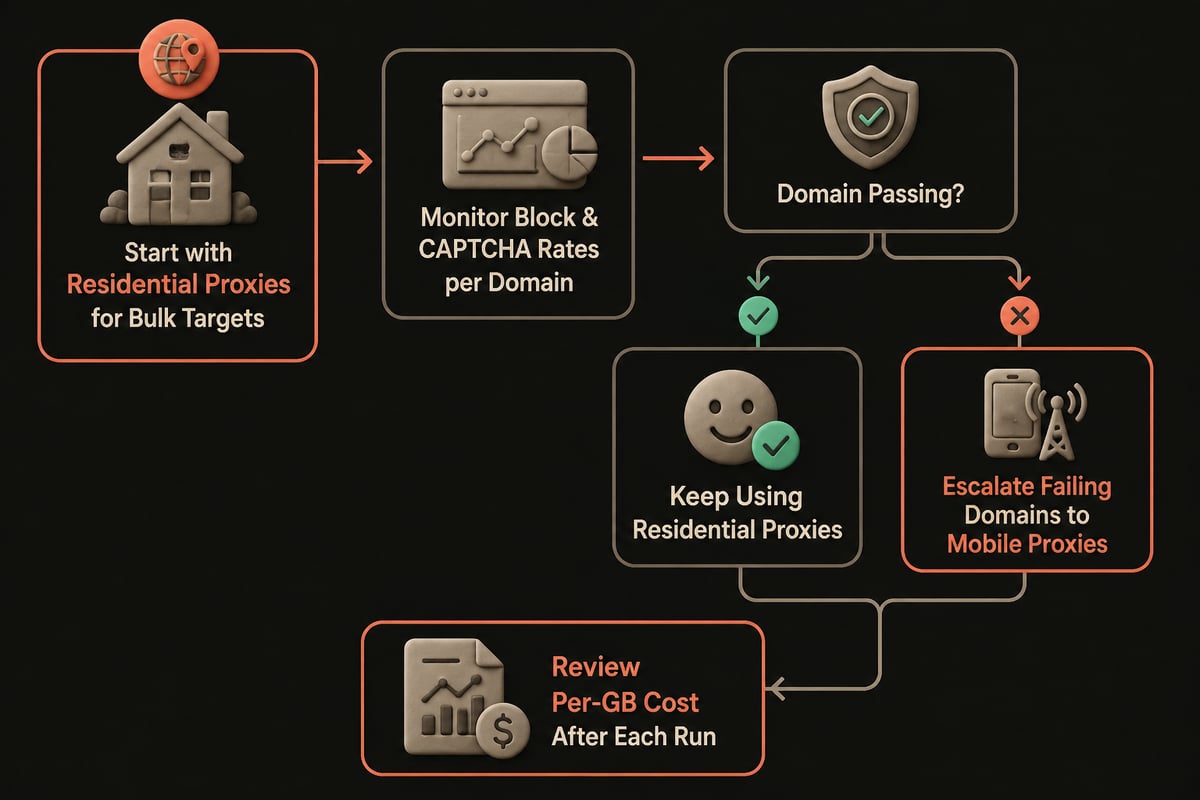
For AI training data, where you may pull terabytes, per-GB cost dominates the budget. Routing everything through mobile IPs would multiply spend without a matching gain on easy targets. A tiered approach works better: send bulk traffic through residential IPs and reserve mobile for the subset of domains that reject them.
Bandwidth caps also change the math. Metered plans punish heavy collection, so check whether a provider limits traffic before comparing sticker prices.
Geo-Targeting and Pool Coverage
Both types support location targeting, but the granularity differs, and available locations vary by provider.
According to Proxys.io, mobile geotargeting may include country, city, and carrier, while residential targeting can include country, region, and city. Carrier-level targeting is the distinctive mobile feature. It matters when you need to see how a service behaves for subscribers of a specific operator, such as app store regional pricing or carrier-specific content delivery.
Pool size favors residential. A 2026 provider comparison from Oxylabs lists residential pools of 177M+ IPs for Oxylabs, 125M+ for Decodo, and 155M+ for SOAX. Mobile pools are generally smaller because carrier address space is more limited. A larger pool means fewer repeated IPs across a crawl and a lower chance of hitting an address that is already flagged.

Where Each Type Fits in a Data Pipeline
Match the proxy to the target and the job, not to a blanket preference.
Residential proxies fit best when:
- You collect product, pricing, or listing data at volume across many domains.
- You run SERP monitoring across countries, regions, and cities.
- You build datasets for model training and need broad geographic diversity.
- You test localized content and need a large number of distinct addresses.
Mobile proxies fit best when:
- A target aggressively blocks or challenges residential IPs.
- You test mobile apps or mobile-only endpoints that expect carrier traffic.
- You need carrier-specific views of a service.
- Session stability on a trusted IP matters more than address variety.
Hypothetical example: a team scraping product pages from retail sites starts on a residential pool. Most domains return clean responses, while a few issue repeated challenges, so the team routes only those domains through mobile IPs. The result is a mixed pipeline where the expensive proxy handles a small share of requests.
Which Proxy Type Is Best for Your Phone?
For traffic originating on a phone, the proxy type matters less than whether you configure it at the device or app level, but a mobile proxy most closely matches how mobile traffic appears to a server.
Most phones accept a proxy through Wi-Fi network settings, though proxy support at the operating-system level typically covers only HTTP and HTTPS and not every app honors it. If you are validating how an app or mobile site behaves, a mobile proxy gives the most realistic carrier-network view. For general browsing or data collection that happens to run from a phone, a residential proxy is usually enough and costs less.
Residential Proxy Data Explained
Residential proxy data refers to the traffic and metadata that flow through residential IP addresses, including the requests you send and the responses you receive, and it should be distinguished from the data you collect through them.
Your own requests pass through a consumer connection, so the provider's logging policy matters. A zero-log policy means the provider does not retain records of your activity, which is worth checking in the provider's terms. For scraping teams handling sensitive targets or proprietary query lists, that policy is worth verifying in a provider's terms rather than assuming.
Mobile Proxies and Residential Proxies at PinguProxy
PinguProxy offers both types on one account, alongside datacenter and TOR proxies, so you can run the tiered approach described above without managing separate vendors.
The Mobile Proxies product starts from €14.99 per 30 days and is aimed at ad verification, app QA, and social media management. The Residential Proxies product is billed per GB at €2.00/GB with volume discounts. Across the network, PinguProxy reports over 500 million IP addresses and coverage in 190+ countries and regions.
A few facts relevant to high-volume collection:
- Unlimited bandwidth on every plan.
- Zero logs.
- A rotating IP interval of 1 ms on Pro and Enterprise plans.
- Unused pay-as-you-go GB never expire.
- A 99.9% uptime target, monitored 24/7.
- Enterprise plans include 24/7 support priority.
There is no free trial. Monthly plans start with a 1-day trial for €1, then move to the regular plan price. For plan limits, rotation settings, or exact pricing for your volume, check the product pages or contact PinguProxy directly.
Verdict: Which Option Suits Which Reader
Choose by target difficulty and budget, because the right answer in a mobile proxy vs residential proxy comparison depends on how your targets respond.
- Start with residential if you collect at volume across many ordinary domains, need broad geographic diversity, or work to a per-GB budget. It covers most scraping and AI training workloads.
- Add mobile if specific targets keep challenging or blocking residential IPs, if you test mobile-first endpoints, or if you need carrier-level targeting.
- Run both if your pipeline spans easy and hard targets. Route by domain, measure block rates, and escalate only where the data justifies the higher cost.
Measure before you commit. Run a small sample against your hardest targets on each proxy type, record success rate and cost per successful page, and let those numbers decide the split.
FAQ
Is a VPN better than a proxy?
For scraping and data collection, a proxy is usually the better tool. Proxies let you rotate IPs per request and target specific locations, while a VPN typically gives you a single tunnel and a small set of shared exit addresses. A VPN fits securing a whole device connection, not distributing requests across many IPs.
Can I change my IP address using a proxy?
Yes. Routing traffic through a proxy replaces your visible IP with the proxy's address, and rotating proxies swap that address automatically on a schedule or per request. Your real IP stays hidden from the target, though other signals such as browser fingerprints can still identify automated traffic.
Pull a small sample of your hardest target URLs and run them through both proxy types to compare success rates and cost per successful page before you scale. If you want to test that split on a single account, PinguProxy's Residential Proxies cover the bulk traffic while mobile ports handle the stubborn domains, and you can Get Started by registering and picking the plan that matches your volume.