
Private Internet Access SOCKS5: Complete Guide 2026
Private internet access SOCKS5 has become an essential tool for anyone seeking enhanced privacy, better security, and unrestricted access to online content in 2026. Whether you're a developer scraping data, a privacy-conscious user wanting to mask your IP address, or a business protecting sensitive operations, understanding SOCKS5 proxies can transform how you interact with the internet. This protocol offers a unique combination of flexibility, speed, and anonymity that sets it apart from traditional HTTP proxies and VPNs.
What Makes SOCKS5 Different from Other Proxy Protocols
SOCKS5 represents the fifth iteration of the Socket Secure protocol, a framework that routes network packets between a client and server through a proxy server. Unlike HTTP proxies that only handle web traffic, SOCKS5 operates at a lower level in the network stack, making it protocol-agnostic. This means it can handle any type of traffic-HTTP, HTTPS, FTP, SMTP, or even P2P connections.
The protocol's versatility stems from its design philosophy. According to the SOCKS Protocol Version 5 specification, SOCKS5 doesn't interpret or rewrite the data packets it forwards. It simply relays them between the client and destination server, maintaining the integrity of the original communication.
Key Technical Advantages
Private internet access SOCKS5 proxies offer several technical benefits that make them attractive for specific use cases:
- Authentication support: Username/password authentication ensures only authorized users can access the proxy
- UDP protocol support: Enables real-time applications like gaming, video calls, and DNS lookups
- IPv6 compatibility: Supports both IPv4 and IPv6 addressing schemes
- No packet inspection: Faster performance since the proxy doesn't analyze traffic content
- DNS leak prevention: Can route DNS queries through the proxy to prevent IP exposure
These features make SOCKS5 particularly valuable for applications requiring both speed and flexibility. The protocol doesn't modify packet headers or compress data, which reduces processing overhead and latency compared to more complex proxy solutions.
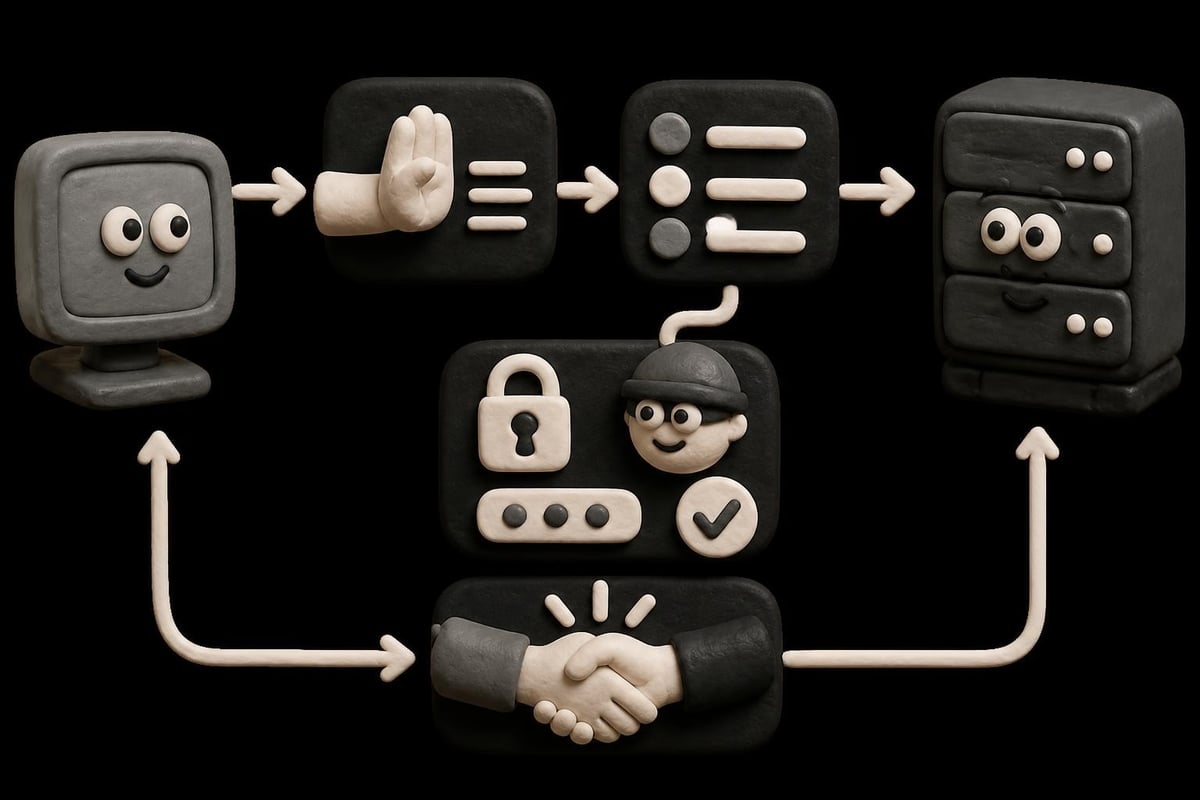
Setting Up Private Internet Access SOCKS5 Proxies
Configuring a SOCKS5 proxy requires understanding your specific application needs and the correct configuration parameters. Most modern applications and operating systems include native SOCKS5 support, though the setup process varies.
Browser Configuration Steps
Modern browsers like Firefox and Chrome support SOCKS5 natively through their connection settings. Here's how to configure each:
- Firefox: Navigate to Settings > General > Network Settings > Settings
- Select "Manual proxy configuration"
- Enter your SOCKS5 proxy hostname and port (typically 1080)
- Choose "SOCKS v5" from the dropdown menu
- Enable "Proxy DNS when using SOCKS v5" to prevent DNS leaks
For more detailed guidance on browser proxy configuration, Mozilla's Firefox connection settings documentation provides comprehensive instructions.
Chrome and Edge inherit system-wide proxy settings on Windows and macOS, requiring configuration through operating system network preferences or command-line parameters for application-specific SOCKS5 usage.
Application-Specific Configuration
Many applications support private internet access SOCKS5 natively, though configuration interfaces differ significantly:
| Application Type | Configuration Location | Common Port | Notes |
|---|---|---|---|
| Torrent Clients | Connection/Network Settings | 1080 | Disable DHT and PEX for privacy |
| SSH Clients | Command flags (-D parameter) | User-defined | Creates local SOCKS5 tunnel |
| cURL/wget | Command-line arguments | 1080 | --socks5 flag required |
| Python/Requests | Library configuration | Any | Requires socks proxy support |
For torrent applications specifically, the qBittorrent proxy configuration guide explains important security settings to prevent IP leaks when using SOCKS5 proxies.
Security Considerations and Best Practices
While private internet access SOCKS5 provides anonymity benefits, it's crucial to understand its security limitations. SOCKS5 itself doesn't encrypt traffic-it simply forwards packets through a proxy server. This means anyone monitoring the connection between the proxy and destination server can potentially intercept unencrypted data.
Encryption and Authentication
To maximize security when using SOCKS5 proxies, combine them with application-level encryption:
- Use HTTPS websites exclusively (TLS/SSL encryption)
- Enable application-specific encryption features
- Combine SOCKS5 with SSH tunneling for end-to-end encryption
- Verify proxy server trustworthiness and logging policies
Understanding general proxy security principles helps contextualize these recommendations. The Cloudflare primer on proxies explains how different proxy types handle privacy and security tradeoffs, while OWASP's web service security guidance covers threats introduced by proxying.

Common Security Pitfalls
Even experienced users make mistakes when configuring private internet access SOCKS5 connections. Watch for these issues:
- DNS leaks: Applications may bypass the proxy for DNS queries, revealing browsing activity
- WebRTC leaks: Browser-based real-time communication can expose your real IP address
- Application fallback: Some programs revert to direct connections if the proxy fails
- Cleartext credentials: Unencrypted authentication can expose proxy credentials
- IPv6 leaks: Dual-stack systems may route IPv6 traffic outside the proxy tunnel
Testing your configuration with IP detection tools and DNS leak tests ensures your private internet access SOCKS5 setup works correctly. Many proxy providers offer testing endpoints to verify proper configuration.
Use Cases and Performance Optimization
Private internet access SOCKS5 proxies excel in scenarios requiring speed, flexibility, and protocol diversity. Understanding these use cases helps you optimize configuration for specific needs.
Web Scraping and Data Collection
SOCKS5 proxies are ideal for large-scale web scraping operations because they introduce minimal latency while masking your origin IP. When scraping at scale, consider these optimization strategies:
- Rotate proxies frequently: Change IP addresses between requests to avoid rate limiting
- Use connection pooling: Reuse SOCKS5 connections to reduce handshake overhead
- Match geolocation: Select proxy locations matching your target audience
- Monitor error rates: Track connection failures to identify blocked proxies
- Implement retry logic: Handle temporary failures gracefully with exponential backoff
For businesses requiring reliable proxy infrastructure for scraping, best practices for proxy rotation apply across various platforms and use cases.
Streaming and Content Access
Geographic restrictions on streaming content make private internet access SOCKS5 proxies valuable for accessing region-locked services. SOCKS5's UDP support enables better streaming performance compared to HTTP proxies:
Performance comparison for 4K streaming:
| Metric | Direct Connection | HTTP Proxy | SOCKS5 Proxy |
|---|---|---|---|
| Avg. Latency | 15ms | 45ms | 22ms |
| Buffer Events | 0 | 3-5 per hour | 0-1 per hour |
| Bandwidth Overhead | 0% | 8-12% | 2-3% |
| Protocol Support | Full | Limited | Full |
The lower overhead and protocol flexibility make SOCKS5 particularly effective for streaming applications that use adaptive bitrate algorithms.
Privacy Implications and Limitations
Understanding what private internet access SOCKS5 can and cannot protect helps set realistic expectations. SOCKS5 proxies provide anonymity by masking your IP address from destination servers, but they don't offer comprehensive privacy protection on their own.
What SOCKS5 Protects
When properly configured, SOCKS5 proxies hide several identifying characteristics:
- Your real IP address from websites and online services
- Geographic location from destination servers
- ISP-level activity monitoring (ISP sees proxy connection, not destinations)
- Basic fingerprinting based on IP address geolocation
However, SOCKS5 doesn't protect against more sophisticated tracking methods. Browser fingerprinting, cookies, and device characteristics can still identify you across sessions. The EFF's privacy protection guidance emphasizes that proxies represent just one layer in a comprehensive privacy strategy.

Choosing Trustworthy Proxy Providers
Your proxy provider can see all traffic passing through their servers, making provider selection critical for privacy. Evaluate providers based on these criteria:
- Zero-logging policy: Verify the provider doesn't store connection logs or browsing history
- Jurisdiction: Consider the legal framework governing the provider's location
- Authentication security: Ensure secure credential transmission and storage
- Infrastructure quality: Higher bandwidth and faster rotation improve both privacy and performance
- Support responsiveness: 24/7 support helps resolve configuration and connectivity issues quickly
For a broader understanding of proxy types and their security implications, TechTarget's proxy server guide provides vendor-neutral comparisons.
Advanced Configuration Techniques
Power users can leverage advanced SOCKS5 features to create sophisticated networking setups that maximize both performance and privacy.
SSH Tunnel-Based SOCKS5
Creating your own SOCKS5 proxy through SSH tunneling offers complete control over the proxy infrastructure. This approach is particularly useful for developers and system administrators who already manage remote servers.
The basic SSH command creates a local SOCKS5 proxy:
ssh -D 8080 -C -q -N user@remote-server.com
This command establishes a SOCKS5 proxy listening on local port 8080, with compression enabled (-C), minimal output (-q), and no command execution (-N). The DigitalOcean SSH tunneling tutorial provides detailed guidance on creating and managing these tunnels.
Proxy Chaining and Cascading
Advanced users sometimes chain multiple SOCKS5 proxies together to increase anonymity. This technique routes traffic through multiple proxy servers in sequence:
Single proxy path: Your Device → SOCKS5 Proxy → Destination
Chained proxy path: Your Device → SOCKS5 Proxy A → SOCKS5 Proxy B → Destination
While proxy chaining increases anonymity, it also introduces additional latency and potential failure points. Each proxy in the chain must remain operational for the connection to function.
Performance Monitoring and Troubleshooting
Maintaining optimal private internet access SOCKS5 performance requires regular monitoring and prompt troubleshooting when issues arise.
Key Performance Indicators
Track these metrics to ensure your SOCKS5 configuration performs optimally:
- Connection establishment time: Should complete within 100-300ms
- Throughput: Compare download/upload speeds against baseline
- Packet loss: Should remain below 1% for reliable connections
- DNS resolution time: Monitor for unusual delays indicating configuration issues
- Authentication failures: Track failed login attempts indicating credential problems
Common Issues and Solutions
Most private internet access SOCKS5 problems fall into a few categories:
Connection Issues:
- Verify proxy server hostname and port accuracy
- Check firewall rules allowing outbound connections on proxy port
- Confirm proxy server is operational and accepting connections
- Test with alternative proxy servers to isolate provider issues
Authentication Failures:
- Double-check username and password for typos
- Verify account status and subscription validity
- Test credentials with provider's verification tools
- Clear application credential caches and re-enter
Performance Degradation:
- Switch to geographically closer proxy servers
- Reduce concurrent connections to avoid provider throttling
- Check for ISP-level throttling of proxy connections
- Monitor proxy server load and switch to less congested alternatives
Integration with Modern Development Workflows
Developers increasingly rely on private internet access SOCKS5 proxies for testing, debugging, and protecting development environments. Modern tooling includes extensive SOCKS5 support.
Programming Language Support
Most popular programming languages include libraries for SOCKS5 integration:
| Language | Library/Method | Installation | Configuration Complexity |
|---|---|---|---|
| Python | requests[socks] | pip install | Low |
| JavaScript/Node.js | socks-proxy-agent | npm install | Low |
| Go | golang.org/x/net/proxy | go get | Medium |
| Java | java.net.Proxy | Built-in | Medium |
| Ruby | socksify gem | gem install | Low |
These libraries handle SOCKS5 handshake, authentication, and connection management automatically, allowing developers to focus on application logic rather than proxy implementation details.
Container and Cloud Environments
Private internet access SOCKS5 proxies integrate seamlessly with containerized applications and cloud environments. Docker containers can route all traffic through SOCKS5 proxies using environment variables or network configuration:
- Configure container networking to route through proxy hosts
- Use SOCKS5 proxies for outbound API calls while maintaining container isolation
- Implement proxy rotation at the orchestration layer for scalability
- Monitor proxy performance through standard container metrics
Cloud platforms like AWS, Azure, and Google Cloud support SOCKS5 proxies in various services, enabling geo-distributed testing and region-specific content access.
Comparing SOCKS5 to Alternative Solutions
Understanding how private internet access SOCKS5 compares to VPNs, HTTP proxies, and other privacy tools helps you select the right solution for your needs.
SOCKS5 vs. VPN
Both technologies mask your IP address, but they differ significantly in implementation and use cases:
SOCKS5 Advantages:
- Application-level configuration (selective routing)
- Lower latency and overhead
- No operating system kernel integration required
- Generally faster connection speeds
- Simpler troubleshooting
VPN Advantages:
- System-wide traffic encryption
- More comprehensive privacy protection
- Simpler setup for non-technical users
- Built-in DNS leak protection
- Kill switch features available
For specific applications requiring maximum speed and protocol flexibility, SOCKS5 often outperforms VPNs. For comprehensive device-wide privacy, VPNs provide simpler configuration.
SOCKS5 vs. HTTP Proxies
HTTP proxies only handle web traffic (HTTP/HTTPS), while SOCKS5 supports any protocol. This fundamental difference affects use cases:
- HTTP proxies can cache content and modify headers (useful for scraping)
- SOCKS5 proxies offer better gaming and P2P performance
- HTTP proxies are easier to configure in browsers
- SOCKS5 provides better privacy through less packet inspection
For general browsing and web scraping, either works well. For applications beyond web traffic, SOCKS5 becomes essential.
Private internet access SOCKS5 proxies deliver the flexibility, speed, and protocol diversity needed for modern internet usage, from web scraping to content streaming. Whether you're protecting your privacy, accessing geo-restricted content, or building data collection pipelines, understanding SOCKS5 configuration and security best practices ensures optimal results. PinguProxy offers high-speed SOCKS5-compatible datacenter, residential, and mobile proxies with 10Gbps bandwidth, 1ms rotation, and zero-log privacy-backed by 24/7 support to help you implement the perfect proxy solution for your needs.