
SOCKS Host Proxy: Complete Guide for 2026
A socks host proxy serves as an intermediary that routes network traffic between client applications and destination servers using the SOCKS protocol. Unlike traditional HTTP proxies that only handle web traffic, a socks host proxy operates at a lower network layer, making it capable of forwarding virtually any type of TCP or UDP traffic regardless of the application protocol. This versatility has made SOCKS proxies essential for developers, security professionals, and businesses requiring flexible network routing solutions in 2026.
Understanding SOCKS Protocol Fundamentals
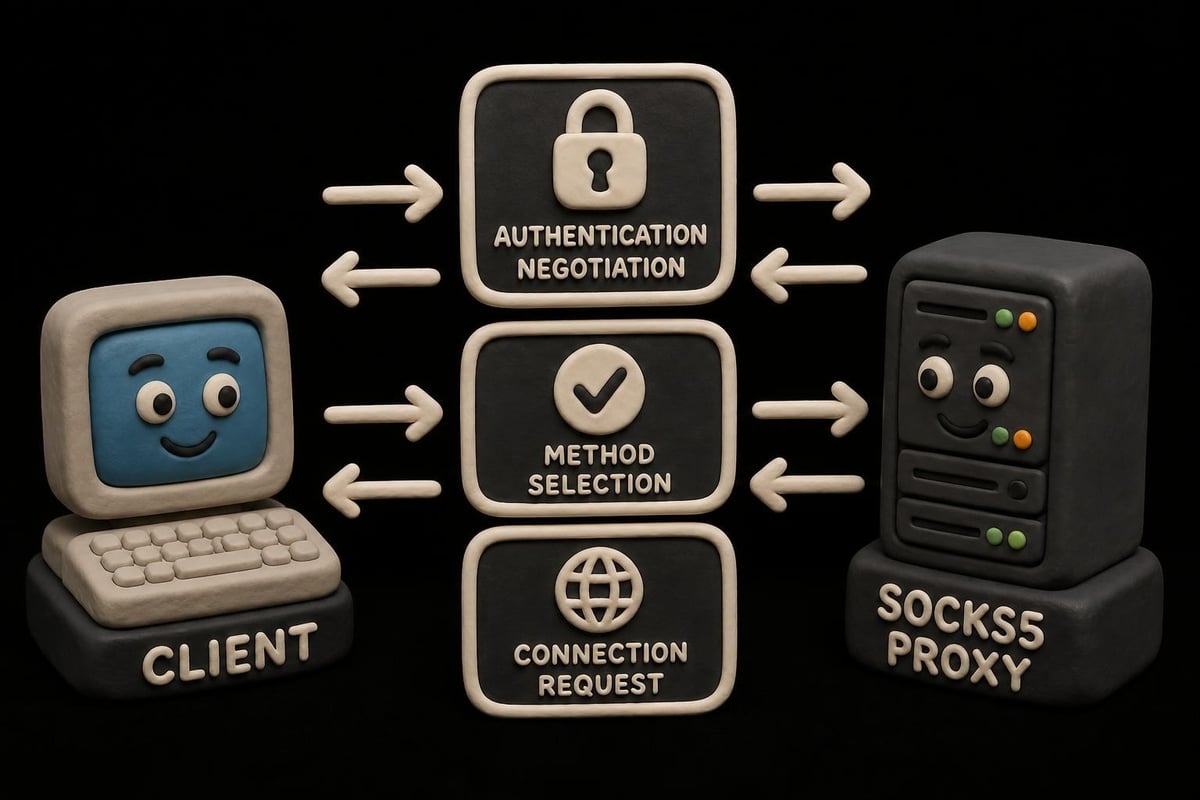
The SOCKS protocol exists in two primary versions that remain widely deployed today: SOCKS4 and SOCKS5. SOCKS5, defined in RFC 1928, introduced significant improvements including UDP support, IPv6 compatibility, and authentication mechanisms that make it the preferred choice for modern implementations.
When you configure a socks host proxy, you're essentially creating a gateway that accepts connections from clients, performs optional authentication, and then establishes connections to destination servers on behalf of those clients. The proxy host maintains these connections, forwarding data bidirectionally while potentially applying access controls, logging, or routing rules.
Key Protocol Differences
| Feature | SOCKS4 | SOCKS5 |
|---|---|---|
| Authentication | None | Multiple methods including username/password |
| Protocol Support | TCP only | TCP and UDP |
| IP Version | IPv4 only | IPv4 and IPv6 |
| DNS Resolution | Client-side | Server-side option |
| Security | Basic | Enhanced with auth |
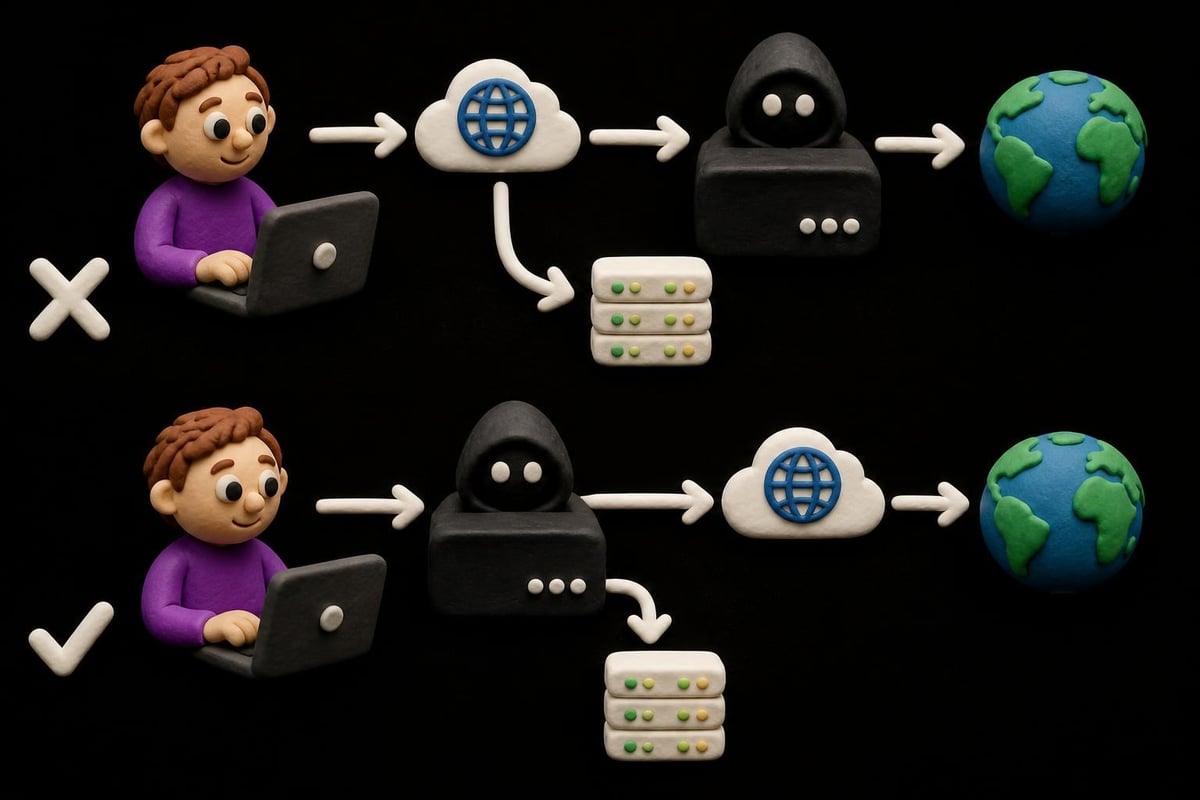
The DNS resolution capability deserves special attention. With SOCKS4, client applications must resolve hostnames to IP addresses before connecting through the proxy. SOCKS5 allows the socks host proxy itself to perform DNS lookups, which prevents DNS leaks and improves privacy by keeping hostname queries within the proxy tunnel.
Configuring Your SOCKS Host Proxy
Setting up a socks host proxy requires careful attention to several configuration parameters that determine functionality, security, and performance. The host configuration typically involves specifying listening interfaces, port numbers, authentication requirements, and access control policies.
Essential Configuration Parameters
Most socks host proxy implementations share common configuration elements:
- Binding address and port: The network interface and port where the proxy listens for connections (commonly 1080)
- Authentication mode: Whether to require credentials and which methods to support
- Access control lists: Rules defining which clients can connect and which destinations they can reach
- Logging level: Detail of connection and error logging for monitoring and troubleshooting
- Timeout values: Connection and idle timeout settings to manage resource usage
For enterprises deploying proxy infrastructure, binding the socks host proxy to specific internal interfaces while restricting external access through firewall rules provides essential security. Authentication becomes critical when the proxy is accessible beyond tightly controlled networks.
Authentication Methods
The SOCKS5 authentication framework supports multiple methods negotiated during connection establishment:
- No authentication required (0x00) - suitable only for controlled environments
- Username/password (0x02) - most common for business deployments
- GSSAPI (0x01) - for Kerberos and enterprise authentication integration
- Custom methods - vendor-specific authentication schemes
A properly secured socks host proxy in 2026 should enforce strong authentication, use encrypted channels for credential transmission, and integrate with centralized identity management systems when serving enterprise users. PinguProxy implements these security best practices while maintaining the high performance needed for data-intensive applications.
DNS Handling and Privacy Implications
One of the most critical yet frequently misunderstood aspects of operating a socks host proxy involves DNS resolution. The choice between client-side and server-side DNS resolution has profound implications for privacy, security, and functionality.
Client-Side vs. Server-Side Resolution
When applications perform DNS lookups locally before connecting through the proxy, several issues emerge:
- DNS queries leak outside the proxy tunnel, potentially revealing browsing patterns
- Local DNS servers may return incorrect results due to geographic location
- Content filtering and surveillance systems can monitor hostname lookups
- Split-horizon DNS configurations may provide different results than intended
Server-side DNS resolution, where the socks host proxy performs lookups on behalf of clients, addresses these concerns. The proxy receives hostnames rather than IP addresses, performs resolution using its own DNS configuration, and then establishes connections to the resolved addresses.
Browser implementations handle this differently, as documented in Mozilla's networking discussions. Firefox users can enable network.proxy.socks_remote_dns to force remote DNS when using a SOCKS proxy, while other browsers may require additional configuration.
DNS Leak Prevention
To prevent DNS leaks when routing traffic through a socks host proxy:
- Configure applications to send hostnames rather than pre-resolved IPs
- Verify that the proxy performs remote DNS lookups
- Test for leaks using DNS leak detection tools
- Consider implementing DNS-over-HTTPS or DNS-over-TLS on the proxy host
- Monitor DNS query logs to identify applications bypassing the proxy
The Tor Project's leak guidance provides excellent troubleshooting steps applicable to any privacy-focused socks host proxy deployment, even outside Tor-specific use cases.
Advanced Use Cases and Integration Patterns
A socks host proxy serves as a building block for sophisticated network architectures. Understanding integration patterns helps maximize the value of proxy infrastructure.
SSH Dynamic Port Forwarding
SSH clients can create a socks host proxy through dynamic port forwarding, providing an encrypted tunnel for routing traffic. The OpenSSH specifications document this functionality, which creates a local SOCKS proxy that forwards connections through an SSH tunnel to a remote server.
ssh -D 8080 user@remote-server
This command establishes a socks host proxy listening on localhost:8080, with all forwarded traffic encrypted within the SSH session. Applications configured to use this local proxy benefit from SSH's encryption and the remote server's network perspective.
Proxy Chaining and Layered Architectures
Advanced deployments chain multiple proxies to achieve specific goals like enhanced anonymity or multi-hop routing. Tools like proxychains-ng enable forcing applications through chains of SOCKS and HTTP proxies, even when applications lack native proxy support.
| Chaining Pattern | Use Case | Consideration |
|---|---|---|
| HTTP → SOCKS | Legacy app compatibility | Protocol translation overhead |
| SOCKS → SOCKS | Geographic routing | Connection latency increases |
| Local → Remote | Privacy layering | Throughput reduction |
| Round-robin | Load distribution | Session consistency issues |
The Privoxy configuration manual demonstrates HTTP-to-SOCKS bridging, enabling HTTP-only applications to utilize SOCKS infrastructure through protocol translation.
Performance Optimization Strategies
Operating a high-performance socks host proxy requires attention to system-level configurations, network tuning, and resource allocation. Modern proxy deployments must handle thousands of concurrent connections while maintaining low latency.
Connection Pooling and Resource Management
Efficient socks host proxy implementations employ several optimization techniques:
- Connection pooling: Reusing established connections to frequently accessed destinations
- Asynchronous I/O: Non-blocking socket operations to maximize throughput
- Buffer tuning: Optimized socket buffer sizes matching network conditions
- Worker processes: Parallel connection handling across multiple CPU cores
Services like Cloudflare's SASE implementation demonstrate how modern proxy architectures leverage protocols like QUIC for improved performance, multiplexing multiple streams over single connections while reducing connection establishment overhead.
Bandwidth and Throughput Considerations
When planning socks host proxy capacity:
- Calculate expected concurrent connections based on user population
- Measure average and peak bandwidth requirements per connection
- Account for protocol overhead (typically 5-10% for SOCKS5)
- Provision network interfaces with headroom beyond peak demand
- Implement traffic shaping to prevent resource exhaustion
PinguProxy's 10Gbps bandwidth allocation ensures that even data-intensive operations like web scraping or bulk data transfers maintain consistent performance without throttling or connection limits.
Security Best Practices for Production Deployments
A socks host proxy represents a critical network security control point requiring comprehensive hardening and monitoring. Production deployments demand multiple layers of defense.
Access Control and Authorization
Implementing granular access controls prevents unauthorized use and contains potential compromises:
- IP allowlisting: Restrict which source IPs can connect to the proxy
- Destination filtering: Block connections to prohibited hosts or networks
- User-based policies: Apply different rules based on authenticated identities
- Rate limiting: Prevent abuse through connection or bandwidth caps
- Time-based access: Restrict proxy availability to business hours
Monitoring and Incident Response
Effective operational security for a socks host proxy includes:
| Monitoring Element | Purpose | Alert Threshold |
|---|---|---|
| Connection rate | Detect abuse or DDoS | >100 connections/min per user |
| Failed auth attempts | Identify brute force | >5 failures in 1 minute |
| Unusual destinations | Spot compromised accounts | Connections to blacklisted IPs |
| Bandwidth spikes | Identify data exfiltration | >1GB transfer in 5 minutes |
| Protocol violations | Catch malformed requests | Any protocol error |
The zero-log policy implemented by privacy-focused providers must be balanced against operational needs for security monitoring. Ephemeral logging that retains data only for active troubleshooting provides this balance.
Integration with Modern Development Workflows
Developers increasingly incorporate socks host proxy functionality into application architectures, testing frameworks, and deployment pipelines. Understanding these integration patterns streamlines development processes.
Container and Cloud Environments
Containerized applications benefit from socks host proxy sidecars that provide:
- Network policy enforcement without modifying application code
- Egress traffic routing through controlled exit points
- Development-production parity in network configurations
- Simplified credentials management through proxy authentication
Cloudflare's Privacy Proxy documentation illustrates how modern platforms expose local SOCKS5 interfaces that applications can consume without complex configuration, demonstrating the convergence of proxy technology with cloud-native architectures.
Automated Testing and QA
Quality assurance teams employ socks host proxy infrastructure to:
- Test applications under various network conditions and geographic perspectives
- Verify proper handling of proxy authentication and failover
- Simulate restricted network environments
- Validate DNS handling and leak prevention
- Benchmark performance across different proxy configurations
Autoproxy configurations enable automated switching between direct connections and proxy routing based on destination patterns, useful for testing hybrid connectivity scenarios.
Protocol Extensions and Specialized Implementations
Beyond standard SOCKS5, specialized implementations extend the protocol for specific use cases. Understanding these extensions helps select appropriate solutions for unique requirements.
Anonymity Network Integration
Anonymity networks like Tor expose SOCKS interfaces with specific behaviors documented in the Tor SOCKS extensions. These extensions include:
- Extended error codes for circuit-related failures
- Special addresses for onion services (.onion domains)
- Stream isolation to prevent correlation across connections
- Circuit selection hints for performance optimization
When operating a socks host proxy alongside anonymity networks, understanding these protocol variations ensures correct integration and prevents unexpected behaviors.
UDP Association for Real-Time Protocols
SOCKS5's UDP association feature enables proxying real-time protocols like VoIP, gaming, and video streaming. The socks host proxy negotiates a UDP relay address where clients send datagrams, with the proxy forwarding them to destinations.
UDP proxying introduces unique challenges:
- NAT traversal: Maintaining address mappings across network boundaries
- Packet loss handling: UDP's unreliable nature requires application-level recovery
- Firewall compatibility: Bidirectional UDP often faces restrictive filtering
- Performance sensitivity: Real-time protocols demand minimal latency
Mobile proxy infrastructure particularly benefits from robust UDP support, as mobile applications increasingly rely on UDP-based protocols like QUIC for improved performance over cellular networks.
Troubleshooting Common Issues
Even well-configured socks host proxy deployments encounter issues requiring systematic diagnosis. Common problems fall into several categories.
Connection Failures and Timeouts
When clients cannot establish connections through a socks host proxy:
- Verify the proxy service is running and listening on the expected port
- Check firewall rules allow traffic to the proxy port from client IPs
- Confirm authentication credentials match configured requirements
- Test basic connectivity using curl or telnet to the proxy port
- Review proxy logs for rejection reasons or protocol errors
DNS Resolution Problems
DNS-related issues manifest as inability to reach hosts despite correct proxy configuration:
- Confirm whether the client or proxy should perform DNS resolution
- Test DNS functionality on the proxy host directly
- Verify DNS servers configured on the proxy host are accessible
- Check for DNS filtering or firewall rules blocking UDP/53
- Examine whether split-horizon DNS requires specific resolution points
Performance Degradation
When proxy performance deteriorates:
- Monitor CPU and memory usage on the proxy host
- Check network interface utilization and error rates
- Analyze connection counts and state distribution
- Review logs for protocol errors or malformed requests
- Test bandwidth to destinations directly from the proxy host
- Verify no rate limiting or traffic shaping is unexpectedly active
Systematic elimination of variables isolates whether issues originate in client configuration, network paths, proxy implementation, or destination services.
Understanding socks host proxy architecture, configuration, and operational considerations enables organizations to deploy robust, secure, and high-performance proxy infrastructure for diverse use cases. Whether you need privacy-focused browsing, development testing environments, or enterprise-scale traffic routing, PinguProxy delivers the performance and reliability modern applications demand, with support for both IPv4 and IPv6, unlimited bandwidth, and 24/7 expert support to ensure your proxy infrastructure operates flawlessly.