
Autoproxy: Enterprise Configuration & Deployment Guide
Automatic proxy configuration has revolutionized how organizations manage network traffic across thousands of devices. Instead of manually configuring proxy settings on each workstation, autoproxy systems enable centralized management through intelligent scripts and discovery protocols. As enterprises scale their infrastructure and remote workforces grow in 2026, understanding autoproxy mechanisms becomes essential for IT administrators, security professionals, and businesses relying on proxy services for web scraping, privacy, and access control.
Understanding Autoproxy Fundamentals
Autoproxy refers to the automated discovery and configuration of proxy server settings on client devices without requiring manual intervention. This approach eliminates the tedious process of visiting each computer to input proxy addresses and ports. The technology relies on two primary mechanisms: Proxy Auto-Configuration (PAC) files and Web Proxy Auto-Discovery Protocol (WPAD).
How PAC Files Enable Dynamic Routing
A PAC file contains a JavaScript function called FindProxyForURL() that determines which proxy server (or direct connection) should handle each request. When a browser or application needs to access a URL, it executes this function, passing the requested URL and hostname as parameters. The Mozilla Developer Network provides comprehensive documentation on PAC file structure and syntax requirements.
The function returns a string specifying the proxy configuration:
- DIRECT - Connect without using a proxy
- PROXY host:port - Use the specified proxy server
- SOCKS host:port - Use a SOCKS proxy (particularly relevant for SOCKS5 implementations)
- Multiple options separated by semicolons for failover scenarios
This flexibility allows organizations to route traffic intelligently based on destination, time of day, client IP address, or any other logic implementable in JavaScript.

WPAD Discovery Methods
Web Proxy Auto-Discovery Protocol enables clients to automatically locate PAC files without users specifying a configuration URL. The autoproxy discovery process follows a specific sequence:
- DHCP Option 252: The client requests proxy configuration from the DHCP server during IP address assignment
- DNS Resolution: The client attempts to resolve "wpad" followed by DNS search suffixes (wpad.example.com, wpad.com, etc.)
- Well-known URL: The client tries to retrieve http://wpad/wpad.dat or http://wpad.domain.com/wpad.dat
Once the WPAD host is located, the client downloads the PAC file from that server and begins using it for proxy decisions. Microsoft's configuration guidance explains Windows-specific implementations and troubleshooting approaches.
Deployment Strategies for Enterprise Environments
Rolling out autoproxy configuration across an organization requires careful planning to minimize disruptions while maximizing security and performance benefits.
Centralized Management Through Group Policy
For Windows-based organizations, Active Directory Group Policy provides the most efficient deployment mechanism. Administrators can configure autoproxy settings through Computer Configuration or User Configuration policies.
| Configuration Method | Use Case | Update Frequency |
|---|---|---|
| Group Policy | Domain-joined Windows devices | Every 90-120 minutes |
| MDM/Intune | Cloud-managed Windows 10/11 | Policy sync interval |
| Browser policies | Chrome/Edge enterprise | Browser restart/update |
| Network-level WPAD | BYOD and unmanaged devices | Each network connection |
Modern Windows management through Microsoft Intune and the NetworkProxy CSP allows cloud-based configuration of autoproxy settings, particularly valuable for remote workers who never connect to the corporate network directly.
Testing PAC Files Before Production
Never deploy a PAC file organization-wide without thorough testing. Create a pilot group of users across different departments and locations to validate:
- Proxy selection logic functions correctly for internal, external, and edge-case URLs
- Failover mechanisms activate when primary proxies become unavailable
- Performance impact remains acceptable during peak usage periods
- Application compatibility extends beyond web browsers to custom software
Use browser developer tools to examine which proxy decisions the PAC file makes for specific URLs. Chromium's proxy documentation explains how Chrome implements PAC evaluation and provides debugging techniques useful across multiple browsers.
Security Considerations and Risk Mitigation
Autoproxy configurations introduce specific security vulnerabilities that attackers actively exploit. Understanding these risks enables organizations to implement appropriate safeguards.
WPAD Hijacking and Name Collision
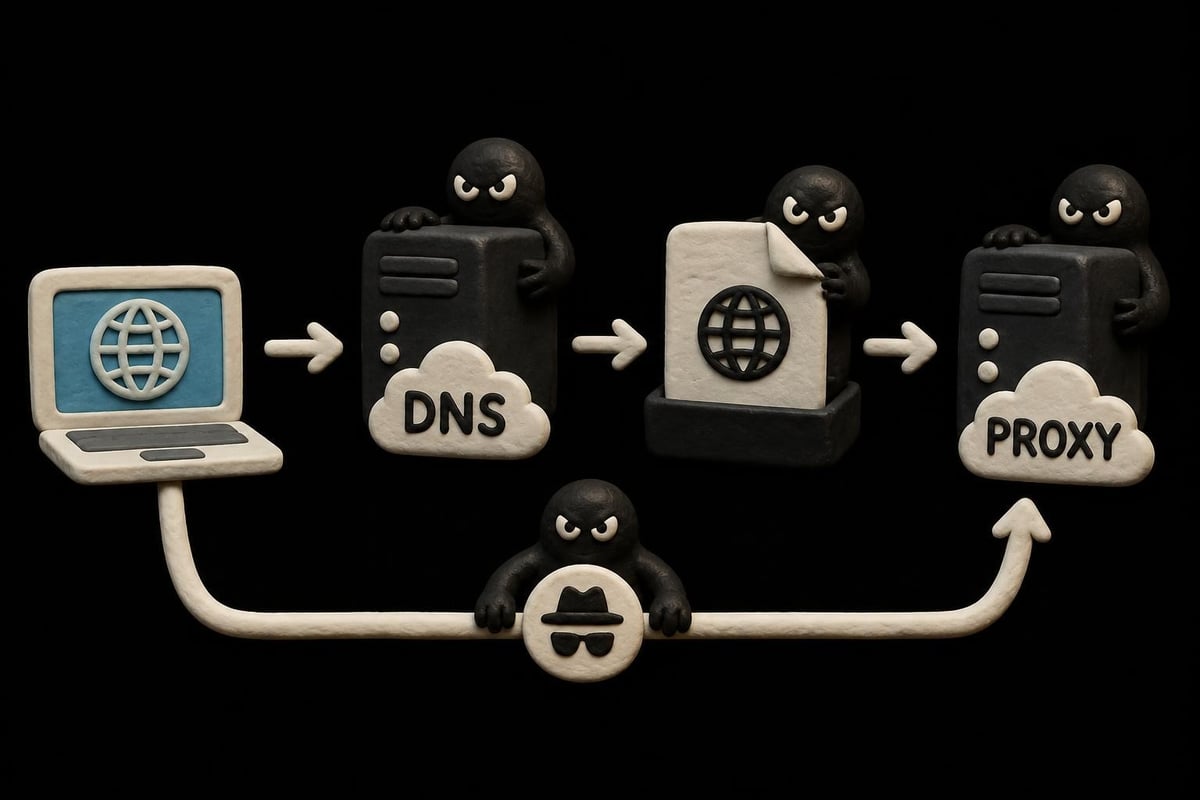
The automatic nature of WPAD discovery creates opportunities for man-in-the-middle attacks. An attacker who controls a "wpad" DNS entry or DHCP server can direct clients to a malicious PAC file, routing all traffic through attacker-controlled proxies.
Critical mitigation steps include:
- Registering and controlling all "wpad" hostnames in your DNS zones
- Disabling WPAD on networks where PAC file URLs are distributed through Group Policy
- Implementing HTTPS for PAC file delivery to prevent tampering in transit
- Monitoring DNS queries for "wpad" to detect potential compromise attempts
Research from Eurecom documents ongoing WPAD security issues and real-world attack measurements from 2024, demonstrating that these vulnerabilities remain actively exploited. The ICANN Name Collision Analysis Project examined how new gTLD delegations exacerbated WPAD-related risks through name collision scenarios.
Historical Vulnerabilities and Patches
Microsoft addressed significant WPAD-related vulnerabilities in 2016, including CVE-2016-3213, which allowed attackers to elevate privileges through NetBIOS name resolution attacks. While patches addressed this specific vulnerability, the underlying autoproxy attack surface persists.
Organizations should regularly review CERT vulnerability notes related to automatic network service discovery and apply defense-in-depth strategies rather than relying solely on patches.
Advanced PAC File Techniques
Sophisticated autoproxy implementations leverage JavaScript's full capabilities to create intelligent routing policies that adapt to changing network conditions and business requirements.
Geographic and Network-Aware Routing
PAC files can determine client location through DNS resolution results or IP address patterns, then select geographically appropriate proxy servers:
function FindProxyForURL(url, host) {
  var myIP = myIpAddress();

  if (isInNet(myIP, "10.1.0.0", "255.255.0.0")) {
    return "PROXY us-east-proxy.company.com:8080";
  }
  if (isInNet(myIP, "10.2.0.0", "255.255.0.0")) {
    return "PROXY eu-west-proxy.company.com:8080";
  }

  return "DIRECT";
}
This approach minimizes latency by ensuring users connect through nearby infrastructure, similar to how rotating datacenter proxies distribute traffic across geographic regions for optimal performance.
Load Balancing and High Availability
Autoproxy configurations support sophisticated load balancing through semicolon-separated proxy lists. Browsers attempt each proxy in order until one succeeds:
- Round-robin distribution spreads load across multiple servers
- Automatic failover maintains connectivity when proxies fail
- Time-based routing shifts traffic to different infrastructure during maintenance windows
- Application-specific paths route different protocols through specialized proxies
Blacklist and Whitelist Implementation
Organizations frequently need to bypass proxies for specific destinations while forcing all other traffic through controlled gateways. PAC files implement these policies efficiently:
Direct connection for internal resources:
- Corporate intranet domains
- Local network services
- Private IP address ranges
Mandatory proxy for external access:
- Internet websites
- Cloud services requiring monitoring
- High-risk destinations needing content filtering
The Java documentation on proxy auto-configuration explains how JVM-based applications interpret these rules, essential for Java application servers and development environments.
Troubleshooting Common Autoproxy Issues
Even well-designed autoproxy deployments encounter operational challenges. Systematic troubleshooting resolves most issues quickly.
PAC File Not Loading
When clients fail to retrieve PAC files, several factors may be responsible:
| Symptom | Probable Cause | Resolution |
|---|---|---|
| Clients use direct connection | WPAD discovery failing | Verify DNS records and DHCP option 252 |
| Intermittent PAC retrieval | Web server overload | Implement caching, add redundant servers |
| Some apps ignore PAC | Application doesn't honor system proxy | Configure app-specific proxy settings |
| PAC works initially then stops | File caching issues | Adjust cache headers, reduce TTL |
JavaScript Errors in PAC Files
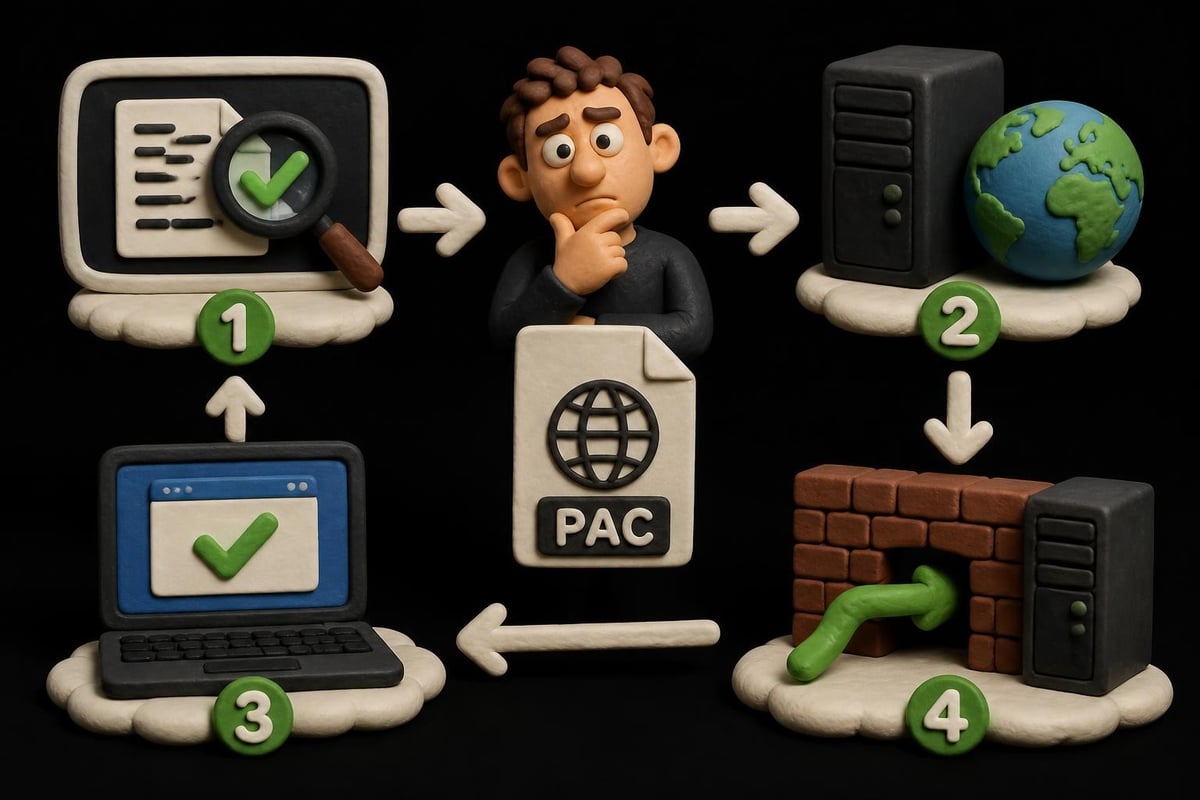
PAC files execute in restricted JavaScript environments with limited functions. Common errors include:
- Using unsupported JavaScript features (ES6+ syntax, modern APIs)
- Excessive execution time causing browser timeouts
- Logic errors that return invalid proxy strings
- DNS resolution failures when using isResolvable() or dnsResolve()
Test PAC files thoroughly using browser-based debugging tools and command-line utilities before production deployment.
Performance Degradation
Slow PAC file execution impacts every network request. Optimize performance through:
- Minimizing DNS lookups - Cache results when possible
- Simplifying logic - Reduce complex conditional statements
- Avoiding external dependencies - Don't fetch data from remote servers within PAC files
- Implementing efficient pattern matching - Use shExpMatch sparingly for domain matching
Organizations requiring high-speed proxy services should consider solutions offering 10Gbps bandwidth and minimal latency overhead to prevent autoproxy configuration from becoming a bottleneck.
Autoproxy in Modern Cloud and Hybrid Environments
The shift toward cloud services and distributed workforces challenges traditional autoproxy models designed for office-centric networks.
Remote Worker Considerations
Employees working from home or traveling need consistent proxy access regardless of network location. Solutions include:
- VPN-based autoproxy - Apply corporate PAC files after VPN connection establishment
- Cloud-delivered PAC files - Host configuration files on globally distributed CDNs
- Agent-based proxying - Deploy lightweight clients that implement proxy logic locally
- Zero Trust Network Access - Replace traditional proxies with identity-aware perimeter controls
Container and Microservices Environments
Kubernetes and containerized applications require different autoproxy approaches than traditional endpoints:
- Configure environment variables (HTTP_PROXY, HTTPS_PROXY, NO_PROXY) in container manifests
- Implement sidecar proxy containers using service mesh patterns
- Use init containers to download and configure PAC files during pod initialization
- Apply network policies that enforce proxy usage at the infrastructure layer
Compliance and Audit Requirements
Organizations in regulated industries must demonstrate control over network traffic routing. Autoproxy configurations support compliance initiatives when properly documented and monitored.
Logging and Monitoring
Comprehensive logging captures:
- PAC file access patterns - Which clients retrieve configuration, how frequently
- Proxy selection decisions - Mapping of URLs to chosen proxy servers
- Configuration changes - Version control and change management for PAC file updates
- Failure events - Instances where autoproxy discovery or execution failed
Security information and event management (SIEM) systems should ingest autoproxy logs for correlation with other security events. OWASP security testing guidance includes considerations for proxy configuration testing and validation.
Documentation Standards
Maintain detailed documentation covering:
- PAC file logic and decision trees
- WPAD configuration (DNS records, DHCP options)
- Proxy server inventory and ownership
- Escalation procedures for autoproxy failures
- Testing and validation processes before updates
This documentation proves invaluable during audits, incident response, and personnel transitions.
Integration with Third-Party Proxy Services
Many organizations augment internal proxy infrastructure with commercial proxy services for specialized use cases like web scraping, competitive intelligence, and geographic access requirements.
Configuring PAC Files for External Proxies
PAC files can route specific traffic through external proxy providers while keeping general traffic on internal infrastructure. This hybrid approach balances cost, performance, and control:
Internal proxies handle:
- Corporate application access
- General web browsing
- Email and productivity tools
External proxies process:
- Data collection and scraping workloads
- Access to geo-restricted content
- High-volume API interactions
- Testing from diverse IP addresses
Organizations requiring both IPv4 and IPv6 support should verify that autoproxy configurations correctly handle dual-stack environments, ensuring applications receive appropriate proxy settings regardless of protocol.
Implementing robust autoproxy infrastructure streamlines network management while maintaining security and compliance across distributed organizations. The combination of PAC files, WPAD discovery, and modern management tools provides flexibility for diverse deployment scenarios. Whether you need enterprise-grade proxy services for web scraping, secure access to restricted content, or global traffic distribution, PinguProxy delivers high-speed datacenter, residential, and mobile proxies with complete IPv4/IPv6 support, 10Gbps bandwidth, and 24/7 expert assistance to optimize your autoproxy implementation.