
Bài viết này hiện chỉ có sẵn bằng tiếng Anh.
Đọc bằng tiếng AnhCharles Proxy for Android: Complete Setup Guide 2026
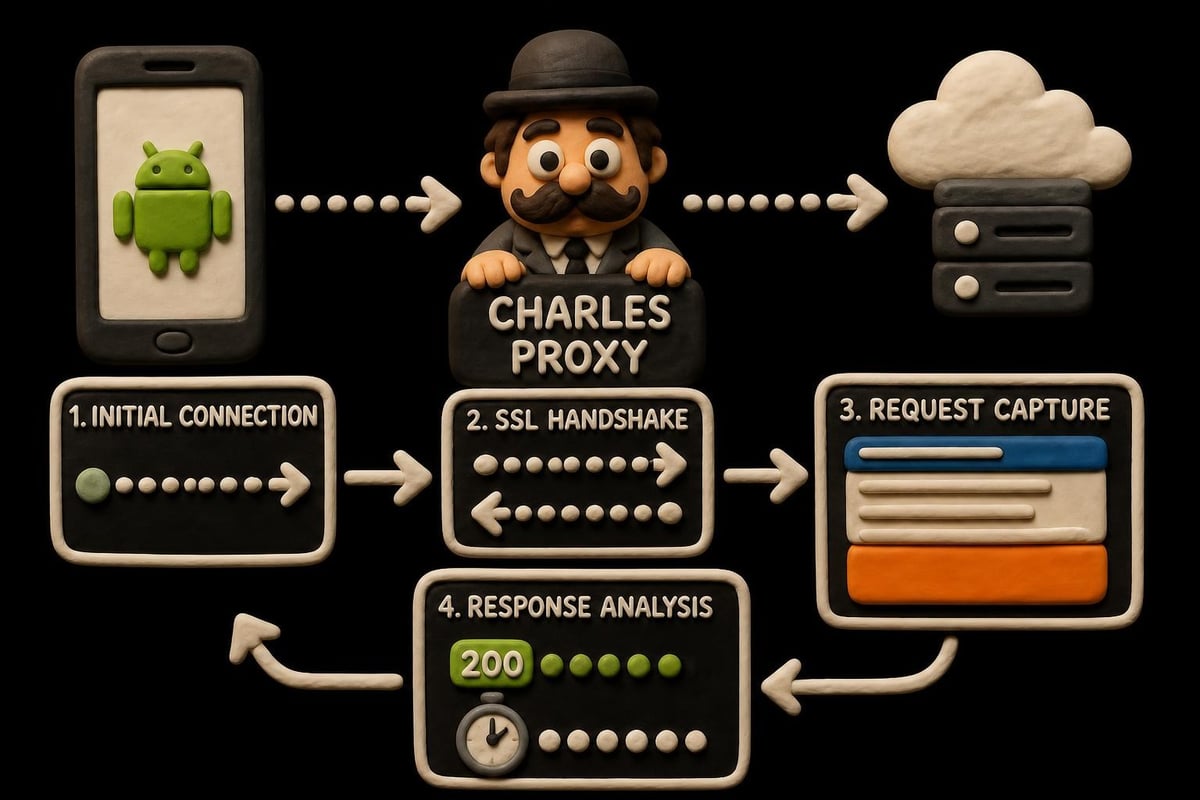
Mobile app development and network analysis require powerful tools to intercept, inspect, and debug HTTP and HTTPS traffic. Charles Proxy for Android has become an essential solution for developers, QA testers, and security professionals who need to monitor network communications on Android devices. This debugging proxy sits between your Android device and the internet, capturing all network requests and responses in real-time. Whether you're troubleshooting API calls, analyzing app behavior, or ensuring secure data transmission, understanding how to properly configure and use charles proxy for android can dramatically improve your development workflow.
Understanding Charles Proxy and Its Android Applications
Charles Proxy operates as an HTTP proxy and HTTP monitor that enables developers to view all network traffic between their Android device and the internet. The tool captures request and response data, including headers, cookies, and payloads, making it invaluable for debugging mobile applications.
Why Use Charles Proxy on Android Devices
The primary advantage of using charles proxy for android lies in its comprehensive traffic analysis capabilities. Unlike basic network monitoring tools, Charles provides detailed insights into every aspect of HTTP communication.
- Real-time traffic monitoring for immediate feedback during development
- SSL certificate proxying to decrypt and inspect HTTPS traffic
- Request throttling to simulate slow network conditions
- Breakpoint debugging to modify requests and responses on the fly
- API testing without modifying application code
Many developers working with mobile proxies appreciate how Charles Proxy complements high-speed datacenter proxies by providing local debugging capabilities before deploying to production environments. The software supports both IPv4 and IPv6 protocols, ensuring compatibility with modern network infrastructures.
Key Features for Mobile Development
Charles Proxy offers specialized features designed specifically for mobile application debugging. The bandwidth throttling function simulates various network conditions, from 3G to 5G speeds, helping developers optimize app performance across different connection types.
The DNS spoofing capability allows testing against different server environments without changing application configuration. This proves particularly useful when testing applications that interact with multiple backend services or regional servers.
| Feature | Purpose | Use Case |
|---|---|---|
| SSL Proxying | Decrypt HTTPS traffic | API debugging, security testing |
| Bandwidth Throttle | Simulate network speeds | Performance optimization |
| Breakpoints | Modify requests/responses | Testing edge cases |
| DNS Spoofing | Override DNS resolution | Multi-environment testing |
| Request Rewriting | Redirect requests | A/B testing, staging environments |
Setting Up Charles Proxy for Android Devices
The configuration process for charles proxy for android requires several steps to ensure proper functionality, especially when dealing with HTTPS traffic. The setup involves both computer-side and device-side configurations.
Initial Installation and Computer Configuration
First, download and install Charles Proxy on your computer from the official website. The software supports Windows, macOS, and Linux operating systems. After installation, launch Charles and note the IP address displayed in the Help menu under Local IP Address.
Configure Charles to enable proxy functionality:
- Open Charles Proxy and navigate to Proxy Settings
- Set the port number (default is 8888)
- Enable transparent HTTP proxying
- Configure SSL Proxying Settings for HTTPS traffic
- Add wildcard locations (*:443) to capture all SSL traffic
The comprehensive Charles Proxy tutorial provides additional details on advanced configuration options and troubleshooting common installation issues.
Android Device Proxy Configuration
Connecting your Android device requires manual proxy configuration in the Wi-Fi settings. Both devices must be on the same network for the connection to work properly.
Step-by-step Android configuration:
- Open Android Settings and navigate to Wi-Fi
- Long-press your connected network and select Modify Network
- Expand Advanced Options
- Change Proxy to Manual
- Enter your computer's IP address in the Proxy hostname field
- Enter the Charles port number (8888) in the Proxy port field
- Save the configuration
After setting the proxy, open any browser on your Android device. Charles should display a connection request prompt. Accept this connection to establish the proxy relationship between your device and computer.
SSL Certificate Installation for HTTPS
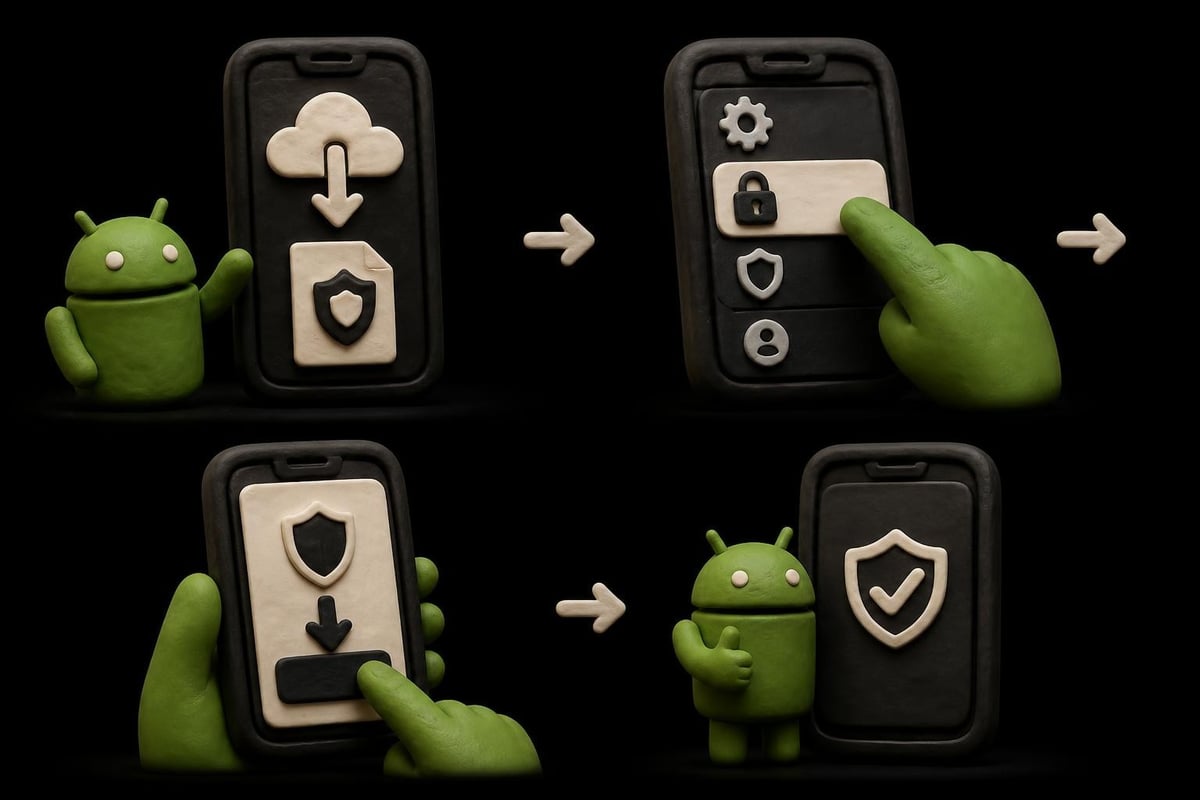
HTTPS traffic requires installing Charles's SSL certificate on your Android device. Without this certificate, encrypted traffic appears as gibberish in Charles, making analysis impossible. The detailed configuration guide walks through the certificate installation process for various Android versions.
Navigate to chls.pro/ssl on your Android device's browser while connected through Charles. This downloads the certificate file. Then install it through Android's security settings:
- Open Settings > Security > Encryption & credentials
- Select Install a certificate > CA certificate
- Navigate to the downloaded certificate file
- Confirm installation
For Android 7.0 (Nougat) and higher, applications ignore user-installed certificates by default due to enhanced security measures. According to Google's developer documentation, you'll need to modify your app's network security configuration to trust user certificates during development.
Advanced Configuration and Troubleshooting
Beyond basic setup, charles proxy for android offers advanced features that enhance debugging capabilities and solve common network analysis challenges.
Configuring Network Security for Modern Android
Android's network security framework prevents apps from trusting user-installed certificates in production builds. This security feature protects users from man-in-the-middle attacks but complicates development debugging.
Create a network security configuration file in your app's res/xml directory:
<network-security-config>
    <debug-overrides>
        <trust-anchors>
            <certificates src="user" />
        </trust-anchors>
    </debug-overrides>
</network-security-config>
Reference this configuration in your AndroidManifest.xml file. This allows Charles to intercept HTTPS traffic during debug builds while maintaining security in release versions. The Android network debugging documentation provides framework-specific implementation details.
Common Connection Issues and Solutions
Many developers encounter connectivity problems when first setting up charles proxy for android. Internet connection failures typically stem from firewall restrictions, incorrect proxy settings, or certificate issues.
| Problem | Cause | Solution |
|---|---|---|
| No internet on device | Firewall blocking proxy port | Configure firewall to allow port 8888 |
| SSL handshake failures | Certificate not trusted | Reinstall certificate, verify network config |
| Cannot see traffic | Wrong IP address configured | Verify Local IP in Charles Help menu |
| App refuses connection | Certificate pinning enabled | Disable pinning in debug builds |
| Partial traffic capture | App uses non-standard ports | Add specific ports to SSL Proxying |
The troubleshooting guide for Android Charles Proxy problems addresses specific scenarios related to certificate validation and network connectivity errors that commonly affect developers.
Filtering and Analyzing Traffic
Charles captures all network traffic by default, which can overwhelm developers working on specific features. Implementing filters helps focus on relevant requests and reduces noise in the session log.
Filter configuration options:
- Include filters to show only specific domains or paths
- Focus mode to highlight traffic from a particular host
- Structure view to organize requests by domain hierarchy
- Sequence view to display requests chronologically
- Recording limits to prevent excessive memory usage
When working with mobile proxies, combining Charles Proxy with production proxy services creates a comprehensive testing environment. This approach allows developers to debug local traffic while simulating real-world proxy routing conditions.
Practical Use Cases and Implementation Strategies
Understanding how to apply charles proxy for android in real-world scenarios maximizes its value for development teams and individual developers.
API Development and Testing
Mobile applications rely heavily on API communications. Charles Proxy enables developers to inspect every aspect of API calls, from authentication headers to response payloads. This visibility helps identify issues before they reach production.
Testing different API responses becomes straightforward with breakpoints. Developers can intercept requests, modify response data, and observe how applications handle various scenarios including error conditions, empty responses, and malformed data.
Consider a scenario where you're integrating a payment API. Using Charles, you can:
- Monitor the authentication flow to ensure proper token handling
- Verify that sensitive data transmits over HTTPS
- Test timeout scenarios by introducing artificial delays
- Simulate failed transactions by modifying response codes
- Validate retry logic by observing repeated requests
Performance Optimization and Monitoring
Network performance significantly impacts user experience in mobile applications. Charles Proxy's bandwidth throttling simulates various network conditions, helping developers optimize applications for users with slower connections.
The timing information displayed for each request reveals performance bottlenecks. Large payload sizes, slow server responses, and excessive request counts become immediately apparent. This data-driven approach to optimization produces measurable improvements in app responsiveness.
Comparing performance metrics across different network configurations helps establish realistic performance baselines. Applications should maintain usability even under constrained network conditions, and Charles provides the tools to verify this requirement.
Security Auditing and Compliance
Security professionals use charles proxy for android to audit mobile applications for vulnerabilities. The ability to view all network traffic reveals potential security issues including unencrypted sensitive data transmission, weak authentication mechanisms, and exposed API endpoints.
Certificate pinning verification ensures applications properly validate server certificates. By attempting to intercept traffic from apps implementing pinning, security teams confirm that the protection mechanism functions correctly.

Privacy-conscious development benefits from Charles Proxy analysis. Developers can verify that applications respect user privacy by monitoring what data gets transmitted to servers. This transparency supports compliance with regulations like GDPR and CCPA. Research on Android security mechanisms provides context for understanding the platform's security model and its interaction with proxy tools.
Integration with Development Workflows
Incorporating charles proxy for android into established development workflows requires strategic planning and team coordination.
Continuous Integration and Automated Testing
While Charles Proxy excels at manual debugging, integrating it with automated testing frameworks extends its utility. The command-line interface supports scripting and automation, enabling teams to capture network traffic during automated test runs.
Session files saved by Charles contain complete request and response data. These files serve as artifacts for test runs, providing developers with detailed information when automated tests fail due to network-related issues.
Teams using datacenter proxies for testing can combine Charles Proxy with proxy rotation strategies. This creates test scenarios that closely mirror production environments where users access applications through various network configurations.
Collaborative Debugging Strategies
Development teams benefit from sharing Charles Proxy session files when diagnosing issues. A QA tester encountering a bug can capture the network traffic and share the session file with developers, providing complete context for troubleshooting.
Documentation improves when network behavior gets captured alongside bug reports. Instead of describing what happened, testers can attach session files showing exactly what the application transmitted and received during the problematic interaction.
Best practices for team collaboration:
- Establish naming conventions for session files
- Store sessions in shared repositories for easy access
- Sanitize sensitive data before sharing externally
- Document filter configurations used during capture
- Include session metadata (Android version, app version, network type)
Developer Productivity Enhancements
Mastering Charles Proxy shortcuts and features accelerates development workflows. The tool's ability to save and load session configurations means developers can quickly switch between different debugging scenarios.
Custom external tools integration allows launching scripts directly from Charles. This automation capability reduces repetitive tasks and enables complex testing scenarios with minimal manual intervention.
The comprehensive Charles setup guide demonstrates advanced workflow optimizations that experienced developers employ to maximize productivity.
Platform-Specific Considerations and Limitations
Different Android versions and device manufacturers implement network security differently, affecting how charles proxy for android functions.
Android Version Compatibility
Google has progressively tightened network security with each Android release. Android 7.0 Nougat introduced significant changes to certificate trust, requiring explicit configuration for user-installed certificates.
Android 10 and later versions expanded these restrictions, making it more challenging to intercept traffic from production applications. Developers must explicitly enable debugging features in development builds while ensuring these configurations don't persist in release versions.
| Android Version | Certificate Handling | Configuration Required |
|---|---|---|
| 6.0 and earlier | Trusts user certificates | Basic proxy setup only |
| 7.0 - 9.0 | Requires network config | XML network security config |
| 10.0 and later | Enhanced restrictions | Debug-specific configurations |
| 11.0+ | Scoped storage impacts | Additional permission handling |
Manufacturer Customizations
Device manufacturers often implement custom security features that affect proxy functionality. Samsung's Knox security, Huawei's security framework, and similar manufacturer-specific systems may require additional configuration steps.
Some manufacturers modify the certificate installation process or implement stricter certificate validation. These variations mean that configuration instructions may need adjustment based on the specific device being debugged.
App-Level Security Measures
Applications implementing certificate pinning actively prevent proxy interception. While this security measure protects users in production, it complicates development debugging.
Developers working on applications with certificate pinning need to maintain separate debug builds with pinning disabled. Environment-based configuration allows toggling security features based on build type, ensuring robust security in production while maintaining debuggability during development.
Understanding Android socket security helps developers implement appropriate security measures while maintaining debuggability. The balance between security and development convenience requires careful architectural planning.
Alternative Approaches and Complementary Tools
While charles proxy for android remains a popular choice, understanding alternative approaches provides developers with additional options for specific scenarios.
Proxy Selection Considerations
Different debugging scenarios benefit from different proxy tools. Charles Proxy excels at HTTP/HTTPS traffic analysis with its user-friendly interface and comprehensive features. However, other tools may better suit specific requirements.
Burp Suite offers advanced security testing capabilities but presents a steeper learning curve. mitmproxy provides powerful scripting capabilities for automated workflows. Fiddler serves Windows users well with its familiar interface and extensive documentation.
When working with production environments, HTTP proxy services complement local debugging tools by providing realistic routing scenarios and geographic distribution testing.
Combining Tools for Comprehensive Analysis
Using multiple debugging tools simultaneously provides deeper insights into application behavior. Android Studio's network profiler captures Android-specific metrics, while Charles Proxy provides detailed HTTP-level analysis.
Logcat output combined with Charles sessions creates a complete picture of application behavior. Network requests correlated with application logs reveal the context behind specific API calls and help identify the root causes of issues.
Performance Monitoring Platforms
Enterprise development often incorporates dedicated performance monitoring platforms. These services provide production-level insights that complement development-time debugging with Charles Proxy.
Combining local debugging during development with production monitoring ensures applications perform well across all environments. Charles Proxy identifies issues during development, while monitoring platforms catch problems that only manifest under production load conditions.
Mastering charles proxy for android empowers developers to build more robust, secure, and performant mobile applications through comprehensive network traffic analysis. Whether you're debugging API integrations, optimizing performance, or conducting security audits, proper proxy configuration provides the visibility needed for professional mobile development. When you need reliable proxy infrastructure for testing across different geographic regions or network types, PinguProxy delivers high-speed datacenter, residential, and mobile proxies with complete IPv4 and IPv6 support, 10Gbps bandwidth, and 24/7 support to ensure your development and testing workflows run smoothly at scale.