
Proxy Example Com 8080: Complete Configuration Guide
When you're setting up proxy configurations for testing, development, or production environments, you'll frequently encounter the format "proxy example com 8080" in documentation and tutorials. This syntax represents a standard way to specify a proxy server address along with its port number, serving as a placeholder that developers and network administrators use to demonstrate proper configuration methods. Understanding how to properly configure and utilize this format is essential for anyone working with proxy services, web scraping tools, or network security applications.
Understanding Proxy Server Address Formats
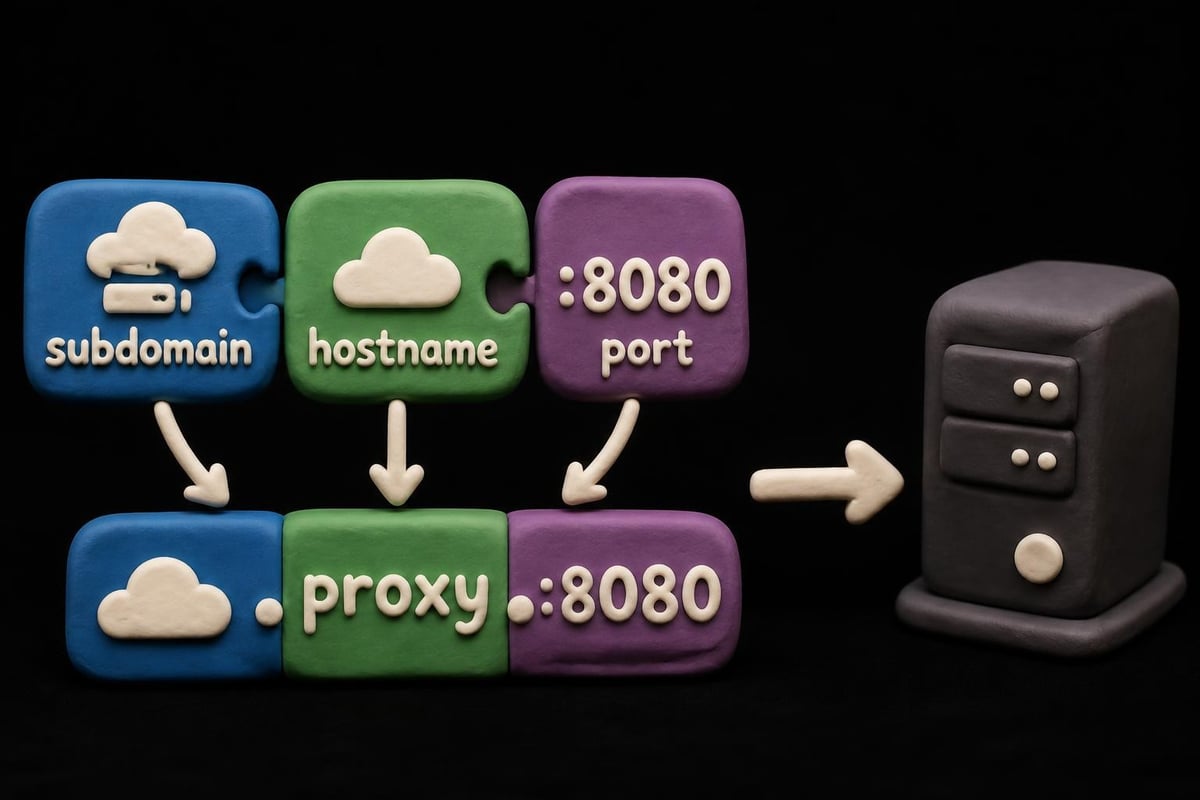
The notation proxy example com 8080 follows a specific structure that combines several critical elements. The first part, "proxy.example.com," represents the hostname or fully qualified domain name (FQDN) of the proxy server you want to connect through. The second component, "8080," indicates the port number where the proxy service listens for incoming connections.
Why this format matters:
- Separates the server address from the port for clarity
- Follows industry-standard URL and network address conventions
- Enables consistent configuration across different applications
- Simplifies documentation and communication between technical teams
Port 8080 has become one of the most commonly used alternatives to the standard HTTP port 80. Many proxy services operate on this port because it's easy to remember, unlikely to conflict with other services, and widely recognized for proxy and web server applications. When you see proxy example com 8080 in tutorials or configuration files, it's demonstrating where you would insert your actual proxy server's address and port.
Breaking Down the Components
The domain "example.com" is specifically reserved for documentation purposes according to RFC 2606. This means you should never encounter a real production server at example.com, making it perfect for demonstrations without risking accidental connections to live systems.
The subdomain "proxy" is a conventional naming choice that indicates the server's purpose. Real-world implementations might use different subdomains like "gateway," "relay," or custom names based on organizational standards.
Configuring Applications to Use Proxy Example Com 8080
Different applications and programming environments require specific syntax when configuring proxy settings. The proxy example com 8080 format adapts to each context while maintaining its core structure.
Command-Line Tools and cURL
When working with cURL, one of the most versatile command-line tools for data transfer, you specify the proxy using the -x or --proxy flag. The cURL documentation provides detailed examples of various proxy configurations.
curl -x proxy.example.com:8080 https://target-website.com
This command routes your request through the specified proxy server before reaching the target destination. For PinguProxy users engaged in web scraping projects, understanding these command-line configurations enables automation and scripting capabilities.
Environment Variables for System-Wide Configuration
Many Linux and Unix-based systems support environment variables that apply proxy settings across multiple applications simultaneously. Setting these variables eliminates the need to configure each tool individually.
| Variable Name | Purpose | Example Value |
|---|---|---|
| http_proxy | Routes HTTP traffic | http://proxy.example.com:8080 |
| https_proxy | Routes HTTPS traffic | http://proxy.example.com:8080 |
| all_proxy | Routes all protocols | http://proxy.example.com:8080 |
| no_proxy | Excludes specific hosts | localhost,127.0.0.1 |
These configurations follow patterns detailed in various Linux proxy setup guides, where the proxy example com 8080 format demonstrates proper syntax.
Browser and Application Settings
Web browsers typically provide graphical interfaces for proxy configuration, but the underlying settings still use the same address and port structure. Firefox, Chrome, and other browsers ask for separate fields for the proxy address and port number.
When you enter "proxy.example.com" in the address field and "8080" in the port field, you're essentially creating the same configuration as proxy example com 8080 in a more user-friendly format.
Proxy Auto-Configuration Files and Advanced Routing
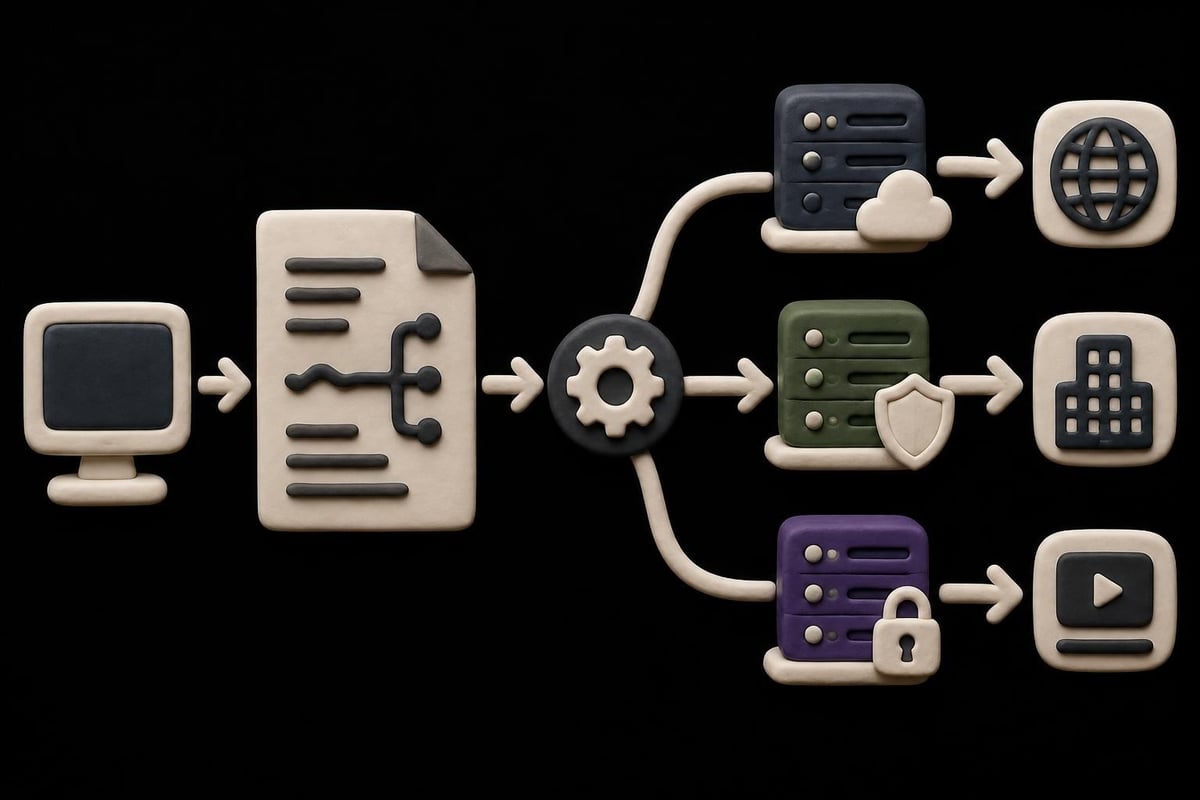
For organizations managing multiple proxy servers or complex routing requirements, Proxy Auto-Configuration (PAC) files offer sophisticated control over traffic routing. These JavaScript files contain functions that determine which proxy to use based on the requested URL, hostname, or other criteria.
A basic PAC file using proxy example com 8080 might look like this:
function FindProxyForURL(url, host) {
    return "PROXY proxy.example.com:8080";
}
This simple example routes all traffic through the specified proxy server. More complex implementations can incorporate conditional logic to direct different types of traffic through various proxy servers based on business rules or security requirements.
The Proxy Auto-Config specification defines multiple return value formats, allowing administrators to specify fallback proxies, direct connections for certain domains, or load balancing across multiple servers. This flexibility makes PAC files particularly valuable for enterprise environments and complex proxy deployments.
Using PAC Files with Real Proxy Services
When implementing PAC files with services like PinguProxy, you replace the example values with your actual proxy endpoints. The structure remains identical, but you gain access to high-speed connections with 10Gbps bandwidth and features like 1ms proxy rotation for enhanced anonymity.
Benefits of PAC file implementation:
- Centralized proxy management across an organization
- Automatic failover to backup proxies
- Geographic routing based on destination
- Selective proxying for specific domains or IP ranges
- Reduced manual configuration overhead
Common Use Cases for Proxy Configurations
Understanding how proxy example com 8080 applies to real-world scenarios helps clarify when and why you need specific proxy configurations. Different use cases demand different approaches to proxy server setup and management.
Web Scraping and Data Collection
Web scraping represents one of the most demanding applications for proxy services. When you're extracting data from websites at scale, rotating through multiple IP addresses becomes essential to avoid rate limiting and IP bans.
For developers building scraping tools, the proxy example com 8080 format appears in configuration files, environment variables, and API calls. Professional HTTP proxy services typically provide endpoints that follow this same address-port structure, making integration straightforward.
Modern scraping frameworks and tools support proxy configuration through various methods:
- Configuration files with proxy server lists
- API parameters that accept proxy URLs
- Middleware that automatically rotates proxies
- Session management that maintains proxy assignments
- Fallback mechanisms when proxies fail
Development and Testing Environments
Development teams frequently use proxy servers to simulate production environments, test geographic restrictions, or debug network issues. The proxy example com 8080 format appears in development documentation because it clearly demonstrates where to insert actual proxy credentials.
Testing SOCKS5 proxies, which operate differently from HTTP proxies, requires understanding various proxy protocols and their respective configuration requirements. While HTTP proxies typically use port 8080, SOCKS5 proxies might use port 1080 or other alternatives.
Gaming and Real-Time Applications
Gamers and streaming enthusiasts use proxy servers to reduce latency, access region-locked content, or protect against DDoS attacks. When configuring gaming applications or streaming software, the proxy example com 8080 format guides users through the setup process.
For gaming applications requiring ultra-low latency, datacenter proxies offer superior speed compared to residential alternatives. The 10Gbps bandwidth available through premium services ensures minimal performance impact even during intensive gaming sessions.
Troubleshooting Proxy Connection Issues
When your proxy configuration isn't working as expected, systematic troubleshooting helps identify whether the issue stems from incorrect syntax, network restrictions, or proxy server availability.
Verifying Proxy Connectivity
Before diving into complex diagnostics, confirm basic connectivity to your proxy server. Tools like telnet or netcat can test whether the proxy port accepts connections.
Common connection problems:
- Incorrect port numbers: Verify you're using 8080 and not 80 or 8888
- Firewall restrictions: Ensure your network allows outbound connections to proxy ports
- DNS resolution failures: Check that proxy.example.com (or your actual proxy hostname) resolves correctly
- Authentication requirements: Some proxies require username and password credentials
- Protocol mismatches: Ensure you're using HTTP proxy settings for HTTP proxies, not SOCKS configurations
Authentication and Credentials
Many production proxy services require authentication to prevent unauthorized use. When proxy example com 8080 includes authentication, the format expands to:
http://username:password@proxy.example.com:8080
This extended format embeds credentials directly in the proxy URL, though some applications require separate fields for username and password. Security-conscious organizations should avoid embedding credentials in configuration files that might be committed to version control systems.

Testing with Different Tools
When one application fails to connect through your proxy while others succeed, the problem likely lies in application-specific configuration rather than the proxy itself. Testing with multiple tools helps isolate the issue.
| Tool | Test Command | Expected Result |
|---|---|---|
| cURL | curl -x proxy.example.com:8080 -I https://ipinfo.io |
Returns headers showing proxy IP |
| wget | wget -e use_proxy=yes -e http_proxy=proxy.example.com:8080 https://ipinfo.io |
Downloads page through proxy |
| Python requests | requests.get('https://ipinfo.io', proxies={'http': 'proxy.example.com:8080'}) |
Returns JSON with proxy IP |
| Browser | Manual proxy settings | Loads pages through proxy |
Advanced Proxy Configuration Strategies
Beyond basic connection setup, advanced configurations enable sophisticated routing, performance optimization, and security enhancements. Understanding these strategies helps you maximize the value of your proxy infrastructure.
Proxy Chaining and Cascading
Some scenarios benefit from routing traffic through multiple proxy servers in sequence. This technique, called proxy chaining, adds layers of anonymity and can combine the benefits of different proxy types.
For example, you might route traffic first through a high-speed datacenter proxy for performance, then through a residential proxy for improved anonymity. Each proxy in the chain sees only the previous proxy's IP address, not your original connection.
Implementation considerations:
- Each additional hop increases latency
- Authentication may be required at each proxy level
- Not all applications support proxy chaining
- Configuration complexity increases significantly
- Troubleshooting becomes more challenging
Geographic Distribution and Load Balancing
Organizations with global operations often deploy proxy servers in multiple geographic regions. Configuring proxy rules based on destination geography optimizes performance by minimizing physical distance between proxy and target.
A PAC file might route requests to Asian websites through an Asian proxy server while directing European requests through European proxies. This geographic optimization reduces latency and improves user experience.
Protocol-Specific Routing
Different protocols have different proxy requirements. While HTTP and HTTPS traffic commonly uses proxies on port 8080, other protocols like FTP, SOCKS, or WebSocket might require different configurations.
Understanding the difference between HTTP and SOCKS5 proxies helps you choose the right protocol for your use case. SOCKS5 proxies handle more protocol types but require application-level support for full functionality.
Security Considerations and Best Practices
Proxy servers introduce both security benefits and potential risks. Proper configuration and security practices ensure you gain the advantages while minimizing vulnerabilities.
Encryption and Privacy
When you route traffic through proxy example com 8080 using unencrypted HTTP, the proxy server can see all transmitted data including sensitive information. For secure communications, consider these approaches:
- Use HTTPS for end-to-end encryption between your client and destination server
- Choose proxy providers with strict zero-log policies like PinguProxy
- Implement proxy authentication to prevent unauthorized use
- Regularly rotate proxy credentials and IP addresses
- Monitor proxy logs for suspicious activity
Research into the free proxy ecosystem reveals significant security concerns with publicly available proxies, including traffic interception and credential theft. Professional proxy services with security guarantees provide much better protection for sensitive operations.
Compliance and Legal Considerations
Using proxy servers for legitimate purposes like web scraping, testing, or privacy protection is generally legal, but the specific use case and jurisdiction matter. Some websites explicitly prohibit proxy access in their terms of service.
Best practices for compliant proxy use:
- Review target website terms of service before scraping
- Respect robots.txt directives and crawl delays
- Implement rate limiting to avoid overwhelming target servers
- Identify your scraper in user-agent strings
- Obtain necessary permissions for automated access
Performance Optimization Techniques
Maximizing proxy performance requires attention to multiple factors including proxy selection, connection pooling, and request optimization. Understanding these elements helps you achieve the best possible results from your proxy infrastructure.
Selecting the Right Proxy Type
Different proxy types offer distinct performance characteristics. Datacenter proxies typically provide the fastest speeds but may face higher block rates on some websites. Residential proxies offer better success rates but slower speeds due to routing through actual residential connections.
Mobile proxies provide excellent success rates for mobile-specific applications but generally operate at cellular network speeds. Choosing the right type depends on your specific requirements for speed, anonymity, and reliability.
Connection Pooling and Reuse
Establishing new proxy connections for every request introduces overhead. Connection pooling maintains persistent connections that can be reused across multiple requests, dramatically improving performance for high-volume operations.
Most modern HTTP clients support connection pooling by default, but configuration options allow fine-tuning:
- Maximum connections: Limit simultaneous connections to prevent overwhelming the proxy
- Idle timeout: Close connections after periods of inactivity
- Keep-alive settings: Maintain connections between requests
- Retry logic: Automatically retry failed requests
- Circuit breakers: Temporarily stop using failing proxies
Request Optimization
Beyond proxy configuration, optimizing your requests reduces bandwidth consumption and improves overall throughput. Techniques include compression, conditional requests, and selective data extraction.
When working with proxy server configurations, pay attention to headers that might reveal your true identity or location. User-agent strings, accept-language headers, and other request metadata can leak information even when using proxies.
Integration with Popular Development Frameworks
Modern development frameworks and libraries provide built-in proxy support, though implementation details vary. Understanding framework-specific configuration helps you integrate proxy functionality seamlessly into your applications.
Python and Requests Library
Python's requests library makes proxy configuration straightforward through the proxies parameter:
proxies = {
    'http': 'http://proxy.example.com:8080',
    'https': 'http://proxy.example.com:8080'
}
response = requests.get('https://api.example.com', proxies=proxies)
For production environments, you would replace proxy example com 8080 with your actual proxy credentials, potentially including authentication information.
Node.js and HTTP Clients
Node.js applications can configure proxies through various HTTP client libraries. Popular choices like axios and got support proxy configuration through similar object-based syntax.
Environmental variables also work well in Node.js environments, allowing you to configure proxies without modifying application code. This approach facilitates deployment across different environments with varying proxy requirements.
Browser Automation Frameworks
Selenium, Puppeteer, and Playwright all support proxy configuration for automated browser testing and web scraping. The syntax varies slightly between frameworks, but all accept the standard proxy example com 8080 format.
Browser automation with proxies enables sophisticated scraping operations that execute JavaScript, handle cookies, and interact with dynamic content. When combined with residential or mobile proxies, these tools can successfully access even heavily protected websites.
Monitoring and Analytics
Tracking proxy performance and usage patterns helps optimize your configuration and identify potential issues before they impact operations. Comprehensive monitoring should cover multiple metrics and provide actionable insights.
Key Performance Indicators
Essential proxy metrics:
- Success rate: Percentage of requests that complete successfully
- Average response time: Latency from request to response
- Bandwidth utilization: Data transferred through proxies
- Error rates: Types and frequencies of connection failures
- Geographic distribution: Request patterns across regions
Many proxy providers, including professional services, offer dashboards displaying these metrics in real-time. Regular analysis helps you optimize proxy selection, identify underperforming servers, and plan capacity upgrades.
Log Analysis and Debugging
Detailed logging provides invaluable insights when troubleshooting proxy issues. Configure your applications to log proxy-related events including connection attempts, authentication results, and error messages.
When analyzing logs, look for patterns that might indicate configuration problems, network issues, or target website changes. Correlation between error spikes and specific proxies or time periods often reveals root causes quickly.
Understanding how to configure and use the proxy example com 8080 format provides the foundation for effectively leveraging proxy services across development, testing, and production environments. Whether you're building web scrapers, testing applications, or protecting your privacy online, proper proxy configuration ensures reliable and secure connections. PinguProxy delivers high-speed datacenter, residential, and mobile proxies with complete IPv4 and IPv6 support, unlimited access, and zero-log privacy protection, backed by 24/7 customer support to help you implement the perfect proxy solution for your needs.