The right proxy for web scraping depends on how strict your target site is: datacenter proxies suit tolerant sites and high volume, while residential and mobile proxies suit sites that block server IPs. A proxy routes your requests through another IP address, which spreads traffic across many addresses, unlocks country-specific content and keeps your scraper from being rate-limited after a few hundred requests.
This guide covers the proxy types that work, the criteria that separate good providers from weak ones, and three concrete options to evaluate, each with specs and a verdict.
Can you use a proxy for web scraping?
Yes, and for any project beyond a few hundred pages you should. Sites track request volume per IP address, so a single address that sends thousands of requests will be throttled, served CAPTCHAs or blocked outright. A pool of proxies divides that load and makes your traffic resemble many separate visitors.
Proxies also solve a second problem: location. Search results, prices and ads change by country and city. Teams monitoring SERPs or verifying ads need exit IPs in the markets they check, and that is a targeting feature, not just an anti-block feature.
Proxy types that work for scraping
Four types cover nearly every scraping workload, and each trades speed, cost and block resistance differently.
- Datacenter proxies: IPs hosted in server facilities. Fast and cheap, but easy for sites to identify as non-consumer traffic.
- Residential proxies: IPs assigned by internet providers to real households. Harder to detect, slower and billed by the gigabyte.
- ISP proxies: Datacenter-hosted IPs registered under consumer ISPs, sitting between the two on speed and trust.
- Mobile proxies: IPs from cellular carriers, shared by many real users behind carrier networks, which makes blocking them risky for target sites.
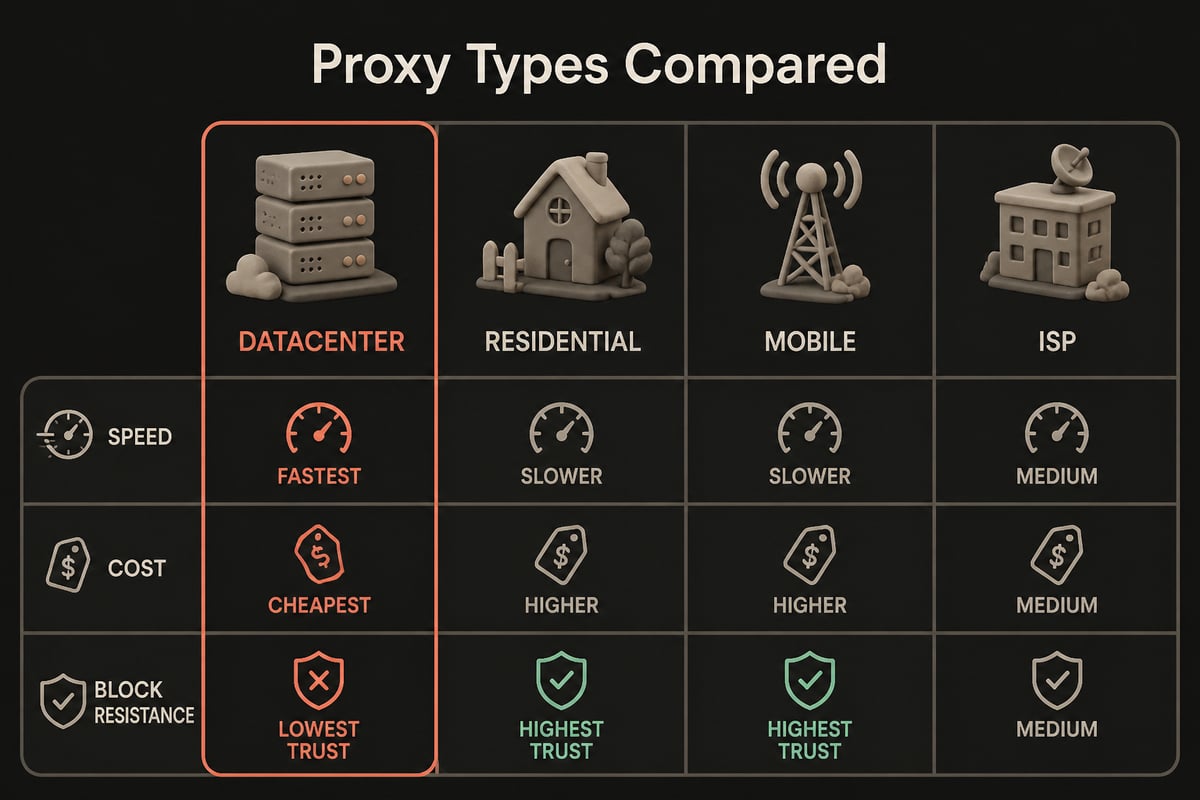
A practical rule: start with datacenter, measure your success rate, and move only the blocked domains to residential or mobile. Paying residential rates for every request is the most common budget mistake in scraping.
How to choose a proxy for web scraping
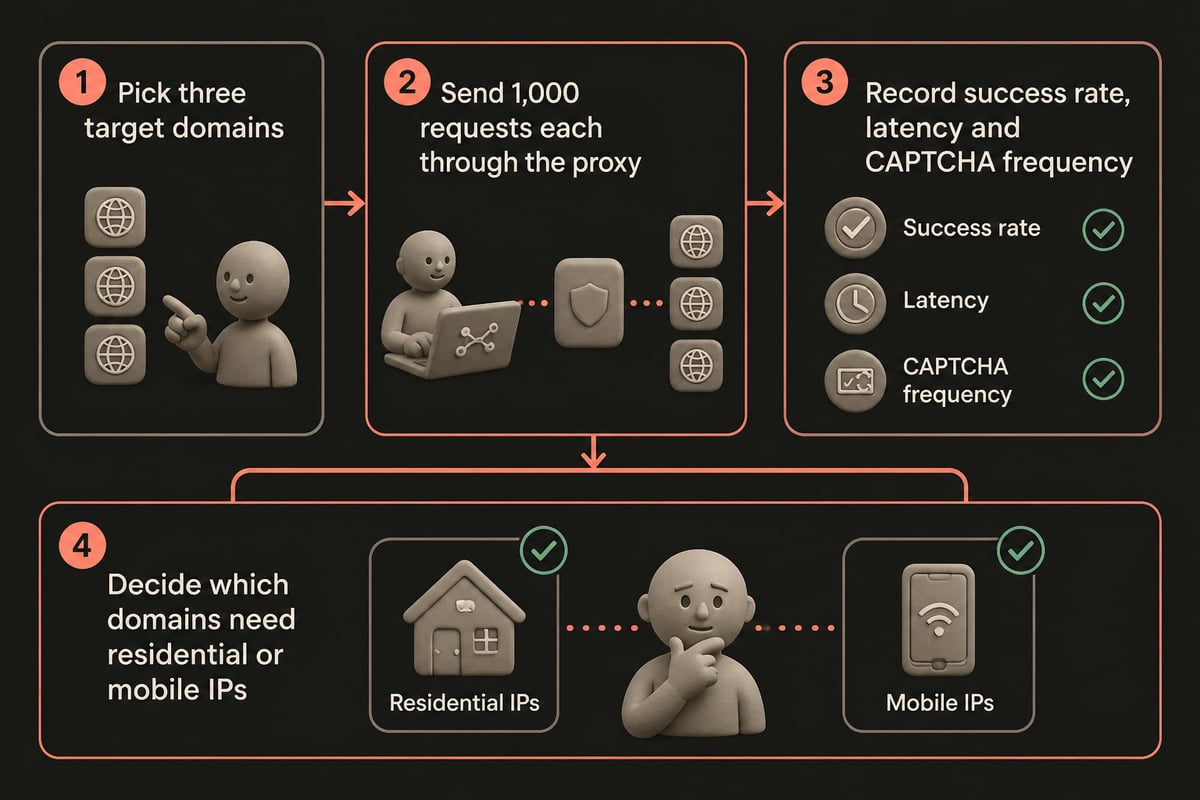
Choose by measuring four things against your target sites, not by reading a provider's headline IP count.
- Success rate on your targets. Test 1,000 requests per domain. A cheap pool with a 60% success rate costs more per usable page than a pricier one at 95%.
- Pricing model. Per-GB billing favors lightweight JSON and API endpoints. Flat or unlimited-bandwidth plans favor heavy pages, images and JavaScript-rendered content.
- Geographic coverage. Check country and city targeting for the exact markets you monitor, not just the total country count.
- Rotation control. You need both rotating sessions for broad crawling and sticky sessions for logins and multi-step flows.
Also confirm IPv4 and IPv6 support if your targets serve dual-stack content, and check what the provider logs. Zero-log policies matter when scraped data or request patterns are commercially sensitive.
Proxy pool management that protects your success rate
A good pool is managed, not just purchased. Rotate IPs per request for stateless crawling and hold one IP per session for anything involving cookies. Randomize request timing, keep headers consistent with a real browser, and retire IPs that return repeated 403 or 429 responses.
Escalation logic saves money. Firecrawl's auto mode, for example, starts with basic proxies and retries with enhanced proxies after a 401, 403 or 429 response, and the retry happens only once per request. You can build the same pattern yourself: send traffic through cheap datacenter IPs first, and escalate only failed requests to residential. The same documentation notes that enhanced proxy requests cost the same as basic ones, so managed tools can hide this cost, while a self-built pipeline has to track it.
If you scrape through your own code, location is usually a parameter, too. Firecrawl's proxy documentation shows that requests can specify a country through location.country, with DE as the example. Whichever stack you use, make country selection a per-request setting so one pipeline can serve several markets.
Is proxy scraping legal?
Using a proxy is legal in most jurisdictions; what you collect and how you collect it determines the legal risk. Scraping publicly available data is generally treated differently from accessing content behind a login, collecting personal data or ignoring a site's terms of service.
Practical safeguards:
- Review the target's terms of service and robots.txt before crawling.
- Avoid personal data unless you have a lawful basis under rules such as the GDPR.
- Do not bypass authentication or paywalls.
- Throttle requests so you do not degrade the target's service.
This is general information, not legal advice. For commercial pipelines, have counsel review the data you collect.
1. SOAX Proxies
SOAX is a multi-type proxy provider covering residential, datacenter, ISP and mobile proxies, with a network of 155M+ IPs and granular location targeting. Pricing starts from $2/GB. Having all four proxy types under one account is practical for the tiered approach described earlier: you can run a tolerant domain through datacenter IPs, move a stricter retail site to residential, and reserve mobile IPs for the few targets that block everything else. Granular targeting matters most for work such as SERP tracking, local price checks and ad verification, where results in one city can differ from the next. Because billing is per GB, lightweight JSON and API endpoints stay inexpensive, while image-heavy pages can raise costs quickly, so measure average page weight before estimating a budget.
- Proxy types: Residential, datacenter, ISP, mobile
- Network size: 155M+ IPs
- Standout feature: Granular targeting by location
- Approximate price: From $2/GB
Best for: Scraping projects that need precise country, region or city targeting across several proxy types.
Verdict: A solid pick when location precision matters more than flat-rate bandwidth.
2. PinguProxy Residential Proxies
PinguProxy Residential Proxies provide residential IPs for geo-targeted scraping, SERP monitoring and localization testing, billed per GB at €2.00/GB with volume discounts. Residential targeting reaches 221 countries, and the broader network spans over 500 million IP addresses across 190+ countries and regions. Since residential traffic is billed by bandwidth, the pay-as-you-go model fits workloads that swing from week to week, such as a quarterly audit of localized search results followed by quiet periods. Unused GB never expire, so a heavy month does not force you to overbuy for a light one. For a multi-market check, the practical pattern is to keep country selection as a per-request setting, so one pipeline can query German, Brazilian and Japanese results without separate configurations. Sticky sessions suit login flows, while the 1 ms rotating interval on Pro and Enterprise plans suits broad stateless crawling.
- Proxy type: Residential
- Targeting: 221 countries
- Billing: Per GB, volume discounts available
- Rotation: 1 ms rotating interval on Pro and Enterprise plans
- Other: Zero logs, 99.9% uptime target monitored 24/7, unused pay-as-you-go GB never expire
Best for: SERP and ad-verification teams that check results across many countries and want unused traffic to carry over rather than expire.
Verdict: Strong country coverage and a pay-as-you-go model that rewards variable workloads. Note that monthly plans start with a 1-day trial for €1, not a free trial.
3. PinguProxy Datacenter Proxies
PinguProxy Datacenter Proxies are high-speed datacenter IPs for large-scale market research and public data gathering, from €14.99 per 30 days. Bandwidth is unlimited on every plan, which removes per-GB cost from the equation for heavy crawls. That changes how you plan a project: a large crawl, such as working through a public catalog or a dataset of listing pages, can be sized by request rate and time instead of by megabytes transferred. Heavy pages, images and JavaScript-rendered content no longer inflate the bill. IPv4 and IPv6 support lets you test which protocol returns a better success rate on each target. The 1 ms rotating interval on Pro and Enterprise plans spreads requests across many addresses, which helps avoid per-IP throttling on tolerant sites.
- Proxy type: Datacenter
- Bandwidth: Unlimited on every plan
- Rotation: 1 ms rotating interval on Pro and Enterprise plans
- Support: Enterprise plan includes 24/7 support priority
- Other: Zero logs, IPv4 and IPv6 support
Best for: High-volume crawling of tolerant sites, API endpoints and public datasets where cost per request is the main constraint.
Verdict: The economical first layer in a tiered setup, with residential reserved for domains that block it.
Comparison table
| Item | Proxy types | Network or targeting | Billing model |
|---|---|---|---|
| SOAX Proxies | Residential, datacenter, ISP, mobile | 155M+ IPs, granular location targeting | Per GB, from $2/GB |
| PinguProxy Residential Proxies | Residential | 221 countries (residential targeting) | Per GB, €2.00/GB with volume discounts |
| PinguProxy Datacenter Proxies | Datacenter | 500M+ IPs across the wider network | €14.99 per 30 days, unlimited bandwidth |
Managed scraping APIs versus raw proxies
A managed scraping API handles proxies for you, while raw proxies give you control and lower unit costs. Firecrawl's cloud service, for example, manages proxies itself, whereas self-hosted Firecrawl requires you to configure your own proxy provider. That split describes the general choice: pay a premium for a hands-off pipeline, or run your own crawler and bring a proxy provider.
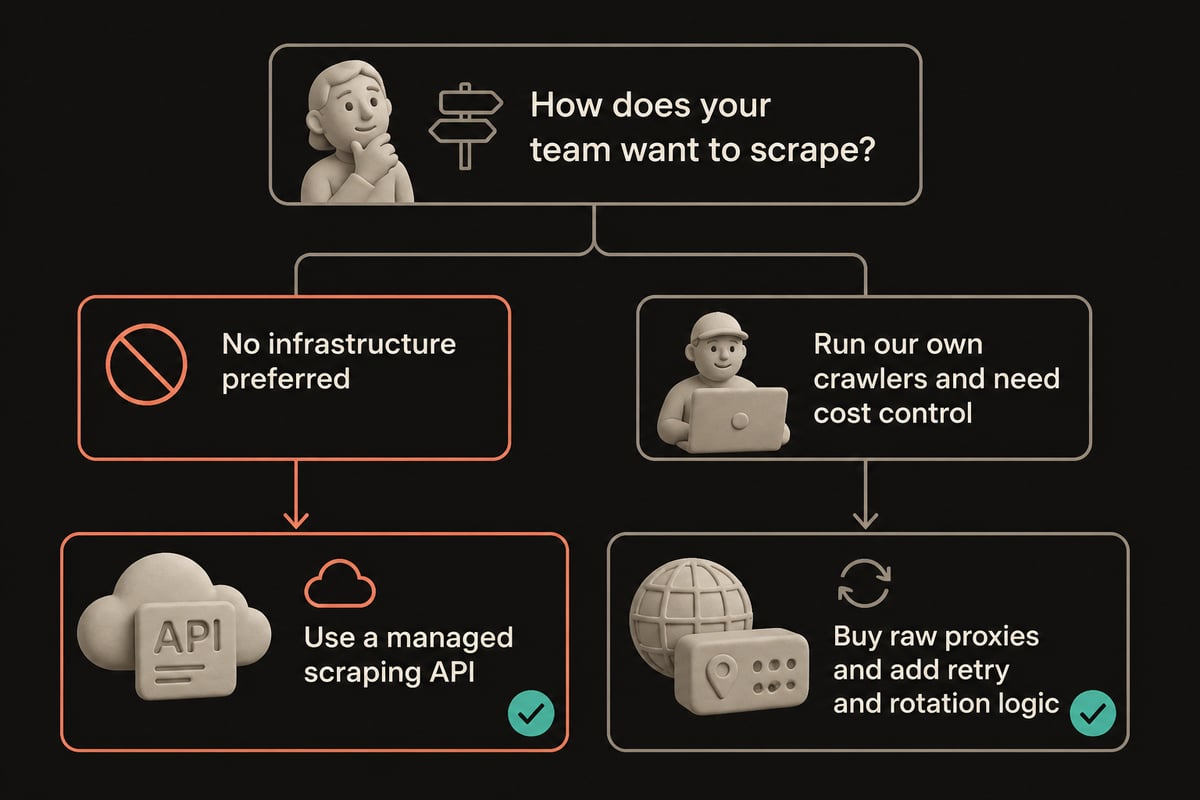
Raw proxies pay off once volume is high and you have engineering capacity. If you need help building the crawler, retry logic or data pipeline around them, Brytend is a team of software developers that builds custom software solutions tailored to clients' specific needs and goals.
Getting free proxies for web scraping
Free proxy lists are unreliable for scraping and risky for anything you care about. Public lists are shared by thousands of users, so the IPs are usually already blocked, slow and unstable. Some free proxies also inject ads, log traffic or intercept unencrypted data, which is a problem when you are collecting data for AI training or commercial analysis.
A cheap paid trial gives a more honest test than a free list. Run a pilot of a few thousand requests on your real targets, measure success rate and latency, and only then commit to a plan.
FAQ
Is it illegal to do web scraping?
Web scraping itself is not illegal in most places, but legality depends on the data, the method and the jurisdiction. Public, non-personal data is generally lower risk, while scraping personal data, bypassing logins or violating contractual terms can create liability. Check the target's terms and consult counsel for commercial projects.
How many proxies do I need for web scraping?
It depends on request volume and target strictness, not on a fixed number. A common starting point is to keep requests per IP low enough that no single address stands out, then scale the pool as your success rate drops. Rotating pools remove the need to count individual IPs.
Do I need IPv6 proxies for scraping?
Not always, but IPv6 support widens your options. Many sites still apply stricter limits to IPv4 ranges, while some serve dual-stack content. Providers that support both protocols let you test which one gives a better success rate on each target.
Before you buy anything, run a pilot of about 1,000 requests per target domain and record the success rate for datacenter and residential IPs separately. If the numbers point to a tiered setup, PinguProxy Datacenter Proxies cover the high-volume layer with unlimited bandwidth, and PinguProxy Residential Proxies cover the geo-targeted layer. With a zero-log policy, an uptime target monitored 24/7 and 24/7 priority support on the Enterprise plan, you can scale from pilot to production on one account, so Get Started with PinguProxy and test your own targets today.