
SOCKS Proxy Server: Complete Guide for 2026
A socks proxy server operates as a versatile intermediary that sits between your device and the internet, routing traffic through a different IP address while supporting multiple protocols. Unlike HTTP proxies that only handle web traffic, SOCKS proxies work at a lower network level, making them ideal for applications ranging from web scraping to gaming and accessing geo-restricted content. Understanding how these proxies function and when to deploy them can significantly enhance your online privacy, bypass restrictions, and improve performance for various business use cases.
Understanding SOCKS Proxy Architecture
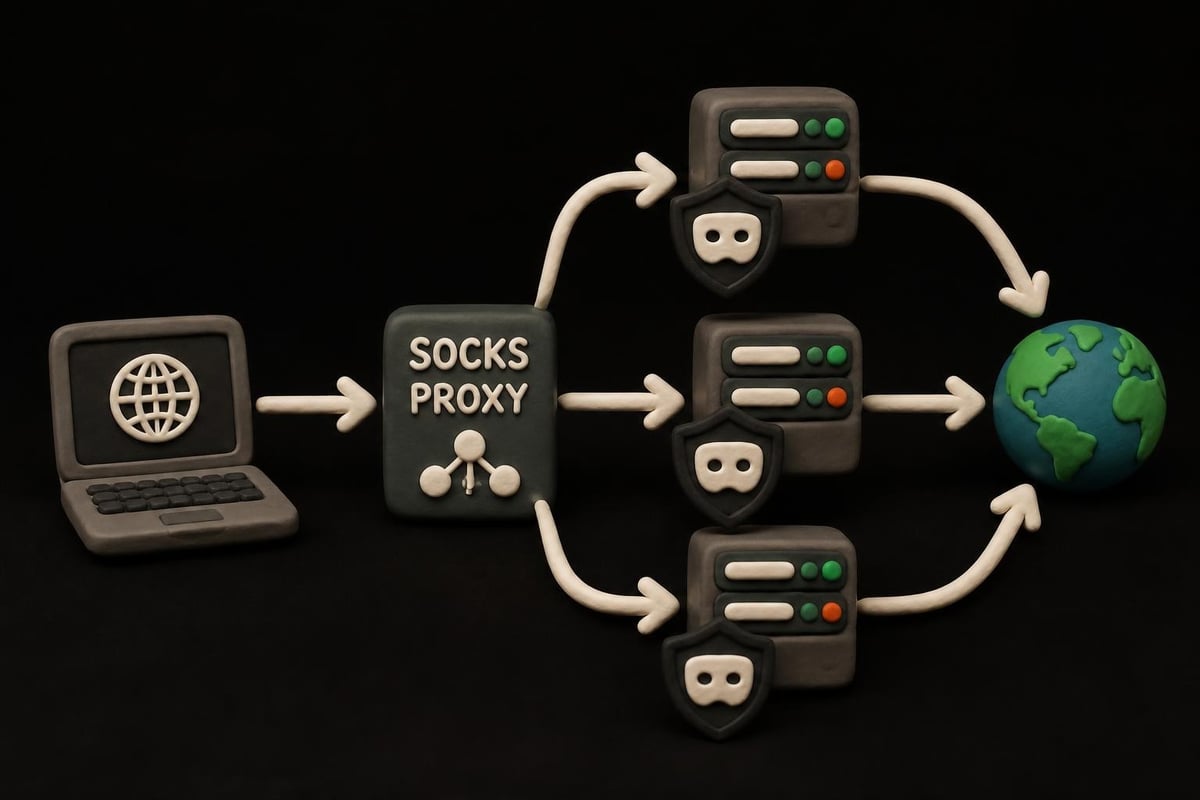
The SOCKS protocol functions as a networking proxy mechanism designed to facilitate secure connections across firewalls. When you configure a socks proxy server, it establishes a connection pathway that accepts client requests and forwards them to destination servers without modifying the data packets.
How SOCKS Differs From HTTP Proxies
Protocol flexibility sets SOCKS apart from traditional HTTP proxies. While HTTP proxies exclusively handle web browsing traffic on ports 80 and 443, a socks proxy server can route any type of traffic including:
- Email protocols (SMTP, POP3, IMAP)
- File transfer protocols (FTP, SFTP)
- Peer-to-peer connections
- Gaming traffic and UDP packets
- Custom application protocols
This protocol-agnostic approach makes SOCKS particularly valuable for businesses running diverse network operations. The proxy doesn't interpret or modify the traffic passing through it, which reduces overhead and potential points of failure.
Authentication and security mechanisms differ substantially between proxy types. SOCKS5, the current standard version, supports various authentication methods including username/password combinations and GSS-API authentication frameworks. This flexibility allows organizations to implement security policies that match their specific requirements.

| Feature | SOCKS5 Proxy | HTTP Proxy |
|---|---|---|
| Protocol Support | All TCP/UDP traffic | HTTP/HTTPS only |
| Speed | Higher (less overhead) | Moderate (more processing) |
| Authentication | Multiple methods | Basic/Digest |
| Use Cases | Gaming, P2P, scraping | Web browsing |
| UDP Support | Yes | No |
SOCKS5 Protocol Advantages
The latest iteration of the SOCKS protocol brings substantial improvements over earlier versions. A modern socks proxy server using SOCKS5 provides enhanced functionality that addresses the limitations of SOCKS4 and SOCKS4a.
UDP protocol support represents one of the most significant advances in SOCKS5. Earlier versions only handled TCP connections, which restricted their usefulness for real-time applications. With UDP support, SOCKS5 proxies now excel at:
- Voice over IP (VoIP) communications
- Online gaming with low latency requirements
- Video streaming applications
- DNS queries and resolution
IPv6 compatibility ensures that your socks proxy server infrastructure remains future-proof as internet protocols evolve. With the ongoing transition from IPv4 to IPv6, having proxy support for both protocol versions prevents connectivity issues and maintains seamless operations across diverse network environments.
Authentication improvements in SOCKS5 allow for granular access control. Organizations can implement multiple authentication schemes simultaneously, choosing the most appropriate method based on security requirements and client capabilities.
Performance Characteristics
Speed advantages emerge from the minimal processing overhead of a socks proxy server. SOCKS proxies excel in performance because they operate at the session layer rather than the application layer, which means they don't need to understand or modify the protocols passing through them.
Bandwidth efficiency comes from the streamlined packet handling. When you route traffic through a socks proxy server, the proxy simply forwards packets without deep packet inspection or content modification. This approach reduces latency and increases throughput compared to proxies that actively process and filter content.
Practical Implementation Scenarios
Deploying a socks proxy server serves multiple business objectives, each with specific configuration requirements and performance considerations.
Web Scraping Operations
Data extraction at scale requires rotating IP addresses to avoid detection and blocking. A socks proxy server enables sophisticated scraping architectures by:
- Distributing requests across multiple IP addresses to stay under rate limits
- Bypassing geographic restrictions that limit access to regional content
- Maintaining persistent sessions when scraping sites that require login states
- Reducing detection risk through genuine residential or mobile IP addresses
For businesses managing large-scale data collection, understanding SOCKS proxies and their optimal configurations becomes critical. The protocol's ability to handle various connection types means you can scrape both standard HTTP websites and services using custom protocols or websockets.
Rotation strategies matter significantly for scraping success. Implementing 1ms proxy rotation through your socks proxy server infrastructure ensures that each request appears to come from a different source, making pattern detection nearly impossible for target servers.
Gaming and Low-Latency Applications
Competitive gaming and real-time applications demand minimal latency and reliable connections. A properly configured socks proxy server addresses several gaming challenges:
- DDoS protection by masking your actual IP address from other players
- Geographic matchmaking by appearing to connect from different regions
- Firewall bypass in restricted networks like schools or workplaces
- Connection stability through dedicated proxy infrastructure
The UDP support in SOCKS5 makes it particularly suitable for gaming traffic. Most online games rely heavily on UDP for real-time state updates, and only SOCKS5 can handle this traffic type effectively.
Configuration and Integration
Setting up a socks proxy server requires understanding both server-side and client-side configurations. The implementation varies based on your specific use case and technical infrastructure.
Command-Line Tools Integration
Tools like curl provide native SOCKS support, making it straightforward to route requests through your proxy infrastructure. When using SOCKS proxies with curl, you can specify the proxy type and connection details directly in your commands.
Syntax examples for common scenarios:
curl --socks5 proxy.example.com:1080 https://target-site.com
curl --socks5-hostname proxy.example.com:1080 https://target-site.com
The hostname variant performs DNS resolution through the socks proxy server rather than your local machine, providing an additional layer of privacy and enabling access to internal DNS records behind firewalls.
Application-Level Configuration
Most modern applications support SOCKS proxy configuration through their settings interfaces. When configuring applications to use a socks proxy server:
- Locate proxy settings in the application's network or connection preferences
- Select SOCKS5 as the proxy type (avoid older SOCKS4 when possible)
- Enter server details including hostname/IP address and port number
- Configure authentication if your proxy requires credentials
- Test connectivity to ensure proper routing
System-wide configurations offer another approach where all network traffic from your device routes through the proxy. This method works well for comprehensive privacy protection but requires careful setup to avoid DNS leaks and application compatibility issues.
| Configuration Level | Scope | Complexity | Use Case |
|---|---|---|---|
| Application-specific | Single app | Low | Testing, specific tools |
| Browser-only | Web traffic | Low | General browsing |
| System-wide | All traffic | High | Complete anonymity |
| Container/VM | Isolated environment | Medium | Development, testing |
Security and Privacy Considerations
A socks proxy server enhances privacy by masking your IP address, but proper implementation requires attention to several security factors.
Authentication Methods
Username/password authentication provides basic access control for your socks proxy server. While simple to implement, this method transmits credentials with each connection, making secure channels essential to prevent interception.
IP whitelisting restricts proxy access to specific source addresses, adding a layer of protection against unauthorized use. Organizations often combine IP whitelisting with credential-based authentication for defense-in-depth security.
No authentication scenarios exist but should be limited to internal networks or testing environments. Public-facing proxies without authentication inevitably face abuse from malicious actors.
Zero-Log Policies
Privacy-conscious implementations maintain strict no-logging policies. When operating a socks proxy server for business use, consider what data gets recorded:
- Connection timestamps and durations
- Source and destination IP addresses
- Traffic volumes and patterns
- Authentication attempts and failures
Compliance requirements in certain industries mandate activity logging, creating tension with privacy objectives. Finding the right balance depends on your regulatory environment and business needs.

Performance Optimization Strategies
Maximizing socks proxy server performance requires strategic infrastructure planning and ongoing optimization.
Bandwidth and Speed Considerations
10Gbps bandwidth capabilities ensure that your proxy infrastructure doesn't become a bottleneck for data-intensive operations. When evaluating proxy providers or building your own infrastructure, bandwidth directly impacts:
- Concurrent connection capacity
- Large file transfer speeds
- Video streaming quality
- Web scraping throughput
Geographic distribution of your socks proxy server fleet reduces latency by positioning proxies closer to target destinations. If you're scraping Asian websites from North America, routing through Asian proxies minimizes round-trip time and improves overall performance.
Connection Pooling
Maintaining persistent connections to your socks proxy server reduces the overhead of repeated authentication and connection establishment. For applications making many sequential requests, connection pooling delivers substantial performance gains.
Pool size optimization balances resource consumption against connection availability. Too few connections create queuing delays, while too many waste system resources on idle connections.
Choosing Proxy Types for Different Needs
Not all proxy solutions fit every use case. Understanding when to deploy datacenter, residential, or mobile proxies through your socks proxy server infrastructure optimizes both cost and effectiveness.
Datacenter Proxies
High-speed datacenter infrastructure provides the fastest connection speeds and lowest latency. These proxies excel when:
- Speed is the primary concern
- Target sites don't aggressively block datacenter IPs
- Budget constraints favor lower per-GB costs
- You need IPv6 support alongside IPv4
Datacenter socks proxy server deployments work well for API interactions, accessing business services, and scenarios where residential IPs aren't required.
Residential Proxies
Real residential IP addresses from ISP networks appear as genuine consumer connections. This authenticity makes residential proxies ideal for:
- Accessing sites with strict anti-bot measures
- Social media account management
- Sneaker and ticket purchasing
- Ad verification and brand protection
The trade-off involves higher costs per connection compared to datacenter alternatives. Many businesses looking for reliable proxy options balance their infrastructure between datacenter and residential sources based on specific task requirements.
Mobile Proxies
Mobile carrier IPs represent the highest tier of authenticity. Sites rarely block mobile IPs because doing so risks alienating large segments of legitimate mobile users. A mobile socks proxy server configuration suits:
- Mobile app testing and development
- Social media automation at scale
- Accessing mobile-specific content
- High-value targets with sophisticated detection
| Proxy Type | Speed | Cost | Detection Risk | Best For |
|---|---|---|---|---|
| Datacenter | Highest | Lowest | Medium-High | APIs, general browsing |
| Residential | Medium | Medium | Low | Web scraping, e-commerce |
| Mobile | Medium | Highest | Lowest | Social media, mobile apps |
Common Troubleshooting Issues
Even properly configured socks proxy server implementations encounter occasional issues. Recognizing and resolving common problems maintains reliable operations.
Connection Timeouts
Timeout errors typically indicate network connectivity problems between your client and the proxy server. Diagnostic steps include:
- Verify the proxy server is online and accessible
- Check firewall rules on both client and server sides
- Confirm correct port numbers in your configuration
- Test with a simple tool like telnet to isolate the issue
DNS resolution failures can masquerade as connection timeouts. Using SOCKS5-hostname mode routes DNS queries through the proxy, bypassing local DNS issues.
Authentication Failures
Credential rejections stem from several possible causes. When your socks proxy server refuses authentication:
- Double-check username and password for typos
- Verify account is active and not expired
- Confirm IP whitelist includes your source address
- Check for special characters requiring URL encoding
Rate limiting on authentication attempts protects against brute-force attacks but can trigger false positives during testing or configuration changes.
Enterprise Deployment Considerations
Organizations deploying socks proxy server infrastructure at scale face unique challenges around management, monitoring, and reliability.
High Availability Architecture
Redundancy ensures continuous service even when individual proxy servers fail. Implementing load balancers in front of your socks proxy server pool distributes traffic and provides automatic failover capabilities.
Health monitoring systems continuously test proxy availability and performance. Automated monitoring should verify:
- Proxy server responsiveness
- Authentication functionality
- Actual internet connectivity through each proxy
- Geographic location accuracy
- IP reputation scores
Traffic Analysis
Usage patterns reveal optimization opportunities and potential security issues. Analyzing traffic through your socks proxy server infrastructure helps identify:
- Peak usage periods requiring additional capacity
- Underutilized resources that can be repurposed
- Unusual traffic patterns indicating compromised credentials
- Applications or users consuming disproportionate bandwidth
Cost allocation becomes possible with detailed traffic analysis. Organizations can charge back proxy usage to specific departments or projects based on actual consumption metrics.
Free vs. Paid SOCKS Proxies
The proxy ecosystem includes both free public proxies and commercial services, each with distinct advantages and limitations.
Free Public Proxies
Resources like proxy lists catalog available free SOCKS proxies, but using them involves significant risks. Research into free proxy ecosystems reveals serious concerns:
- Security vulnerabilities from malicious operators intercepting traffic
- Unreliable performance with frequent downtime and slow speeds
- No support when issues arise or configuration help needed
- Privacy concerns about data logging and resale
Free proxies suit learning and experimentation but prove inadequate for business operations. If you're exploring options, checking a free SOCKS5 proxy list helps understand the landscape before committing to paid services.
Commercial Proxy Services
Professional socks proxy server providers deliver reliability, performance, and support that business operations demand. Key differentiators include:
- Guaranteed uptime with SLA commitments
- 24/7 customer support for troubleshooting
- Ethical sourcing of IP addresses
- Regular IP rotation to maintain freshness
- Comprehensive API access for automation
Cost structures vary by provider and proxy type. Datacenter proxies typically use per-GB pricing, while residential and mobile proxies often charge per GB or per port. Understanding your usage patterns helps select the most cost-effective pricing model.
Advanced Use Cases
Beyond basic proxy functionality, sophisticated socks proxy server deployments enable specialized applications across various industries.
Cross-Platform Testing
Developers testing applications across different geographic regions rely on proxies to simulate user locations. A socks proxy server allows:
- Verifying content localization and language adaptations
- Testing geo-restricted features and availability
- Validating CDN performance from various regions
- Checking compliance with regional regulations
Automated testing pipelines integrate proxy rotation to ensure comprehensive geographic coverage without maintaining physical infrastructure in each region.
Ad Verification
Marketing teams use socks proxy server infrastructure to verify ad placements and detect fraud. By viewing ads from different locations and network types, brands can:
- Confirm ads appear in approved contexts
- Detect click fraud and impression manipulation
- Monitor competitor advertising strategies
- Verify regional pricing and promotional accuracy
Access to Restricted Services
Organizations with distributed teams need access to services that implement geographic restrictions. A socks proxy server enables:
- Accessing corporate resources while traveling
- Testing services from restricted markets
- Maintaining service continuity across borders
- Bypassing overly restrictive network policies
The best proxy services for 2026 emphasize flexibility and global coverage to support these diverse access requirements.
IPv4 and IPv6 Protocol Support
Modern socks proxy server infrastructure must accommodate both IPv4 and IPv6 protocols as the internet continues its transition to the newer addressing system.
Dual-Stack Implementation
Simultaneous IPv4 and IPv6 support ensures compatibility regardless of client or target server protocol preferences. A properly configured dual-stack socks proxy server:
- Accepts connections from both IPv4 and IPv6 clients
- Routes to destination servers using either protocol
- Translates between protocols when necessary
- Maintains session state across protocol boundaries
IPv6 advantages include larger address space, improved routing efficiency, and better support for mobile networks. As more services migrate to IPv6-only infrastructure, proxy support becomes essential for maintaining connectivity.
Protocol Translation
IPv6/IPv4 gatewaying through a socks proxy server bridges networks using different protocol versions. This functionality proves critical for organizations managing hybrid infrastructure during the transition period.
Understanding how a socks proxy server operates and when to deploy different proxy types enables businesses to enhance privacy, bypass restrictions, and optimize performance across various use cases. Whether you need datacenter speed for API access, residential authenticity for web scraping, or mobile IPs for social media operations, selecting the right proxy infrastructure makes all the difference. PinguProxy delivers high-speed datacenter, residential, and mobile proxies with complete IPv4 and IPv6 support, unlimited access, 10Gbps bandwidth, and 1ms rotation capabilities backed by 24/7 support to power your web scraping, gaming, and global access needs.