
Proxy for Android: Complete Setup & Configuration Guide
Mobile devices have become the primary gateway to the internet for billions of users worldwide. As Android continues to dominate the mobile operating system market with over 70% market share in 2026, understanding how to configure and leverage a proxy for Android devices has become essential for privacy-conscious users, developers, and businesses. Whether you're testing applications, accessing geo-restricted content, or protecting your data on public networks, Android proxy configuration opens up new possibilities for enhanced security and functionality.
Understanding Android Proxy Basics
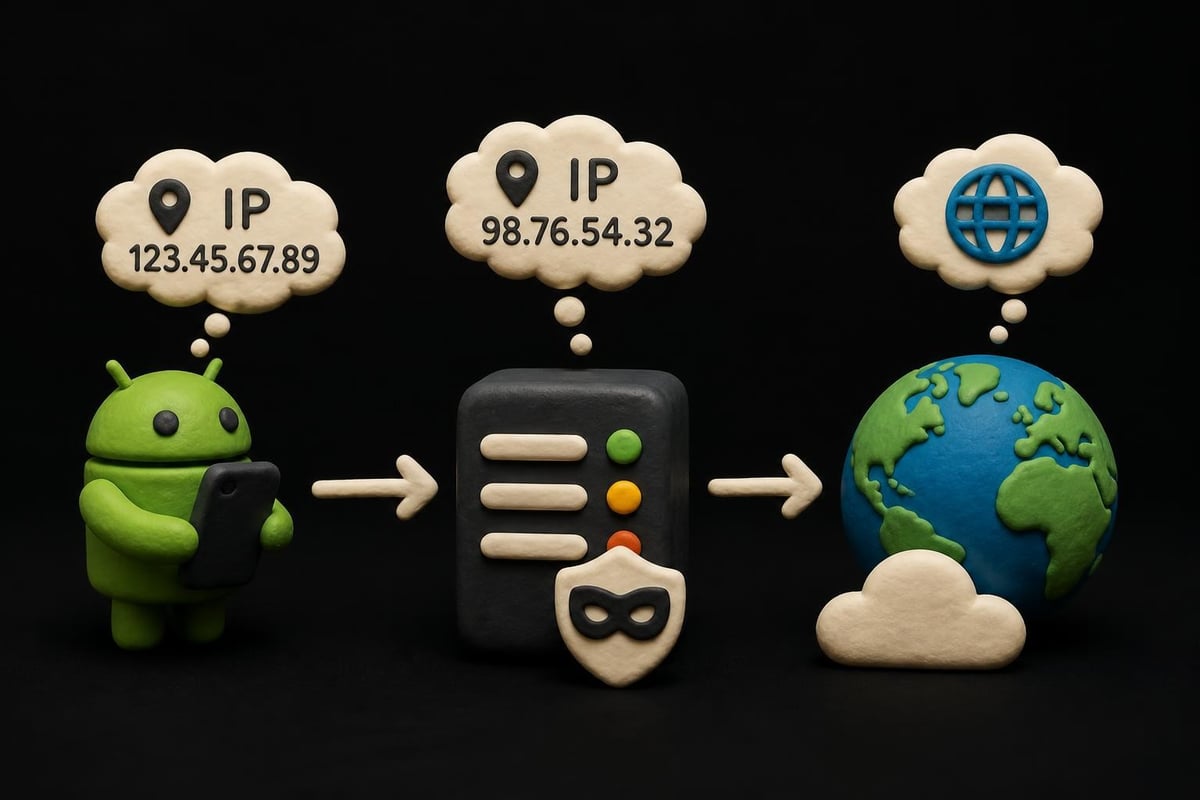
A proxy for Android works as an intermediary server that routes your device's internet traffic through a different IP address before reaching its destination. This fundamental architecture provides multiple benefits including enhanced privacy, bypass capabilities for restricted content, and improved security when using untrusted networks.
Android's native proxy support has evolved significantly over the years. The operating system now supports various proxy protocols including HTTP, HTTPS, and SOCKS configurations. Modern Android versions (Android 10 and later) offer more granular control over proxy settings, allowing users to configure proxies per Wi-Fi network rather than applying system-wide changes.
Types of Proxies Compatible with Android
Understanding which proxy types work best with Android helps you choose the right solution for your needs:
- HTTP Proxies: Basic web traffic routing, suitable for general browsing
- HTTPS Proxies: Encrypted connections for sensitive data transmission
- SOCKS5 Proxies: Universal protocol supporting all types of traffic including apps and games
- Residential Proxies: Real device IP addresses that appear as legitimate users
- Mobile Proxies: IPs from actual mobile carrier networks, ideal for social media and mobile-specific tasks
The proxy types available from PinguProxy include datacenter, residential, and mobile options, each optimized for different Android use cases. Selection depends on your specific requirements, whether you're focused on speed, authenticity, or geographic targeting.
Configuring Wi-Fi Proxy Settings on Android
Setting up a proxy for Android through Wi-Fi settings represents the most straightforward configuration method available to users. This approach works across most Android devices regardless of manufacturer customizations.
Step-by-Step Configuration Process
- Open your device's Settings application
- Navigate to Network & Internet or Connections
- Select Wi-Fi and tap the network you're currently connected to
- Choose Advanced or tap the gear icon next to your network name
- Scroll down to find Proxy settings
- Change from None to Manual
- Enter the proxy hostname and port number
- Save your configuration
After entering your proxy details, Android routes all traffic from that specific Wi-Fi network through your configured server. This configuration persists until you manually change it or forget the network.
Manual vs. Automatic Proxy Configuration
Android supports two primary proxy configuration methods:
| Configuration Type | Best For | Complexity | Flexibility |
|---|---|---|---|
| Manual | Single proxy server, simple setups | Low | Limited |
| PAC (Proxy Auto-Config) | Multiple proxies, complex routing | Medium | High |
| WPAD (Web Proxy Auto-Discovery) | Enterprise environments | High | Very High |
Most individual users benefit from manual configuration when using services like PinguProxy's rotating proxy infrastructure. Business environments often require PAC files to route different traffic types through appropriate proxy servers.
Using Third-Party Proxy Apps
While Android's built-in Wi-Fi proxy settings work well for basic needs, third-party applications provide enhanced functionality and easier management. These apps often include features like automatic proxy switching, per-app proxy routing, and improved protocol support.
Popular Android proxy applications in 2026 include Drony, ProxyDroid, and Every Proxy. Each offers unique advantages depending on your technical expertise and specific requirements.
Key features to look for in proxy apps:
- Root and non-root operation modes
- Per-app proxy configuration (split tunneling)
- Support for multiple proxy protocols
- Automatic proxy testing and failover
- Easy profile switching between different proxy servers
Non-root solutions work within Android's permission framework but may have limitations with certain applications. Rooted devices gain complete system-level proxy control, enabling truly universal proxy coverage across all installed applications and system services.
ADB Proxy Configuration for Developers
Developers frequently need to configure a proxy for Android emulators and test devices during application development. The Android Debug Bridge (ADB) provides command-line tools for this purpose.
The official Android emulator networking documentation details how developers can configure proxy settings programmatically. This proves particularly valuable when testing applications under various network conditions or troubleshooting connection timeouts.
Common ADB commands for proxy configuration include setting global proxy variables and modifying network settings through shell access. These techniques enable automated testing scenarios where proxy configurations need to change frequently.

Business Applications and Use Cases
Organizations leverage a proxy for Android devices across numerous professional scenarios. Understanding these applications helps businesses maximize their proxy infrastructure investments.
Mobile Web Scraping and Data Collection
Web scraping through Android devices has become increasingly important as more content becomes mobile-first. Mobile proxies provide authentic mobile user agents and IP addresses, reducing the likelihood of detection and blocking.
Companies collecting market intelligence, price comparisons, or competitive analysis benefit from Android proxy configurations that distribute requests across multiple mobile IP addresses. The 1ms rotation capabilities offered by PinguProxy ensure each request appears to originate from a different device.
Social Media Management at Scale
Managing multiple social media accounts requires distinct IP addresses to avoid platform restrictions. A proxy for Android enables social media managers to operate numerous accounts across platforms like Instagram, TikTok, and Facebook without triggering security flags.
Mobile proxies prove especially valuable for social media automation because platforms increasingly prioritize mobile app activity over desktop browsing. Using mobile IP addresses makes automated actions appear more natural and legitimate.
App Quality Assurance and Testing
Quality assurance teams use proxy configurations to test how Android applications behave under different geographic and network conditions. Localization testing requires accessing apps as they appear to users in specific countries or regions.
Testing scenarios include:
- Verifying geo-restricted features function correctly
- Checking content delivery network (CDN) performance across regions
- Identifying region-specific bugs or compatibility issues
- Testing app behavior on different carrier networks
- Validating compliance with local regulations and content restrictions
Security and Privacy Considerations
Implementing a proxy for Android significantly impacts your device's security posture. Understanding both the benefits and potential risks ensures you make informed configuration decisions.
Encryption and Data Protection
Not all proxies provide equal security. HTTP proxies transmit data in plain text, making them vulnerable to interception on untrusted networks. HTTPS and SOCKS5 proxies offer better protection, though the ultimate security depends on the proxy provider's infrastructure.
Premium services implement zero-log policies, ensuring no records of your browsing activity or connection data persist on proxy servers. This becomes critical when handling sensitive business information or personal data through mobile devices.
Security features to prioritize:
- SSL/TLS encryption support
- No-logs privacy policies
- IPv6 compatibility for modern networks
- Regular security audits and certifications
- DDoS protection and rate limiting
The complete IPv4 and IPv6 protocol support offered by modern proxy services ensures compatibility with current and future network standards while maintaining security across both protocols.
Avoiding Malicious Proxy Servers
Free proxy services often monetize through data collection, ad injection, or worse. Some actively intercept and modify traffic, steal credentials, or distribute malware to connected devices.
Legitimate proxy providers clearly communicate their business model, offer transparent pricing, and maintain professional infrastructure. They provide customer support, uptime guarantees, and detailed documentation rather than operating anonymously through obscure websites.

Troubleshooting Common Android Proxy Issues
Even properly configured proxy setups occasionally encounter problems. Recognizing common issues and their solutions minimizes downtime and frustration.
Connection Failures and Timeouts
When applications fail to connect after configuring a proxy for Android, several factors might be responsible. Incorrect hostname or port configuration represents the most common cause, followed by firewall restrictions and proxy server outages.
Systematic troubleshooting steps include:
- Verify proxy credentials and server address accuracy
- Test the proxy connection using proxy testing tools
- Check if the proxy server is operational and accessible
- Confirm your device has internet connectivity without the proxy
- Review any error messages for specific failure indicators
- Try alternative proxy servers to isolate the issue
Network administrators should also consider protocol compatibility issues when applications fail despite correct configuration. Some apps refuse to work through certain proxy types or require specific protocol features.
App-Specific Proxy Bypass
Certain Android applications deliberately bypass system proxy settings, making global proxy configuration ineffective. Banking apps, video streaming services, and security-focused applications often implement this behavior.
Per-app proxy solutions or system-level proxy enforcement (requiring root access) can address these situations. Alternatively, network-level solutions like proxy-configured routers affect all connected devices regardless of individual app behavior.
| Issue | Cause | Solution |
|---|---|---|
| Apps ignore proxy | Direct connection code | Use per-app proxy tools or VPN |
| Slow performance | Server overload or distance | Switch to geographically closer servers |
| Frequent disconnections | Unstable proxy server | Enable automatic failover or change providers |
| Authentication failures | Incorrect credentials | Verify username/password or API keys |
| DNS leaks | Improper configuration | Use DNS-over-HTTPS or proxy DNS settings |
Advanced Configuration Techniques
Power users and developers benefit from advanced proxy configuration options that provide greater control and automation capabilities.
Programmatic Proxy Management
Android applications can programmatically configure proxy settings through the system APIs. This enables apps to switch between different proxy servers based on network conditions, user location, or specific tasks being performed.
Developers working on automation tools, testing frameworks, or privacy applications leverage these APIs to create seamless proxy integration. The ability to manage rotation intervals programmatically ensures optimal performance for different use cases.
Combining Proxies with Other Privacy Tools
Layering a proxy for Android with additional privacy technologies creates defense-in-depth security. Common combinations include proxy plus encrypted DNS, proxy with secure browsers, or proxy alongside privacy-focused operating system modifications.
Each layer addresses different attack vectors and tracking methods. While proxies mask your IP address, encrypted DNS prevents network providers from monitoring your browsing through DNS queries. Privacy browsers block tracking scripts and fingerprinting attempts.
Performance Optimization Strategies
Maximizing speed and reliability from your Android proxy configuration requires attention to several technical factors and best practices.
Speed depends heavily on the physical distance between your device, the proxy server, and your destination website. Choosing geographically appropriate proxy locations minimizes latency and improves response times.
Optimization techniques include:
- Selecting proxy servers near your physical location or target content
- Using datacenter proxies for speed-critical applications
- Implementing connection pooling to reduce overhead
- Monitoring bandwidth usage and adjusting configurations
- Enabling compression when supported by both proxy and destination
Services offering 10Gbps bandwidth capabilities ensure network capacity doesn't become the bottleneck in your workflow. This proves especially important for data-intensive tasks like video streaming or bulk content downloads.
Proxy Rotation and IP Management
Automatic IP rotation prevents rate limiting and detection when performing repetitive tasks. Modern proxy services rotate IPs at configurable intervals, from milliseconds to hours, depending on your requirements.
For web scraping operations, aggressive rotation (every request or few seconds) mimics organic traffic patterns. Social media management typically uses longer rotation intervals (hourly or daily) to maintain consistent IP addresses per account.
The extensive proxy pool infrastructure available from professional providers ensures you have access to thousands or millions of unique IP addresses, preventing exhaustion even with high-volume operations.
Selecting the Right Proxy Provider
Not all proxy services deliver equivalent value or performance. Evaluating providers based on specific criteria ensures you choose a solution matching your Android proxy needs.
Consider these critical factors:
- Network size and diversity: Larger proxy pools provide more options and better rotation
- Protocol support: Ensure compatibility with your required protocols (HTTP, HTTPS, SOCKS5)
- Geographic coverage: Verify availability in your target regions
- Speed and reliability: Check bandwidth guarantees and uptime statistics
- Customer support: 24/7 assistance helps resolve issues quickly
- Pricing structure: Compare pricing models and included features
- Documentation quality: Comprehensive guides reduce setup time and troubleshooting
Testing proxy services before committing to long-term contracts helps validate performance claims. Many providers offer trial periods or money-back guarantees enabling risk-free evaluation.
Configuring a proxy for Android devices opens up numerous possibilities for enhanced privacy, security, and functionality across personal and professional applications. From basic Wi-Fi proxy setup to advanced programmatic management, Android's flexible architecture accommodates various implementation approaches. Whether you're managing social media accounts at scale, conducting academic research, or testing mobile applications across different regions, proper proxy configuration proves essential. PinguProxy delivers the high-speed infrastructure, comprehensive protocol support, and professional features necessary to maximize your Android proxy implementation in 2026.