
Bài viết này hiện chỉ có sẵn bằng tiếng Anh.
Đọc bằng tiếng AnhRemote Proxy for HTTP Injector: Setup and Configuration
HTTP Injector has become an essential tool for mobile users seeking to customize their network connections and bypass restrictions. At its core, this Android application functions as a versatile proxy server that modifies HTTP requests through custom headers and payload configurations. When combined with a remote proxy for HTTP Injector, users unlock advanced capabilities for secure browsing, accessing geo-restricted content, and maintaining privacy across different networks. Understanding how to properly configure and utilize remote proxies within HTTP Injector requires knowledge of both the application's architecture and the fundamental principles of proxy networking.
Understanding HTTP Injector Architecture
HTTP Injector operates as an intercepting proxy application that sits between your mobile device and the internet. The application reads configuration files containing server details, custom headers, and payload instructions to establish connections through various tunneling methods.
When you introduce a remote proxy for HTTP Injector into this equation, you're essentially creating a multi-layered connection pathway. Your device connects to HTTP Injector, which then routes traffic through the remote proxy server before reaching the final destination. This architecture provides multiple benefits including enhanced anonymity, geographic location masking, and the ability to bypass local network restrictions.
Core Components of HTTP Injector
The application relies on several key elements to function effectively:
- Configuration Files: JSON or ehi files containing server credentials, proxy details, and custom payloads
- SSH Tunneling: Encrypted connections that route traffic through secure servers
- Custom Headers: Modified HTTP request headers that help bypass network filters
- Payload Injection: Additional data inserted into requests to circumvent deep packet inspection
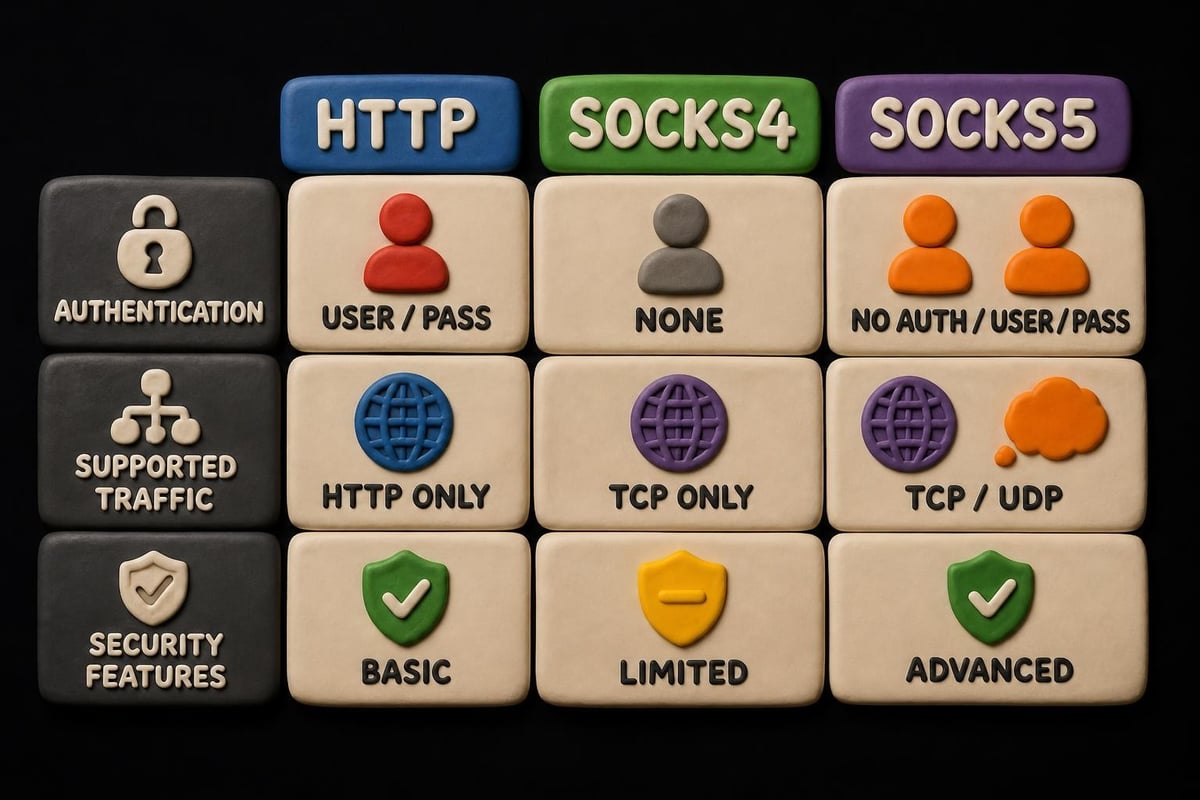
These components work together to create flexible connection scenarios. The HTTP Injector application supports multiple protocols including SOCKS4, SOCKS5, and HTTP proxies, making it compatible with various server configurations.

Configuring Remote Proxy Settings
Setting up a remote proxy for HTTP Injector requires careful attention to configuration details. The process varies depending on your proxy type and the specific requirements of your network environment.
Basic Setup Steps
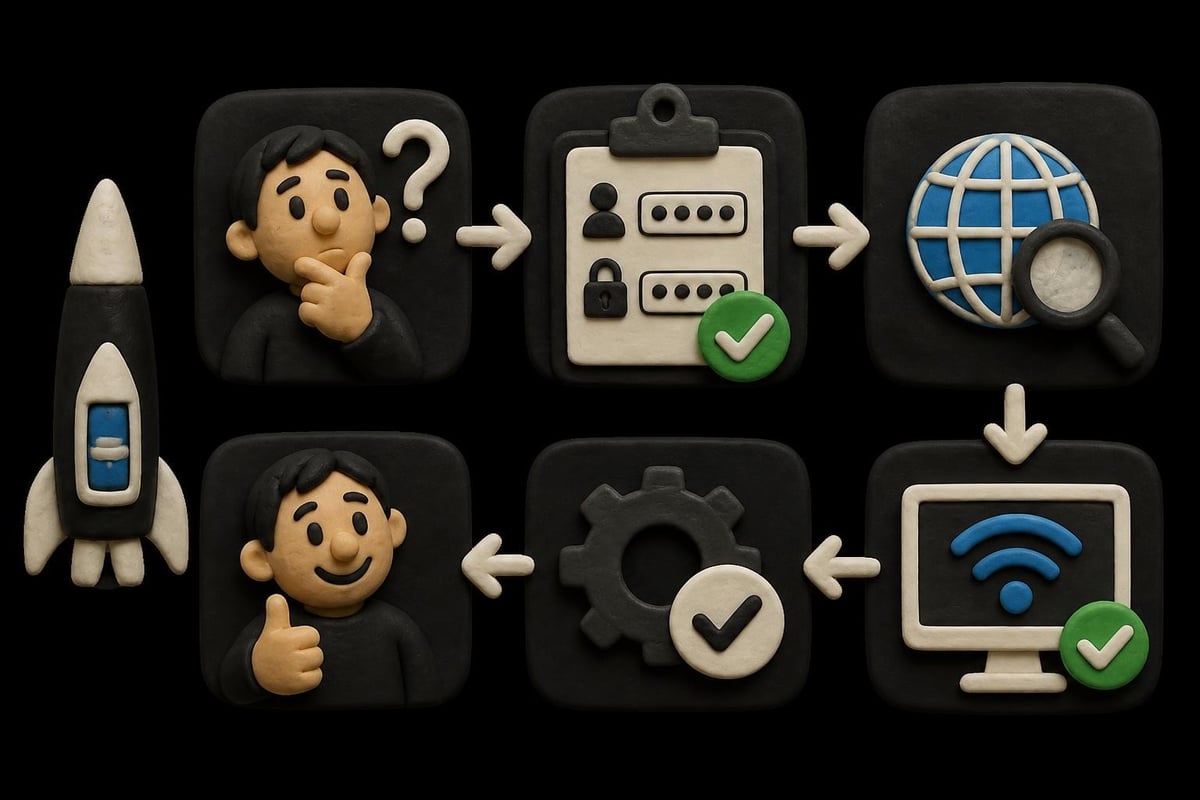
- Obtain Proxy Credentials: Acquire IP address, port number, username, and password from your proxy provider
- Create Configuration File: Build an ehi or JSON file with your proxy details
- Configure Proxy Type: Select between HTTP, SOCKS4, or SOCKS5 based on your server capabilities
- Set Custom Headers: Add headers that match your network requirements
- Test Connection: Verify the configuration before regular use
When working with datacenter or residential proxies, ensure your remote proxy for HTTP Injector supports the authentication method required by your provider. Most modern proxy services, including those offering HTTP proxy solutions, support basic authentication or IP whitelisting.
Advanced Configuration Options
| Setting Type | Purpose | Example Value |
|---|---|---|
| Remote Proxy | External proxy server | 192.168.1.100:8080 |
| SSH Server | Tunneling endpoint | ssh.example.com:22 |
| Custom Header | Request modification | X-Online-Host: target.com |
| Payload | Injection data | CONNECT [host_port] HTTP/1.1 |
For users requiring advanced anonymity features, combining HTTP Injector with high-speed SOCKS proxies creates a robust multi-layer connection that's difficult to trace or block.
Proxy Types and Protocol Selection
Choosing the right proxy type for your remote proxy for HTTP Injector setup significantly impacts performance and compatibility. Each protocol offers distinct advantages depending on your use case.
HTTP proxies excel at web browsing applications and work seamlessly with standard browser traffic. They understand HTTP requests natively, making them efficient for typical web access scenarios. However, they're limited to HTTP and HTTPS traffic, which restricts their versatility.
SOCKS5 proxies provide protocol-agnostic routing, meaning they can handle any type of traffic including email, torrenting, and gaming data. This flexibility makes SOCKS5 an excellent choice when configuring a remote proxy for HTTP Injector for diverse applications. The forward proxy concept explains how these protocols operate at the network layer.
SOCKS4 proxies offer basic functionality without authentication support, making them simpler but less secure than their SOCKS5 counterparts.
Performance Considerations
Connection speed depends heavily on several factors when using a remote proxy for HTTP Injector:
- Geographic distance between you, the proxy server, and target destination
- Proxy server hardware specifications and bandwidth allocation
- Network congestion on both your local connection and the proxy's connection
- Encryption overhead from SSH tunneling or SSL/TLS connections
Testing multiple proxy locations helps identify the optimal configuration for your specific needs. Services providing 10Gbps bandwidth capabilities ensure minimal speed degradation even under heavy load conditions.
Security and Privacy Implications
Using a remote proxy for HTTP Injector introduces both security benefits and potential vulnerabilities that users must understand. The primary advantage lies in masking your original IP address from websites and services you access, creating an additional privacy layer.
However, the proxy security landscape reveals that not all proxy services maintain adequate security standards. Free proxy services often log user activity, inject advertisements, or worse, harvest sensitive data transmitted through their servers.
Essential Security Practices
Always encrypt traffic before it reaches the remote proxy. HTTP Injector's SSH tunneling feature provides this encryption, ensuring that even if the proxy server itself is compromised, your actual data remains protected. This approach aligns with the MITRE ATT&CK framework's guidance on proxy usage in security contexts.
Verify proxy provider policies regarding data retention and logging. Zero-log policies ensure that even if legally compelled, the proxy provider has no user activity data to surrender. When selecting a remote proxy for HTTP Injector, prioritize providers with documented privacy commitments.
Implement authentication whenever possible. Using username/password authentication or IP whitelisting prevents unauthorized users from accessing your proxy connection, reducing the risk of bandwidth theft or malicious activity associated with your proxy IP.
Privacy Enhancement Techniques
Beyond basic security measures, several advanced techniques maximize privacy when using a remote proxy for HTTP Injector:
- Proxy rotation: Regularly changing proxy IP addresses prevents tracking based on IP patterns
- Multi-hop configurations: Routing through multiple proxies increases anonymity at the cost of speed
- DNS leak prevention: Ensuring DNS queries route through the proxy prevents exposure of browsing activity
- WebRTC blocking: Disabling WebRTC prevents IP address leaks in browser-based applications
The combination of these techniques with a reliable remote proxy for HTTP Injector creates a formidable privacy setup for mobile users.
Troubleshooting Common Issues
Even with proper configuration, users frequently encounter challenges when operating a remote proxy for HTTP Injector. Understanding common problems and their solutions accelerates the troubleshooting process.
Connection Failures
When HTTP Injector cannot establish a connection through the remote proxy, several culprits typically emerge:
Incorrect credentials: Double-check username, password, IP address, and port number. A single character error prevents authentication. Many users find success by copying credentials directly rather than typing them manually.
Firewall blocking: Both your local network and the remote proxy server may have firewall rules blocking the connection. SSH typically uses port 22, which some networks restrict. Testing alternative ports (443, 80) often resolves these blocks.
Server availability: The remote proxy server itself might be offline or experiencing technical issues. Attempting connection from a different network helps determine if the problem lies with your local connection or the proxy server.
Speed and Performance Problems
| Issue | Possible Cause | Solution |
|---|---|---|
| Slow browsing | Geographic distance | Choose closer proxy location |
| Frequent disconnections | Network instability | Enable auto-reconnect feature |
| High latency | Server overload | Switch to less congested server |
| Timeout errors | Incorrect MTU settings | Adjust payload size in config |
When diagnosing speed issues with your remote proxy for HTTP Injector, systematically test different variables. Connect without the proxy to establish baseline speeds, then add the proxy connection to measure the performance impact.
Configuration File Errors
HTTP Injector configuration files follow specific syntax requirements. JSON parsing errors prevent the application from reading your settings correctly. Common mistakes include:
- Missing commas between array elements
- Unmatched quotation marks around string values
- Incorrect escape characters in payload sections
- Invalid proxy type specifications
Using a JSON validator before importing configuration files into HTTP Injector eliminates many syntax-related issues. The HTTP Proxy Injector documentation provides additional configuration examples for various scenarios.
Practical Applications and Use Cases
Organizations and individuals deploy remote proxy for HTTP Injector configurations across diverse scenarios. Understanding these applications helps users optimize their setups for specific objectives.
Content accessibility represents the most common use case. Users in regions with restricted internet access employ HTTP Injector with remote proxies to access blocked websites and services. The combination of custom headers and proxy routing effectively bypasses many content filters.
Mobile research and testing benefits significantly from this configuration. Developers testing geo-restricted applications use HTTP Injector with remote proxies in different countries to verify functionality across regions. This approach provides more realistic testing than simple VPN connections.
Privacy-conscious browsing appeals to users who want to separate their mobile identity from their browsing activity. When configured with a zero-log remote proxy for HTTP Injector, users maintain anonymity even on cellular networks that typically expose extensive metadata.
Enterprise and Business Applications
Businesses leverage HTTP Injector configurations for specialized purposes:
- Competitive intelligence: Market researchers access competitor websites from different geographic locations
- Ad verification: Marketing teams verify that advertisements display correctly across regions
- Price monitoring: E-commerce businesses track competitor pricing from various locations
- Content delivery testing: Companies verify CDN performance from multiple global locations
These professional applications require reliable proxy infrastructure with consistent uptime and performance. The mobile proxy site approach offers residential IP addresses that appear as legitimate mobile users, ideal for business intelligence gathering.
Best Practices for Long-Term Use
Maintaining an effective remote proxy for HTTP Injector configuration requires ongoing attention and optimization. Following established best practices ensures consistent performance and security over time.
Regular credential rotation prevents long-term tracking and reduces the impact of potential credential leaks. Many users schedule monthly proxy password updates and quarterly server changes to maintain optimal security posture.
Performance monitoring identifies degradation before it significantly impacts user experience. Track key metrics including:
- Connection establishment time
- Average page load speeds
- Disconnection frequency
- Latency measurements to common destinations
Documentation of configuration changes helps troubleshoot issues that emerge after updates. Maintain a changelog noting modifications to headers, payloads, proxy servers, and other critical settings.
Backup configurations ensure rapid recovery from configuration corruption or accidental deletion. Store validated configuration files in multiple locations, including cloud storage and local backups on different devices.
Optimization Strategies
Fine-tuning your remote proxy for HTTP Injector setup maximizes both performance and reliability:
Payload optimization: Trim unnecessary data from payloads to reduce overhead. Each additional byte increases latency and bandwidth consumption. Test minimal payloads that still achieve desired functionality.
Header selection: Include only headers necessary for your specific use case. Excessive custom headers may trigger suspicion on some networks or create parsing delays.
Server selection criteria: Evaluate proxy servers based on multiple factors beyond simple speed tests. Consider server load patterns, geographic routing efficiency, and historical uptime when choosing your remote proxy for HTTP Injector configuration.
The technical foundations of proxy servers and tunneling provide deeper insights into optimization opportunities at the protocol level.
Advanced Tunneling Techniques
Power users push HTTP Injector beyond basic proxy configurations by implementing sophisticated tunneling strategies. These advanced techniques require deeper technical knowledge but deliver superior results for demanding applications.
Multi-protocol tunneling combines different connection methods within a single configuration. Users might establish an initial SSH tunnel to a remote server, then route that encrypted connection through an additional HTTP proxy layer. This multi-hop approach, while slower, provides exceptional anonymity and resilience against network analysis.
Dynamic proxy switching automatically selects from a pool of remote proxies based on predefined criteria. Configuration scripts can rotate between proxy servers on a scheduled basis or trigger changes based on connection failures, creating a self-healing connection system.
Split tunneling configurations route specific applications or domains through the remote proxy for HTTP Injector while allowing other traffic to use direct connections. This selective routing optimizes speed for applications that don't require proxy protection while maintaining security for sensitive connections.
The RFC 9484 standards for proxying IP packets over HTTP provide technical specifications that advanced users can leverage when designing custom tunneling solutions.
Custom Payload Development
Creating tailored payloads requires understanding how target networks analyze and filter traffic. Effective custom payloads:
- Mimic legitimate traffic patterns to avoid detection
- Include timing variations to prevent pattern recognition
- Incorporate region-specific headers matching target geography
- Balance between complexity and parsing efficiency
Testing payloads across different network environments identifies compatibility issues before deployment. What works on one cellular carrier may fail on another due to differences in deep packet inspection implementations.
Implementing a remote proxy for HTTP Injector transforms mobile browsing by adding powerful privacy and access capabilities. Success depends on proper configuration, security awareness, and ongoing optimization to match your specific requirements. Whether you need residential IPs, datacenter speed, or mobile anonymity, PinguProxy delivers high-performance proxy solutions with 10Gbps bandwidth, zero-log privacy protection, and 24/7 support to ensure your HTTP Injector configurations run flawlessly across any network environment.