
यह लेख वर्तमान में केवल अंग्रेज़ी में उपलब्ध है।
अंग्रेज़ी में पढ़ेंiPhone Proxy: Complete Setup Guide for 2026
Configuring an iphone proxy has become increasingly essential for users seeking enhanced privacy, access to geo-restricted content, and improved security in 2026. Whether you're a business professional managing sensitive data, a developer testing applications across different regions, or simply someone who values online anonymity, understanding how to properly set up and utilize proxy services on your iPhone is crucial. This comprehensive guide walks through everything you need to know about iPhone proxy configuration, from basic setup to advanced troubleshooting.
Understanding iPhone Proxy Fundamentals
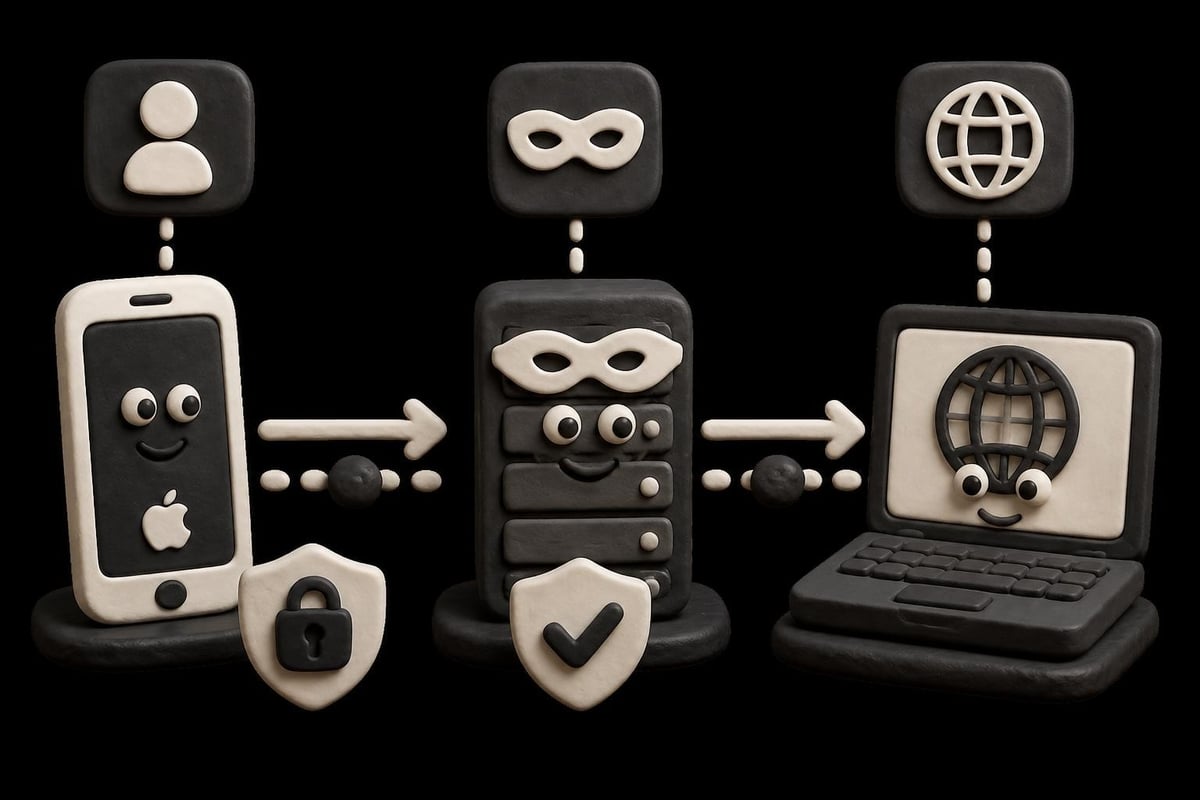
An iphone proxy serves as an intermediary server between your device and the internet. When you configure a proxy on your iPhone, all your network traffic routes through this server before reaching its final destination. This setup masks your actual IP address and can provide several benefits.
The primary advantage of using an iphone proxy is enhanced privacy. Your real IP address remains hidden from websites and services you access, making it significantly harder for third parties to track your online activities. This protection extends to your browsing habits, location data, and device information.
Key benefits of iPhone proxy usage include:
- Bypassing geographical restrictions on content and services
- Enhanced security when using public Wi-Fi networks
- Improved anonymity for sensitive browsing activities
- Access to region-locked applications and websites
- Reduced risk of targeted advertising and tracking
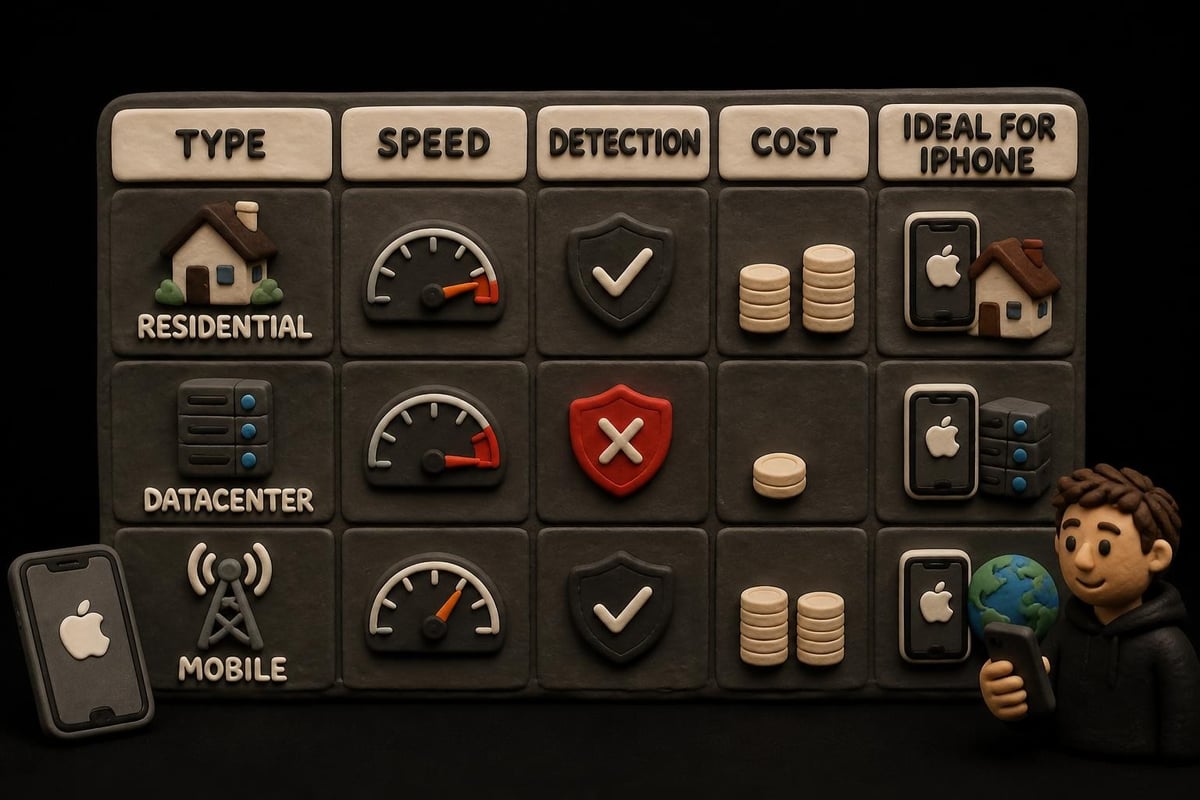
Mobile proxies specifically designed for iOS devices offer unique advantages over traditional datacenter proxies. They utilize real mobile IP addresses from cellular networks, making them nearly impossible to detect or block. This makes them particularly valuable for accessing services that aggressively filter proxy traffic.
Step-by-Step iPhone Proxy Configuration
Setting up an iphone proxy requires accessing your device's network settings. The process differs slightly depending on whether you're connecting to a Wi-Fi network or using cellular data, but the core principles remain consistent.
Manual Proxy Configuration for Wi-Fi Networks
Navigate to Settings, then tap on Wi-Fi to begin the configuration process. Find the network you're currently connected to and tap the information icon (i) next to its name.
- Scroll down to the HTTP Proxy section at the bottom of the network details
- Tap "Configure Proxy" to access proxy settings
- Select "Manual" from the available options
- Enter your proxy server address in the Server field
- Input the port number provided by your proxy service
- If authentication is required, toggle "Authentication" on and enter your username and password
- Tap "Save" in the upper right corner to apply changes
The manual configuration method gives you complete control over proxy settings and works with most proxy providers. However, you'll need to repeat this process for each Wi-Fi network you connect to, as iOS maintains separate proxy settings for different networks.
Automatic Proxy Configuration Using PAC Files
For users managing multiple proxies or complex routing rules, automatic configuration offers a more streamlined approach. This method uses a Proxy Auto-Configuration (PAC) file to determine which proxy server to use for different destinations.
| Configuration Type | Best For | Setup Complexity |
|---|---|---|
| Manual | Single proxy, simple setup | Low |
| Automatic (PAC) | Multiple proxies, advanced routing | Medium |
| No Proxy | Direct connection, no intermediary | None |
To configure automatic proxy settings, select "Automatic" instead of "Manual" in the HTTP Proxy section. Enter the URL where your PAC file is hosted, then save the configuration. Your iPhone will automatically fetch and apply the routing rules defined in the PAC file.
Understanding SOCKS configuration can further enhance your proxy setup, particularly for applications requiring lower-level network access.
Choosing the Right iPhone Proxy Service
Not all proxy services deliver equal performance or security on iOS devices. The security risks of free proxy services have been thoroughly documented, with research revealing significant vulnerabilities in data handling and encryption practices.
When evaluating proxy providers for your iPhone, prioritize services offering robust security features and reliable performance. Look for providers supporting both IPv4 and IPv6 protocols, as dual-stack compatibility ensures broader access across modern networks and future-proofs your setup.
Essential features to consider:
- Zero-log policies that protect your privacy
- Fast rotation capabilities for enhanced anonymity
- High-bandwidth connections (10Gbps or higher)
- 24/7 technical support for troubleshooting
- Multiple proxy types (datacenter, residential, mobile)
- Comprehensive geographic coverage
Mobile proxies using genuine cellular IP addresses provide the highest success rates for accessing restricted content. These proxies appear as legitimate mobile users to websites and applications, making them virtually undetectable. For users seeking cheap datacenter proxies as an alternative, be aware that while cost-effective, they may face higher block rates on certain platforms.
Residential vs. Datacenter vs. Mobile Proxies
Each proxy type serves different use cases and offers distinct advantages. Residential proxies use IP addresses assigned by internet service providers to real households, providing excellent legitimacy but typically slower speeds. Datacenter proxies offer blazing-fast performance but face higher detection rates on security-conscious platforms.
Mobile proxies represent the premium option for iPhone users, leveraging actual mobile carrier IP addresses that match your device's network type. This alignment creates seamless authentication and exceptional compatibility with mobile-first services.
Advanced iPhone Proxy Applications
Beyond basic privacy protection, an iphone proxy enables sophisticated use cases that enhance productivity and expand digital capabilities. Professional users leverage proxies for competitive intelligence, market research, and accessing region-specific data essential to their work.
Web scraping on mobile devices has grown increasingly common as businesses seek mobile-specific data and user experiences. An iphone proxy allows developers and researchers to gather this information while maintaining proper rate limits and avoiding IP bans. The ability to rotate through multiple IP addresses ensures sustained access without triggering anti-bot measures.
Gaming and Streaming Optimization
Gamers use iPhone proxies to reduce latency, access region-locked games, and protect against DDoS attacks during competitive play. By connecting through strategically located proxy servers, players can sometimes achieve better routing paths than their default ISP connections provide.
Streaming enthusiasts rely on proxies to access content libraries restricted to specific geographic regions. A properly configured iphone proxy can make it appear as though you're browsing from any supported country, unlocking vast catalogs of international content.
Popular applications include:
- Accessing geo-restricted streaming platforms
- Testing mobile applications from different regions
- Bypassing network restrictions on corporate or school Wi-Fi
- Protecting sensitive communications on unsecured networks
- Conducting market research across different geographic markets
Understanding broader phone proxy concepts helps users optimize their mobile proxy strategy across multiple devices and platforms.
Troubleshooting Common iPhone Proxy Issues
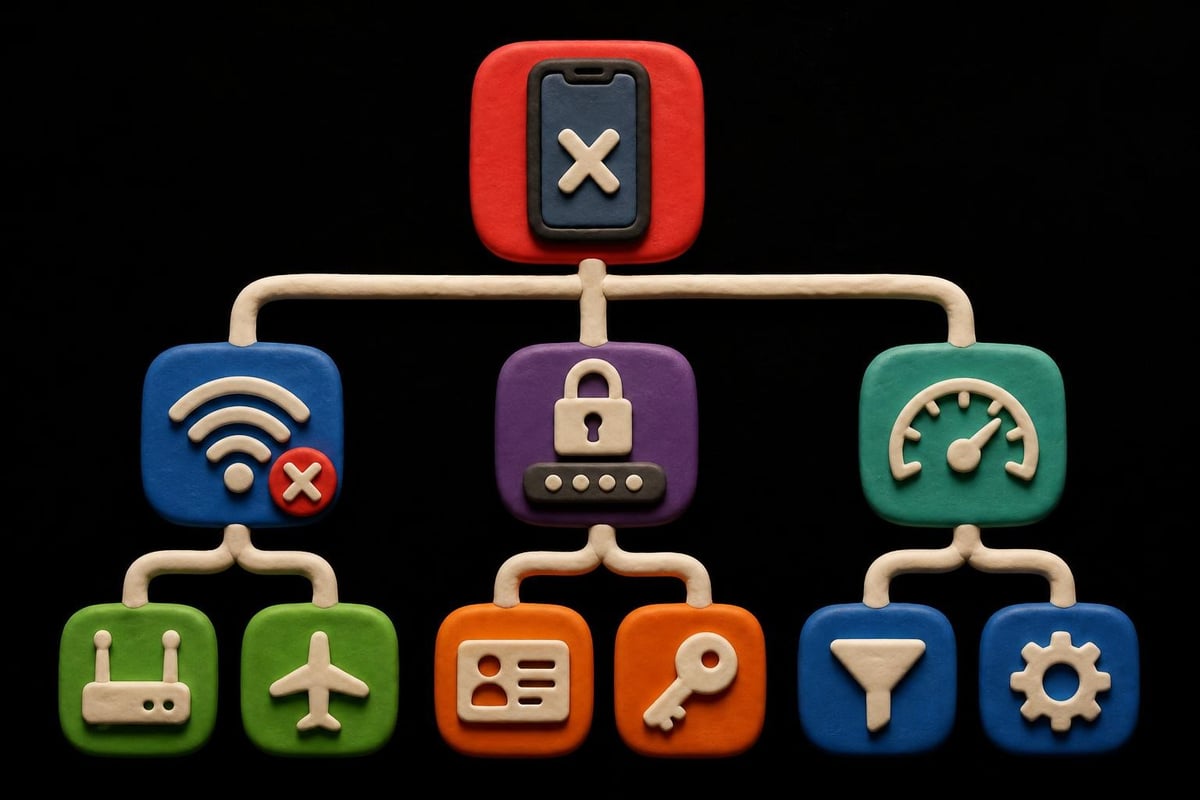
Even with proper configuration, users occasionally encounter connectivity problems or performance issues with their iphone proxy setup. Systematic troubleshooting can quickly identify and resolve most common problems.
Connection Failures and Timeouts
When your iPhone cannot establish a proxy connection, first verify that your proxy server address and port number are entered correctly. A single typo in these fields will prevent successful connection. Double-check credentials if authentication is enabled, ensuring there are no extra spaces or incorrect characters.
Test whether the proxy server is actually online and responding. You can do this by attempting to connect from another device or checking your proxy provider's status page. If the server is operational but your iPhone still cannot connect, the issue may lie with your network settings or firewall rules.
| Problem | Common Cause | Solution |
|---|---|---|
| Cannot connect | Incorrect server/port | Verify proxy credentials |
| Slow performance | Server overload or distance | Switch to closer server |
| Intermittent drops | Network instability | Enable automatic reconnection |
| Authentication failures | Wrong credentials | Reset password, check username |
Some networks actively block proxy connections, particularly corporate or educational environments. If you suspect network-level blocking, try connecting through a different Wi-Fi network or cellular data to isolate the problem.
Performance Optimization
Sluggish browsing speeds through your iphone proxy often stem from server distance or overloaded infrastructure. Select proxy servers geographically closer to your physical location to minimize latency. Premium proxy services typically offer multiple server locations, allowing you to optimize for speed.
The VPN security concerns on iOS highlighted by security researchers also apply to proxy configurations. Always verify that your proxy connection is properly encrypted when handling sensitive data, and avoid using unknown or untrusted proxy providers.
Bandwidth throttling can occur when proxy servers detect high-volume traffic from a single user. Services offering 10Gbps bandwidth or higher generally provide more consistent performance even during peak usage periods. Consider rotating between multiple proxy IPs to distribute load and maintain optimal speeds.
Security Best Practices for iPhone Proxy Usage
While an iphone proxy enhances privacy, proper security hygiene remains essential. Combining proxy usage with other security measures creates comprehensive protection against various threats.
Never transmit highly sensitive information like banking credentials or medical records through unknown proxy servers. Even reputable providers should employ zero-log policies, but for critical data, consider additional encryption layers. Using HTTPS connections ensures end-to-end encryption between your device and destination servers, independent of proxy configuration.
Multi-Layer Security Approach
Implement these security practices to maximize protection:
- Use only trusted proxy providers with verified privacy policies and transparent operations
- Enable two-factor authentication on accounts accessed through proxies
- Regularly rotate proxy servers to prevent pattern recognition and tracking
- Monitor for DNS leaks that could expose your real location despite proxy usage
- Keep iOS updated to patch security vulnerabilities that could compromise proxy connections
Research on mobile app server vulnerabilities demonstrates that security extends beyond just the proxy itself. Applications you use through your iphone proxy must also implement proper security measures to prevent data exposure.
Consider the authentication requirements of your proxy service. Username and password authentication provides basic security, but IP whitelisting offers stronger protection by restricting proxy access to specific addresses. For business users handling valuable data, IP whitelisting combined with rotating proxies delivers optimal security.
Integrating iPhone Proxy with Applications
Most iOS applications respect system-wide proxy settings configured through the Wi-Fi or cellular data menus. However, some apps bypass these settings or require specific configuration. Understanding how different applications interact with your iphone proxy ensures consistent protection across all your mobile activities.
Safari and other web browsers automatically use configured proxy settings without additional setup. Simply configure your proxy at the system level, and all browser traffic will route through the designated server. This applies to both direct URL entry and clicking links from other applications.
App-Specific Proxy Configuration
Certain applications, particularly those prioritizing security or using custom networking protocols, may ignore system proxy settings. Messaging apps, VPN clients, and some streaming services fall into this category. For these applications, you'll need to configure proxy settings within the app itself if supported.
Social media management tools and business applications often include built-in proxy support. Check the app's network or advanced settings menu for proxy configuration options. The setup process mirrors system-level configuration, requiring server address, port, and authentication credentials.
Games and streaming applications rarely offer direct proxy configuration options. For these apps, system-level settings should apply automatically. If they don't, the application may be using direct IP connections that bypass standard HTTP/HTTPS routing.
Understanding how to buy HTTP proxy services helps ensure compatibility across your most-used applications.
Future of iPhone Proxy Technology
The proxy landscape continues evolving alongside iOS development and changing internet infrastructure. As we progress through 2026, several trends are reshaping how users leverage iphone proxy services.
IPv6 adoption has accelerated significantly, with many networks now operating dual-stack configurations supporting both IPv4 and IPv6. Modern proxy services must support both protocols to ensure seamless connectivity across all network types. Users should verify that their chosen proxy provider offers comprehensive IPv6 support alongside traditional IPv4 addresses.
Emerging trends shaping iPhone proxy usage:
- AI-powered proxy routing for optimal performance
- Increased integration with privacy-focused applications
- Enhanced mobile proxy networks leveraging 5G infrastructure
- Blockchain-based proxy authentication and billing
- Automated rotation strategies based on usage patterns
The rise of machine learning algorithms detecting proxy traffic has pushed providers to develop more sophisticated rotation and obfuscation techniques. Services now offer sub-second rotation capabilities, making it nearly impossible for websites to establish consistent fingerprints across connections.
5G networks have transformed mobile proxy performance, delivering speeds previously only available through wired connections. This bandwidth increase makes mobile proxies viable for data-intensive tasks like high-quality video streaming and large-scale web scraping operations directly from iOS devices.
Privacy regulations worldwide continue tightening, making legitimate proxy services increasingly valuable for compliance. Businesses operating internationally rely on iphone proxy infrastructure to test localized services, verify ad delivery, and ensure consistent user experiences across different geographic markets.
Mastering iphone proxy configuration empowers you to take control of your mobile privacy, access global content, and enhance security across all your iOS activities. Whether you need proxies for business applications, personal privacy, or accessing restricted services, proper setup and provider selection make all the difference. PinguProxy delivers the high-speed, secure proxy infrastructure you need with support for datacenter, residential, and mobile proxies across both IPv4 and IPv6 protocols, backed by 24/7 support and a zero-log privacy guarantee.