
HTTP Proxy iPhone: Complete Setup Guide for iOS 2026
Setting up an http proxy iphone configuration has become increasingly important for mobile users who need enhanced privacy, access to geo-restricted content, or specialized business applications. Whether you're a developer testing applications, a professional managing multiple social media accounts, or someone simply looking to browse more securely, understanding how to properly configure proxy settings on your iPhone is essential. This comprehensive guide walks you through everything you need to know about http proxy iphone setup, from basic manual configuration to advanced automated solutions that work seamlessly with iOS 18 and beyond.
Understanding HTTP Proxy on iPhone
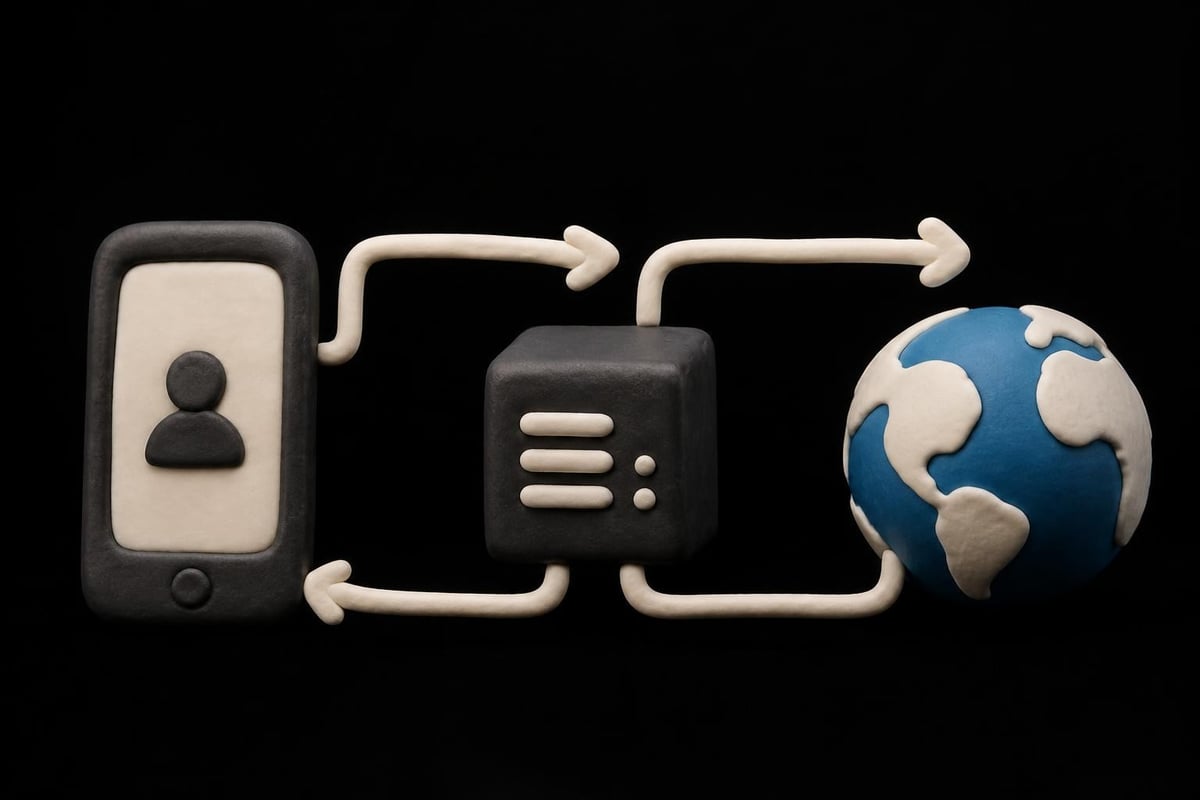
An http proxy iphone setup acts as an intermediary server between your device and the internet. When you configure a proxy on your iPhone, all your web traffic routes through this server before reaching its final destination.
The primary benefits include:
- Enhanced privacy by masking your real IP address
- Access to geo-restricted content and services
- Improved security on public Wi-Fi networks
- Ability to bypass network restrictions
- Professional use cases like web scraping and app testing
The iPhone's built-in proxy support works at the network level, meaning you configure it within your Wi-Fi settings rather than individual apps. This system-wide approach affects Safari, Mail, and most other applications that use standard HTTP connections. However, some apps may bypass proxy settings or require additional configuration.
Manual vs Automatic Configuration
Your iPhone offers two primary methods for http proxy iphone configuration. Manual setup requires you to enter specific server details, while automatic configuration uses a PAC (Proxy Auto-Configuration) file.
| Configuration Type | Best For | Complexity | Flexibility |
|---|---|---|---|
| Manual | Single proxy server, simple setups | Low | Limited |
| Automatic (PAC) | Multiple proxies, conditional routing | Medium | High |
| Off | No proxy needed | None | N/A |
Manual configuration works well when you have a dedicated proxy server with static credentials. The automatic configuration option provides more sophisticated routing rules, allowing different proxies for different destinations or even bypassing the proxy for specific domains.
Step-by-Step Manual HTTP Proxy iPhone Setup
Configuring your http proxy iphone manually involves accessing your Wi-Fi settings and entering the proxy server details. This process takes just a few minutes once you have the necessary information from your proxy provider.
Prerequisites and Requirements
Before beginning the setup process, gather the following information:
- Proxy server address (hostname or IP address)
- Port number (typically 8080, 3128, or custom)
- Authentication credentials (username and password if required)
- Active Wi-Fi connection to configure
Make sure you're connected to the Wi-Fi network where you want to use the proxy. The http proxy iphone configuration applies per network, so you'll need to repeat the process for each Wi-Fi connection you use regularly.
Configuration Process
Navigate to Settings > Wi-Fi on your iPhone. Tap the information icon (i) next to your connected network name. Scroll down to the HTTP Proxy section at the bottom of the screen.
Follow these steps:
- Tap Configure Proxy
- Select Manual from the options
- Enter the Server address (without http:// prefix)
- Input the Port number
- Toggle Authentication on if your proxy requires credentials
- Enter your Username and Password
- Tap Save in the top right corner
The configuration takes effect immediately. You can verify your setup by visiting a site that displays your IP address. If configured correctly, it should show the proxy server's IP rather than your cellular or home IP.
For detailed visual instructions, this comprehensive setup guide provides additional screenshots and troubleshooting tips specific to iOS devices.
Advanced Automatic Proxy Configuration
Automatic proxy configuration offers greater flexibility for complex networking environments. This method uses a PAC file, which is essentially a JavaScript file that defines rules for routing traffic.
Understanding PAC Files
A PAC file contains functions that determine which proxy to use for each URL request. Organizations often use this approach to implement sophisticated routing policies without requiring manual configuration on each device.
Common PAC file use cases include:
- Routing internal traffic directly while proxying external requests
- Load balancing across multiple proxy servers
- Bypassing proxies for specific trusted domains
- Implementing different proxies based on URL patterns
Setting Up Automatic Configuration
To configure automatic http proxy iphone settings, you'll need the URL where your PAC file is hosted. This might be an internal server URL for corporate environments or a cloud-hosted file provided by your proxy service.
Navigate to the same HTTP Proxy section in your Wi-Fi settings, but this time select Automatic instead of Manual. Enter the complete PAC file URL in the URL field. The iPhone will download and parse this file each time it connects to the network.

Troubleshooting Common HTTP Proxy iPhone Issues
Even with proper configuration, you may encounter issues with your http proxy iphone setup. Understanding common problems and their solutions helps maintain consistent connectivity.
Connection and Authentication Problems
Authentication failures rank among the most frequent issues. Double-check that your username and password are entered correctly, paying attention to case sensitivity. Some proxy services use special characters that may be difficult to enter on iPhone's keyboard.
If you experience connection timeouts, verify that:
- The proxy server address is correct and accessible
- The port number matches your provider's specifications
- Your proxy service is currently operational
- Network firewall rules aren't blocking the connection
For detailed troubleshooting of connection issues, review guidance on handling connection timeouts and protocol compatibility.
Performance and Compatibility Issues
Slow browsing speeds can result from several factors. The proxy server's location relative to your physical location significantly impacts latency. Choosing a geographically closer server typically improves performance.
| Issue | Likely Cause | Solution |
|---|---|---|
| Slow loading | Distant proxy server | Select closer geographic location |
| Apps not working | App bypasses proxy | Check app-specific settings |
| Intermittent disconnects | Proxy server instability | Switch to more reliable provider |
| No internet access | Incorrect server details | Verify all configuration fields |
Some applications implement their own network stacks and may ignore system-wide proxy settings. This is particularly common with VPN apps, some streaming services, and security-focused applications. Research has shown that mobile applications vary significantly in their HTTP header implementation, which can affect proxy compatibility.
Security Considerations for iPhone Proxy Use
When implementing an http proxy iphone configuration, security should be a primary concern. Not all proxy services offer the same level of protection, and some free services may actually compromise your privacy.
Evaluating Proxy Security
Research into free proxy services has revealed significant security vulnerabilities, including traffic interception and injection of malicious content. Enterprise-grade proxy services implement encryption, maintain strict no-logs policies, and undergo regular security audits.
Key security features to verify:
- Encryption protocols (HTTPS support, TLS versions)
- Privacy policy (data retention, logging practices)
- Authentication methods (secure credential transmission)
- Provider reputation (reviews, security incidents)
Professional proxy providers like those offering rotating proxy capabilities implement 1ms rotation intervals and zero-log policies to maximize anonymity. This level of security proves essential for sensitive business operations and privacy-conscious users.
Best Practices for Secure Proxy Usage
Always use HTTPS websites when routing traffic through a proxy. While the proxy sees your connection to the destination server, HTTPS encryption protects the actual data being transmitted. This creates a layered security approach.
Regularly rotate your proxy credentials and servers, especially for business applications. Many modern proxy services offer automated IP rotation to enhance security and prevent tracking.
Business Applications and Use Cases
The http proxy iphone configuration serves numerous professional purposes beyond basic privacy protection. Understanding these applications helps you maximize the value of proxy services.
Mobile App Development and Testing
Developers use iPhone proxies to test applications under different network conditions and geographic locations. This enables verification of geo-restricted features, localization testing, and app QA across multiple markets without physical travel.
Testing scenarios include:
- Simulating user locations in different countries
- Verifying region-specific content delivery
- Testing rate limiting and anti-bot measures
- Analyzing network performance under various conditions
- Debugging geo-restricted API responses
Social Media and Account Management
Professionals managing multiple social media accounts often use http proxy iphone setups to maintain separate identities. This proves particularly valuable for agencies handling client accounts across platforms like Instagram, TikTok, and Facebook.
Each account can appear to originate from a different location, reducing the risk of account linking and platform restrictions. Mobile proxies specifically designed for iOS devices provide the most authentic fingerprints for these applications.

Choosing the Right Proxy Service for iPhone
Selecting an appropriate proxy provider significantly impacts your http proxy iphone experience. Different services specialize in various use cases and offer distinct features.
Proxy Types and Their Applications
Three main proxy types work with iPhone configurations, each serving different purposes and offering unique advantages.
| Proxy Type | Speed | Anonymity | Best Use Case | Cost |
|---|---|---|---|---|
| Datacenter | Fastest | Moderate | General browsing, testing | Low |
| Residential | Fast | High | Social media, e-commerce | Medium |
| Mobile | Moderate | Highest | App testing, account management | High |
Datacenter proxies offer excellent speed and reliability for general purposes. They're ideal for tasks requiring high bandwidth and low latency but may be detected by sophisticated anti-bot systems.
Residential proxies use IP addresses assigned to real devices by internet service providers. This makes them appear as regular users, perfect for e-commerce operations and brand protection activities.
Mobile proxies route traffic through actual mobile network connections, providing the highest level of authenticity for iPhone-specific applications. These prove invaluable for Discord automation and Reddit account management.
Essential Features for iPhone Proxy Services
When evaluating providers for your http proxy iphone needs, prioritize services offering comprehensive protocol support. Both IPv4 and IPv6 compatibility ensures maximum flexibility, as detailed in this guide on IPv4 and IPv6 support.
Look for providers offering unlimited access models rather than data-capped plans. The no-limit approach eliminates concerns about usage restrictions during critical business operations. High-bandwidth options, such as 10Gbps connections, ensure smooth operation even with data-intensive tasks.
Alternative Configuration Methods
Beyond the standard settings-based approach, several alternative methods exist for implementing http proxy iphone functionality, each offering unique advantages.
Third-Party Proxy Apps
Dedicated proxy applications provide user-friendly interfaces for managing proxy connections. These apps often include features like server switching, connection testing, and usage statistics that aren't available in native iOS settings.
Some apps support protocols beyond HTTP, including SOCKS5, which offers better performance for certain applications. For guidance on SOCKS configuration alongside HTTP options, consult resources on SOCKS configuration.
VPN with Proxy Capabilities
Modern VPN services sometimes include proxy functionality, offering a hybrid approach. While technically different technologies, this combination can provide benefits of both systems. However, understand that VPNs operate at a different network layer than HTTP proxies.
The key differences:
- VPNs encrypt all device traffic, proxies typically affect only HTTP/HTTPS
- VPNs may offer better security, proxies often provide superior performance
- VPNs work system-wide, proxies can be more selective
- Proxies typically offer more geographic locations and faster rotation
Monitoring and Maintaining Your Proxy Connection
After successfully configuring your http proxy iphone setup, ongoing monitoring ensures optimal performance and security. Regular maintenance prevents issues before they impact your activities.
Connection Verification Techniques
Periodically verify that your proxy is functioning correctly by checking your apparent IP address. Numerous online tools display your current IP, which should match your proxy server's location when properly configured.
Regular maintenance tasks:
- Test connection speed weekly
- Verify IP address matches expected location
- Check for DNS leaks that might expose real location
- Update authentication credentials when changed
- Review proxy service status for outages
Many professional proxy services provide dedicated tools for testing connectivity. The proxy testing functionality helps verify that your http proxy iphone configuration works as expected before relying on it for critical operations.
Performance Optimization
Fine-tuning your proxy setup maximizes speed and reliability. Consider configuring rotation intervals appropriate for your use case. Frequent rotation enhances anonymity but may slightly reduce speed.
If you experience performance issues, switching between different proxy servers or types often resolves problems. Access to a large proxy pool provides flexibility to select the optimal server for each task.
Enterprise and Corporate Proxy Deployments
Organizations deploying http proxy iphone configurations across multiple devices require centralized management approaches. Mobile Device Management (MDM) solutions streamline this process.
MDM-Based Proxy Configuration
Apple's MDM framework allows IT administrators to push proxy configurations to enrolled devices automatically. This eliminates manual setup and ensures consistency across the organization. The official Apple deployment documentation provides comprehensive guidance for enterprise deployments.
Enterprise deployment advantages include:
- Centralized configuration management
- Automatic updates to proxy settings
- Enhanced security through policy enforcement
- Simplified onboarding for new devices
- Compliance with corporate network policies
Compliance and Policy Enforcement
Corporate environments often require specific proxy configurations to meet regulatory requirements or security standards. MDM solutions enforce these policies automatically, preventing users from disabling or modifying critical security settings.
For organizations with diverse use cases, different proxy configurations might apply to different device groups. Research and development teams might need access to specialized testing proxies, while general staff use standard corporate proxies for basic internet access.
Regional Considerations and Geographic Routing
The effectiveness of your http proxy iphone setup often depends on selecting appropriate geographic locations. Different regions offer distinct advantages for various applications.
Selecting Optimal Proxy Locations
Choose proxy locations based on your target audience or service location. For SERP monitoring, select proxies in the regions where you want to view search results. For travel aggregation, use locations matching your target markets.
Geographic selection criteria:
- Latency requirements: Closer locations provide faster response times
- Content availability: Some content is only accessible from specific regions
- Language and localization: Match proxy location to desired language variants
- Regulatory compliance: Certain data must be accessed through specific jurisdictions
Advanced proxy services offer extensive geographic coverage with servers in dozens of countries. This diversity enables sophisticated testing and data collection strategies that would be impossible with limited location options.
Configuring an http proxy iphone setup provides powerful capabilities for privacy, testing, and business operations in 2026. Whether you need basic anonymity or sophisticated multi-account management, proper proxy configuration enhances your mobile experience while maintaining security. For professional-grade proxy services that deliver high-speed connections, complete IPv4 and IPv6 support, and zero-log privacy protection, PinguProxy offers datacenter, residential, and mobile proxies with 24/7 support and unlimited access to meet your specific needs.